
-
×InformationNeed Windows 11 help?Check documents on compatibility, FAQs, upgrade information and available fixes.
Windows 11 Support Center. -
-
×InformationNeed Windows 11 help?Check documents on compatibility, FAQs, upgrade information and available fixes.
Windows 11 Support Center. -
- HP Community
- Notebooks
- Notebook Hardware and Upgrade Questions
- Re: HP Edge battery draining fast

Create an account on the HP Community to personalize your profile and ask a question
Your account also allows you to connect with HP support faster, access a personal dashboard to manage all of your devices in one place, view warranty information, case status and more.
Common problems for Battery
We would like to share some of the most frequently asked questions about: Battery Reports, Hold a charge, Test and Calibrating Battery . Check out this link: Is your notebook plugged in and not charging?

It has been a while since anyone has replied. Simply ask a new question if you would like to start the discussion again.

06-18-2021 10:13 PM
 HP Recommended
Product: Edge
Operating System: Microsoft Windows 10 (64-bit)
My battery is draining faster than expected and from searching Google, there are a lot of people with similar issue.
HP edge X360 is supposed to have roughly 12 hours of battery but my newly bought Envy only lasted roughly 4 hours. I only use it for browsing (no media playing i.e. no spotify playing in the background). Brightness level is at 30%. I did a battery check and it was OK. Also I Have updated the BIOS yesterday.
I tried to follow an instruction from 2017 so I am hoping if there is an update to this instruction.
Thanks all.
8 REPLIES 8


06-22-2021 07:02 AM
HP Recommended
Thank you for posting on the HP Support Community.
Don't worry as I'll be glad to help, however, to provide an accurate resolution, I need a few more details:
- Did this happen after a recent window or software update?
- What is the product number of your device? Use this link to find it: http://support.hp.com/us-en/document/c03754824
- Does the notebook shut down immediately (right after you unplug the charger)?
- Do you get any error message on your notebook (Such as Plugged in, not charging, etc.)?
Keep me posted for further assistance.
ECHO_LAKE
I am an HP Employee
06-23-2021 07:32 PM
HP Recommended
Hi Echo_Lake,
The issue started from day 1. I looked in the community page and followed some of the tips and tricks such as updating the systems etc. Nothing has worked so far.
The notebook did not shut down immediately after charger was unplugged - it will behave normally. It's just the battery drains faster than advertised. I understand if it wont have the full 14 or so hours but I will expect at least maybe 7-8 hours, not the current 4 hours.
Also to answer your last question, there is no error message.
The Product number is: 2H9N6PA#ABG.
Thanks for your help.
06-24-2021 02:01 PM
HP Recommended
Thank you for posting back.
Let's try this:
- 1. Go to Start, search for Device Manager, and open this result.
- 2. Expand batteries.
- 3. Right-click on the ACPI option (usually the 2nd option) and select delete or uninstall. Follow the prompts.
- 4. Shut down the computer.
- 5. Disconnect the charger.
- 6. Remove the battery. (only for removable battery)
- 7. Hold down the power button for 1 minute.
- 8. Insert the battery only. (only for removable battery)
- 9. Attempt to turn the battery on.
Hope this helps! Keep me posted for further assistance.
Please click “Accept as Solution” if you feel my post solved your issue, it will help others find the solution.
ECHO_LAKE
I am an HP Employee
06-30-2021 01:08 PM
HP Recommended
Thank you for posting back.
Use the following instructions to test the battery:
-
Turn on the computer.
-
Search for HP PC Hardware Diagnostics Windows, right-click the app in the search results, and then select Run as administrator.
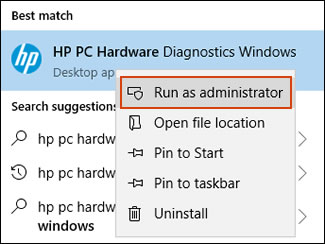
If the app is not installed on your computer, download the latest version, go to HP PCs - Testing for Hardware Failures website.
-
Click Component Tests in the main menu.
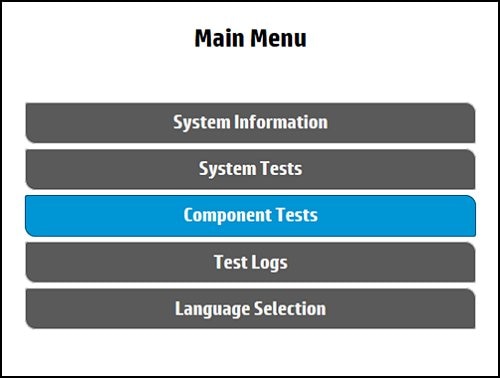
-
In the list of Component Tests, click Power.
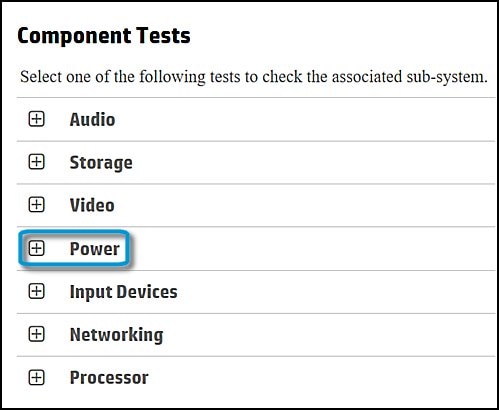
-
Select Battery Check, and then click Run once.
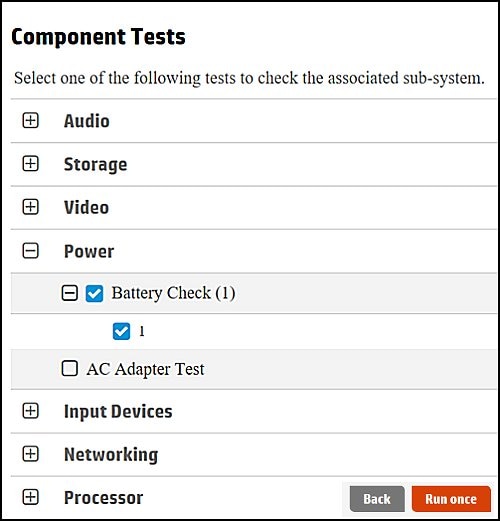
-
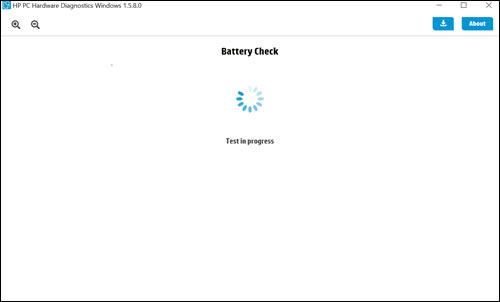
Wait while the test is in progress. The Battery Test takes about two minutes.
-
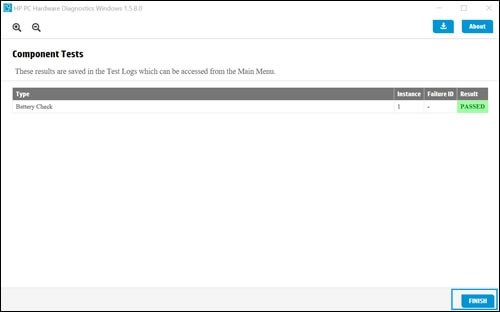
Click Finish on the Component Tests page.
-
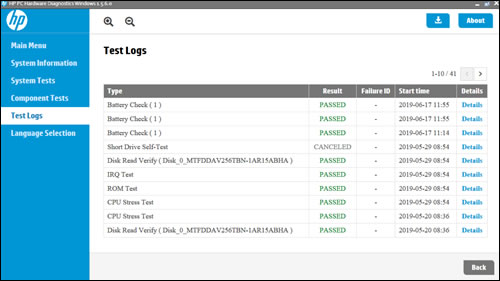
Select Test Logs to see the results of the battery test.
Keep me posted for further assistance.
Please click “Accept as Solution” if you feel my post solved your issue, it will help others find the solution.
ECHO_LAKE
I am an HP Employee
07-03-2021 10:14 AM
HP Recommended
Thank you for posting back.
I can see how that would be difficult. It sounds like hardware related issue with the battery and in order to fix this issue, your computer needs to be serviced. As we have limited support boundaries in the support community as of now.
I would request you to reach out to our Support and our Support Engineers should be able to check the available service options in order to diagnose the computer physically. HP Support can be reached by clicking on the following link: www.hp.com/contacthp/
Please feel free to contact us here anytime you need any further assistance. Please click “Accept as Solution” if you feel my post solved your issue, it will help others find the solution.
ECHO_LAKE
I am an HP Employee

Be alert for scammers posting fake support phone numbers and/or email addresses on the community.
If you think you have received a fake HP Support message, please report it to us by clicking on "Flag Post".
† The opinions expressed above are the personal opinions of the authors, not of HP. By using this site, you accept the Terms of Use and Rules of Participation.


Didn't find what you were looking for?
Ask the community
† The opinions expressed above are the personal opinions of the authors, not of HP. By using this site, you accept the <a href="https://www8.hp.com/us/en/terms-of-use.html" class="udrlinesmall">Terms of Use</a> and <a href="/t5/custom/page/page-id/hp.rulespage" class="udrlinesmall"> Rules of Participation</a>.