• ×
    Information
    Need Windows 11 help?
    Check documents on compatibility, FAQs, upgrade information and available fixes.
    Windows 11 Support Center.
  • post a message
  • ×
    Information
    Need Windows 11 help?
    Check documents on compatibility, FAQs, upgrade information and available fixes.
    Windows 11 Support Center.
  • post a message
Guidelines
Join the HP Community Solve‑a‑thon | Help Others & Share Your Solutions | Live on Zoom | 2:30 PM to 2:30 AM IST | Every Wednesday Click here to know more
Common problems for Battery
We would like to share some of the most frequently asked questions about: Battery Reports, Hold a charge, Test and Calibrating Battery . Check out this link: Is your notebook plugged in and not charging?
HP Recommended

Dear HP Support Team,

I am facing a serious issue with my HP laptop battery. I have noticed sudden battery drain while using the laptop. Even when the laptop is completely shut down, the battery drains very quickly after charging.

I would like a proper explanation regarding this issue, especially since it started after the warranty period ended. When I contacted the service center to claim warranty support, I was informed that the issue could not be covered. I am very disappointed with the response from the offline service center, as they did not provide proper guidance or inform me about any online support options or pre-installed HP service applications.

Additionally, the keyboard backlight is not working properly, which makes it difficult and uncomfortable to use the laptop at night.

I kindly request HP to inspect these issues and provide a proper solution as soon as possible.

Thank you.

Sincerely,
Partha Sarathi K

1 REPLY 1
HP Recommended

Please run the battery report and post the summary if you want.
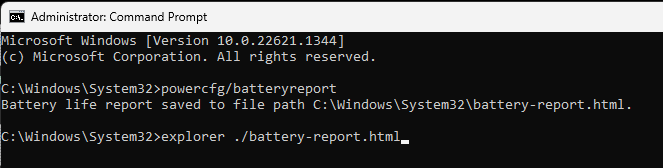
You run the battery report by bringing up the administrator command window and running

 powercfg/batteryreport 


as shown below


After entering that explorer line you should see something like the following. You will have to click on it as it is long
https://stateson.net/docs/SP4_battery-report.html
Battery should last about 5 years but less for gaming systems.

Have you done a battery calibration?
If not, then do the battery report both before and after the calibration.
Save the results so you can compare.


Thank you for using HP products and posting to the community.
I am a community volunteer and do not work for HP. If you find
this post useful click the Yes button. If I helped solve your
problem please mark this as a solution so others can find it
† The opinions expressed above are the personal opinions of the authors, not of HP. By using this site, you accept the <a href="https://www8.hp.com/us/en/terms-of-use.html" class="udrlinesmall">Terms of Use</a> and <a href="/t5/custom/page/page-id/hp.rulespage" class="udrlinesmall"> Rules of Participation</a>.