• ×
    Information
    Need Windows 11 help?
    Check documents on compatibility, FAQs, upgrade information and available fixes.
    Windows 11 Support Center.
  • post a message
  • ×
    Information
    Need Windows 11 help?
    Check documents on compatibility, FAQs, upgrade information and available fixes.
    Windows 11 Support Center.
  • post a message
Guidelines
Seize the moment! nominate yourself or a tech enthusiast you admire & join the HP Community Experts!
Common problems for Battery
We would like to share some of the most frequently asked questions about: Battery Reports, Hold a charge, Test and Calibrating Battery . Check out this link: Is your notebook plugged in and not charging?
HP Recommended
HP ENVY x360 - 15m-cp0011dx
Microsoft Windows 10 (64-bit)

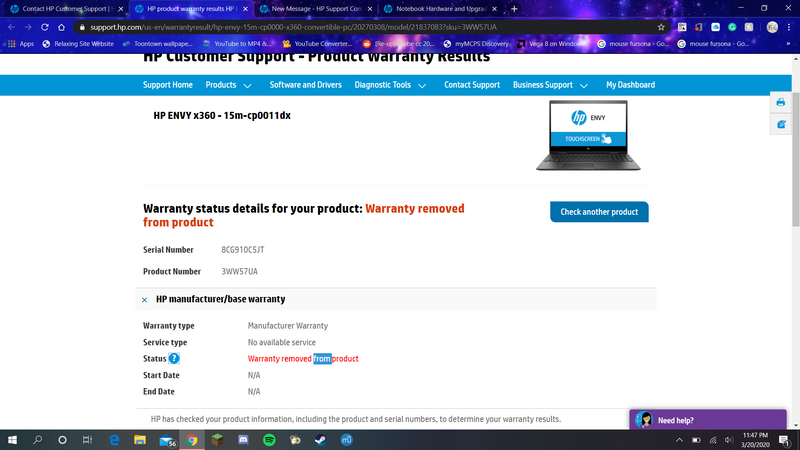
I'm writing in this thread because I've seemed to have noticed an issue that has come up with my relatively new laptop. I purchased my HP ENVY x360 - 15m-cp0011dx brand new from Best Buy in early to mid-June of last year (2019) and already, the hinge is having issues. Now I've noticed quite sometime earlier that the right hinge on my laptop was a little off and crooked, but nothing seemed wrong with the screen position or opening and closing the lid. But recently, I've realized that now the right hinge is making a small crack or popping noise when open and close the lid. And I've also noticed that when my laptop is shut, the broken hinge is literally causing the laptop screen to be misaligned with the bottom portion of the laptop. I"m very upset because I've managed to upgrade the system's ram and have a lot of personal things and progress stored on this laptop, and now I may have to return it. This really shouldn't be happening to a brand new, quite high-quality laptop that costs around $800. I've taken good care of this laptop and have not dropped it or bumped it into anything, or done anything to cause harm like this to the computer. And obviously, with COVID-19 going around, all Best Buy stores are closed so I can't do anything right now. So my questions are these; Best Buy said I only had a 14-Day window to return this laptop in case anything were to happen to it, which is obviously long gone by now. Will the manufacturer warranty cover this damage? It was not caused by me and obviously came from use, but it shouldn't happen this early to a brand new laptop. Best buy said the manufacturer warranty only covers internal hardware damage that was not caused by the user but rather manufacturer error. And speaking of which, I just checked my laptop's manufacturer warranty status, which is supposed to last for a year. My warranty status "Warranty Removed from Product" because this laptop was apparently "Designated to be returned to HP. Thus, the warranty has been removed from product", and I had no idea about this and was not notified. I'm very upset and infuriated with this issue right now because this HP laptop hasn't been a reliable product, especially for its price, and the warranty seems to be obsolete and no longer reliable as well. How can I rely on the services that HP has to offer and another laptop if I were to purchase from HP again when I can't even rely on a brand new laptop that only lasted for about 6 months?


Image of Warranty Status:

Warranty Status.png

1 ACCEPTED SOLUTION

Accepted Solutions
HP Recommended

@Anti_Zac 


Sorry, but this is just self-help Community staffed mostly by volunteers and we are not authorized to deal with warranty, service or equipment replacement issues. For these issues, you will need to contact HP Customer Support.


To contact HP Support see the following link to create yourself a case number, then call and it may help speed up the call process:
Step 1. Goto this page https://support.hp.com/us-en/contact-hp
Step 2. Enter Product number or select to auto detect
Step 3. Scroll down to "Still need help? Complete the form to select your contact options"
Step 4. Scroll down and click on: HP contact options - click on Get phone number
Case number and phone number appear.


I am a volunteer and I do not work for, nor represent, HP

View solution in original post

2 REPLIES 2
HP Recommended

@Anti_Zac 


Sorry, but this is just self-help Community staffed mostly by volunteers and we are not authorized to deal with warranty, service or equipment replacement issues. For these issues, you will need to contact HP Customer Support.


To contact HP Support see the following link to create yourself a case number, then call and it may help speed up the call process:
Step 1. Goto this page https://support.hp.com/us-en/contact-hp
Step 2. Enter Product number or select to auto detect
Step 3. Scroll down to "Still need help? Complete the form to select your contact options"
Step 4. Scroll down and click on: HP contact options - click on Get phone number
Case number and phone number appear.


I am a volunteer and I do not work for, nor represent, HP
HP Recommended

Will do, thank you for informing me.

† The opinions expressed above are the personal opinions of the authors, not of HP. By using this site, you accept the <a href="https://www8.hp.com/us/en/terms-of-use.html" class="udrlinesmall">Terms of Use</a> and <a href="/t5/custom/page/page-id/hp.rulespage" class="udrlinesmall"> Rules of Participation</a>.