• ×
    Information
    Need Windows 11 help?
    Check documents on compatibility, FAQs, upgrade information and available fixes.
    Windows 11 Support Center.
  • post a message
  • ×
    Information
    Need Windows 11 help?
    Check documents on compatibility, FAQs, upgrade information and available fixes.
    Windows 11 Support Center.
  • post a message
Guidelines
Seize the moment! nominate yourself or a tech enthusiast you admire & join the HP Community Experts!
Common problems for Battery
We would like to share some of the most frequently asked questions about: Battery Reports, Hold a charge, Test and Calibrating Battery . Check out this link: Is your notebook plugged in and not charging?
HP Recommended
Spectre 15"
Microsoft Windows 10 (64-bit)

Hi, 


My Spectre 15" 4k touchscreen purchase April 2018 has the common screen burn issue when using the integrated graphics. I also now have a keyboard issue where the Volume up is continuous so cannot lower the volume without a) disabling sound or b) disabling the F8 button via a Disable Key Software. 


I am out of warranty but I am wanting to know if cost wise this is worth me getting fixed both screen and keyboard in order to save a $2k laptop?


Thanks

1 REPLY 1
HP Recommended

@GavT11 Welcome to HP Community!


I understand that you are facing issues with screen and keyboard issues.


Do not worry. I will try to fix the issue.


I suggest you download and run the HP Support Assistant from this Link: https://www8.hp.com/us/en/campaigns/hpsupportassistant/hpsupport.html?jumpid=va_r602_us/en/any/psg/p...


HPSA will automatically search for all the latest drivers for your Notebook


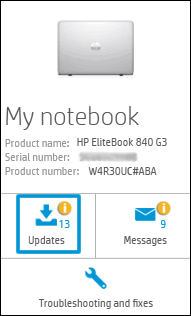
  1. Click My devices in the top menu, and then click Updates in the My PC or My notebook pane.

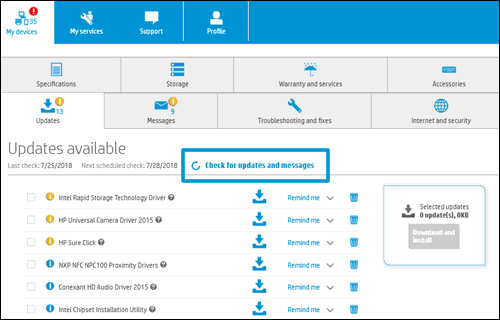
  1. Click Check for updates and messages to scan for new updates.

  1. Review the list of updates. Updates with a yellow information icon are recommended. Updates with a blue information icon are optional.
  2. Click the update name for a description, version number, and file size.
  3. Select the box next to any updates you want to install, and then click Download and install.

Also, ensure Windows is up to date.


If the issue still persists, please try creating a new user account on your computer.


Go to http://hp.care/2dWJKgW  and follow the steps to create a new user account.


Keep us posted,

If you would like to thank us for our efforts to help you, 


Give us a virtual high-five by clicking the 'Thumbs Up' icon below, followed by clicking on the "Accept as solution" on this post, 


Have a great day!

† The opinions expressed above are the personal opinions of the authors, not of HP. By using this site, you accept the <a href="https://www8.hp.com/us/en/terms-of-use.html" class="udrlinesmall">Terms of Use</a> and <a href="/t5/custom/page/page-id/hp.rulespage" class="udrlinesmall"> Rules of Participation</a>.