• ×
    Information
    Need Windows 11 help?
    Check documents on compatibility, FAQs, upgrade information and available fixes.
    Windows 11 Support Center.
  • post a message
  • ×
    Information
    Need Windows 11 help?
    Check documents on compatibility, FAQs, upgrade information and available fixes.
    Windows 11 Support Center.
  • post a message
Guidelines
Seize the moment! nominate yourself or a tech enthusiast you admire & join the HP Community Experts!
Common problems for Battery
We would like to share some of the most frequently asked questions about: Battery Reports, Hold a charge, Test and Calibrating Battery . Check out this link: Is your notebook plugged in and not charging?
HP Recommended
HP Elite USB-C Docking Station TPA-B01
Microsoft Windows 10 (32-bit)

I am using an HP Elitebook 840 G6 with the USB-C Docking Station TPA-B01.  All drivers and firmware are up to date. (drivers and firmware on the dock have last been updated by HP years ago 😞 ).

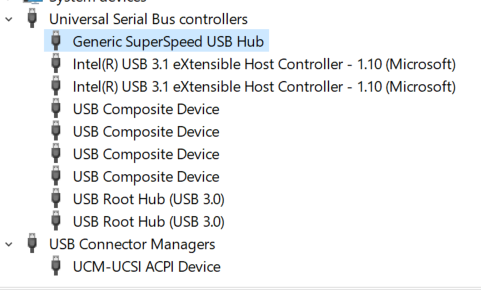
Whenever I plug in a USB device into the dock it will not show up on the computer.

If I start up my computer while docked, I do not see the devices.  Dual displays and Ethernet work, (most of the time. :S)

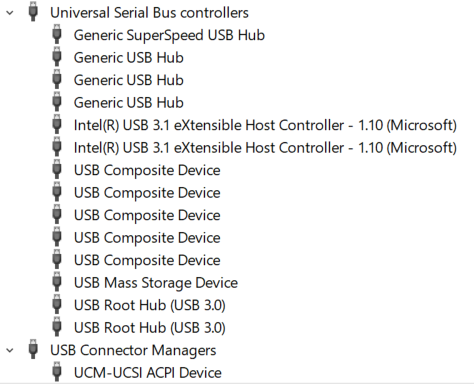
If I unplug the USB-C connector from the laptop and replug, all the USB devices appear and work.

I tried with my Plantronics USB adapter and with my phone.

This has become an annoying daily ritual.

I checked the Thunderbolt app in Windows and it confirms that security is not needed for USB.  I also checked the BIOS and security is set to be open.

USB-C Dock on startup.PNGUSB-C Dock on replug.PNG

Is this just an annoying behavior of Thunderbolt?

1 REPLY 1
HP Recommended

I have re-installed the latest drivers from 2018, then installed all newer drivers per the Hp Support Assistant, still had the same problem.  Then re-installed 2018 drivers and still had the same problem.  If the machine is hibernated or started from a cold boot the USB devices on the dock will not be loaded.

A Windows re-start does keep the USB ports active if already activated by a re-dock.

Also, displays and ethernet controller work fine without a re-dock.  It is only USB ports that won't be detected through dock.

† The opinions expressed above are the personal opinions of the authors, not of HP. By using this site, you accept the <a href="https://www8.hp.com/us/en/terms-of-use.html" class="udrlinesmall">Terms of Use</a> and <a href="/t5/custom/page/page-id/hp.rulespage" class="udrlinesmall"> Rules of Participation</a>.