• ×
    Information
    Need Windows 11 help?
    Check documents on compatibility, FAQs, upgrade information and available fixes.
    Windows 11 Support Center.
  • post a message
  • ×
    Information
    Need Windows 11 help?
    Check documents on compatibility, FAQs, upgrade information and available fixes.
    Windows 11 Support Center.
  • post a message
Guidelines
Seize the moment! nominate yourself or a tech enthusiast you admire & join the HP Community Experts!
Common problems for Battery
We would like to share some of the most frequently asked questions about: Battery Reports, Hold a charge, Test and Calibrating Battery . Check out this link: Is your notebook plugged in and not charging?
HP Recommended
Microsoft Windows 7 (32-bit)

I wa using the touchpad to move the mouse and it quit how do I get back on there some sequence on the pad I think

1 REPLY 1
HP Recommended

@Colemanrr

 
Greetings!

 
Welcome to the HP Community. This is a great place to get support, find answers and tips to your technical queries. I have reviewed your post and I understand, you are trying to enable the touchpad.


Don't worry, I'm here to help! To better assist you - What's the exact model name of the computer? Refer to this link for steps to find the product details. (Ensure not to share the serial number, email, phone number, etc.)


While you respond to that, let's try these steps -


1) Click Start, and then type mouse in the search field.
2) Select Mouse from the list of options.
3) Click the Device Settings tab.
4) From the Devices list, select your Synaptics device, and then click Settings.


Select Settings


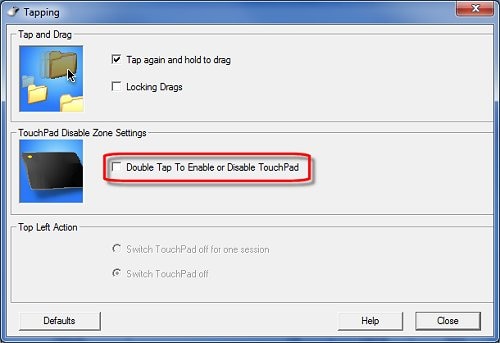
5) Double-click Tapping. The Tapping window displays.


Image: Double-click Tapping


6) Uncheck Double Tap to Enable TouchPad.


Image: Tapping window


7) Click Close, and then click OK.
8) In the Mouse Properties window, click Apply.


Hope this helps!


Let me know how that goes.


To thank us for our efforts to help you, click here to access your public post and Select - "Accept as solution" and click on the blue "Thumbs up".  
 

Have a great day!

Asmita
I am an HP Employee

† The opinions expressed above are the personal opinions of the authors, not of HP. By using this site, you accept the <a href="https://www8.hp.com/us/en/terms-of-use.html" class="udrlinesmall">Terms of Use</a> and <a href="/t5/custom/page/page-id/hp.rulespage" class="udrlinesmall"> Rules of Participation</a>.