
-
×InformationNeed Windows 11 help?Check documents on compatibility, FAQs, upgrade information and available fixes.
Windows 11 Support Center. -
-
×InformationNeed Windows 11 help?Check documents on compatibility, FAQs, upgrade information and available fixes.
Windows 11 Support Center. -
- HP Community
- Notebooks
- Notebook Hardware and Upgrade Questions
- Re: Incorrect dedicated and integrated memory

Create an account on the HP Community to personalize your profile and ask a question
Your account also allows you to connect with HP support faster, access a personal dashboard to manage all of your devices in one place, view warranty information, case status and more.
Common problems for Battery
We would like to share some of the most frequently asked questions about: Battery Reports, Hold a charge, Test and Calibrating Battery . Check out this link: Is your notebook plugged in and not charging?

It has been a while since anyone has replied. Simply ask a new question if you would like to start the discussion again.

06-01-2017 10:26 AM
 HP Recommended
Product: pavalion-E3B57PA#ACJ
Operating System: Microsoft Windows 10 (64-bit)
Hey i upgraded my laptop fom windows 8 to windows 10 and updated it and installed all the driver from official sites.all my display drivers are now showing in dxdiag but the problem is that i have 2 gb intel hd 4000 series graphics integrated and radeon hd8670m 2 gb dedicated . but the display settings is showing intel 1760mb and dedicated 32mb but in previous windows it was total 4000mb and dedicated nearby 2050 mb can you please tell me how i can increase it or change it or what is the problem??? please tell me fast !!!!!! and how can i change it from bios???
Solved! Go to Solution.
1 ACCEPTED SOLUTION
Accepted Solutions


06-02-2017 01:15 PM
HP Recommended
Welcome to HP Forums,
This is a great place to get support, find answers and tips,
Thank you for posting your query, I'll be more than glad to help you out 🙂
As I understand you have incorrect dedicated and integrated memory,
Don't worry as I'll be glad to help, however, to provide an accurate resolution, I need a few more details:
Did you know that the GPU settings on your laptop are system managed?
While you respond to that, I must inform you that the integrated and external GPU is managed by the computer, hence cannot be tweaked manually.
Doing so using 3rd party tools is neither supported nor recommended by HP.
Let me know how that works out, keep me in the loop and Good luck! 😉
Riddle_Decipher
I am an HP Employee
Learning is a journey, not a destination.
Let's keep asking questions and growing together.
5 REPLIES 5
06-02-2017 01:15 PM
HP Recommended
Welcome to HP Forums,
This is a great place to get support, find answers and tips,
Thank you for posting your query, I'll be more than glad to help you out 🙂
As I understand you have incorrect dedicated and integrated memory,
Don't worry as I'll be glad to help, however, to provide an accurate resolution, I need a few more details:
Did you know that the GPU settings on your laptop are system managed?
While you respond to that, I must inform you that the integrated and external GPU is managed by the computer, hence cannot be tweaked manually.
Doing so using 3rd party tools is neither supported nor recommended by HP.
Let me know how that works out, keep me in the loop and Good luck! 😉
Riddle_Decipher
I am an HP Employee
Learning is a journey, not a destination.
Let's keep asking questions and growing together.
06-02-2017 01:23 PM
HP Recommended
its very appreciable that you replied to the problem . yeh its still showing dedicated memory as 32mb but the performance was increased i thought it will decrease .it was a drastic change of 34 fps in gta 5 thanks😍😍😍😍😍
06-02-2017 01:53 PM
HP Recommended
Thank you for responding,
It's great to have you back 😉
Don't worry, that's quite normal, you may try the below steps, as even if the game is compatible with your system hardware it may have a slow performance because you are using the wiWindows 10 as the OS uses most of the CPU & graphics card usage, you might want to reduce the visual effects for windows to save the amount of CPU & Graphics card usage required to run your game properly.
Here's how you do it:
-
Go to Start Menu > click on Settings.
-
Type performance > choose to Adjust the appearance and performance of Windows.
-
In the new window, go to the Visual Effects and select Adjust for best performance.
-
click Apply and ok...this should do the trick.
Keep me posted for further assistance 😉
Riddle_Decipher
I am an HP Employee
Learning is a journey, not a destination.
Let's keep asking questions and growing together.
06-03-2017 02:04 AM
HP Recommended
HEY NOW I AM FACING THIS PROBLEM THAT LAST night i had a windows 10 update i updated it properly then i found my amd display driver causing problem so i uninstalled it by rebooting to safe mode!!! now when i install the drivers windows gets stu ks i cant move my mouse or nothing thw whole laptop freezes ???? please what is the problem should i do clean by ddu and then try to install or some other problem?
06-03-2017 03:37 PM
HP Recommended
Thank you for responding,
It's great to have you back 😉
That seems to be a known issue with the Windows 10 update,
Don't worry we are in conversation with the Microsoft support to take care of this,
In the meantime, simply disable the Windows updates and then install the AMD graphics card drivers from the HP website: Click here
Once the graphics card drivers have been installed everything should be okay, if not install the drivers from the recovery manager:
Use the following steps to reinstall original software or drivers.
-
In Windows, search for and open HP Recovery Manager.
If prompted for an administrator password or confirmation, type the password or provide confirmation. If prompted by User Account Control to allow the program to make changes to the computer, click Yes.
-
Under Help, click Reinstall drivers and/or applications and wait for Recovery Manager to generate a list.
Figure : Recovery Manager
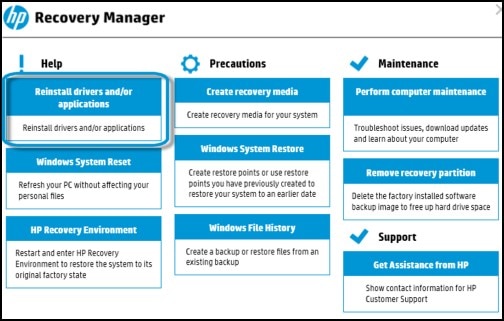
A combined list of applications and drivers to reinstall appears, with the drivers listed first.
CLICK HERE FOR MORE STEPS AND INSTRUCTIONS.
Keep me posted for further assistance 😉
Riddle_Decipher
I am an HP Employee
Learning is a journey, not a destination.
Let's keep asking questions and growing together.

Be alert for scammers posting fake support phone numbers and/or email addresses on the community.
If you think you have received a fake HP Support message, please report it to us by clicking on "Flag Post".
† The opinions expressed above are the personal opinions of the authors, not of HP. By using this site, you accept the Terms of Use and Rules of Participation.


Didn't find what you were looking for?
Ask the community
† The opinions expressed above are the personal opinions of the authors, not of HP. By using this site, you accept the <a href="https://www8.hp.com/us/en/terms-of-use.html" class="udrlinesmall">Terms of Use</a> and <a href="/t5/custom/page/page-id/hp.rulespage" class="udrlinesmall"> Rules of Participation</a>.