• ×
    Information
    Need Windows 11 help?
    Check documents on compatibility, FAQs, upgrade information and available fixes.
    Windows 11 Support Center.
  • post a message
  • ×
    Information
    Need Windows 11 help?
    Check documents on compatibility, FAQs, upgrade information and available fixes.
    Windows 11 Support Center.
  • post a message
Guidelines
Join the HP Community Solve‑a‑thon | Help Others & Share Your Solutions | Live on Zoom | 2:30 PM to 2:30 AM IST | Every Wednesday Click here to know more
Common problems for Battery
We would like to share some of the most frequently asked questions about: Battery Reports, Hold a charge, Test and Calibrating Battery . Check out this link: Is your notebook plugged in and not charging?
HP Recommended
Pavilion x360
Microsoft Windows 10 (64-bit)

Model - 14-cd0050tx

HP Pavillion x360 2018 Edition with Intel 8th Gen Core i3 processor


I will be upgrading my boot drive in the next few days from 1 TB SSHD that came with the device to either a Crucial P1 PCIe NVMe SSD or the SAMSUNG 970 EVO PLUS 500 GB SSD. And I would take out the SSHD from the laptop and use it externally.


For the space that would be freed up by removing the SSHD from the laptop, will I be able to install any one of the following in its place:- 

1) 1TB Seagate Fireacuda SSHD

2) 1TB Seagate Baracuda HDD

3) 1TB/ 500GB SAMSUNG 860 EVO SATA SSD

4) 1TB/500GB WD GREEN SSD

5) 2TB or higher capacity Seagate Baracuda HDD


*I want to take out my SSHD from inside the laptop, is primarily because I don't wish to format my drive and risk losing any files, neither do I wish to buy an external HDD and transfer all the files from the SSHD to the external drive. 


1 REPLY 1
HP Recommended

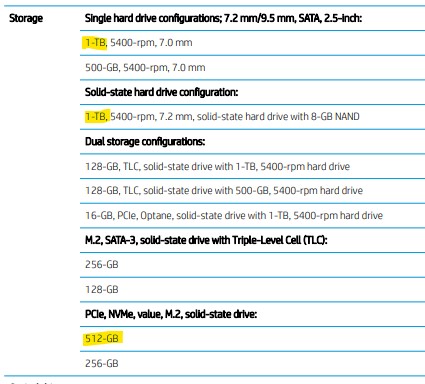
@Alex216 There are a few storage sizes tested and approved by HP, please check if the information listed below matches the specification of the storage devices of your choice and upgrade accordingly, although, I must let you know that HP recommends that you go easy on upgrades as the device is equipped with parts that perform at its optimal performance and also, the upgrade-able parts listed below are purely for your ease, though the decision to upgrade will be at your own discretion:


(Note: It doesn't matter which brand the SSD or HDD is from, all that matters is the specification as listed below, you may also check the same on Page. 2 Chapter 1 Product description using this link: click here)


P.S: Welcome to HP Community 😉


I hope that answers your query,  

If it did, simply select "Accept as solution", to help the community grow, 

And if you wish to thank us for our efforts, click on the thumbs up for kudos.

Have a great day ahead.

Riddle_Decipher
I am an HP Employee


Learning is a journey, not a destination.
Let's keep asking questions and growing together.
† The opinions expressed above are the personal opinions of the authors, not of HP. By using this site, you accept the <a href="https://www8.hp.com/us/en/terms-of-use.html" class="udrlinesmall">Terms of Use</a> and <a href="/t5/custom/page/page-id/hp.rulespage" class="udrlinesmall"> Rules of Participation</a>.