
-
×InformationNeed Windows 11 help?Check documents on compatibility, FAQs, upgrade information and available fixes.
Windows 11 Support Center. -
-
×InformationNeed Windows 11 help?Check documents on compatibility, FAQs, upgrade information and available fixes.
Windows 11 Support Center. -
- HP Community
- Notebooks
- Notebook Hardware and Upgrade Questions
- Internal webcam

Create an account on the HP Community to personalize your profile and ask a question
Your account also allows you to connect with HP support faster, access a personal dashboard to manage all of your devices in one place, view warranty information, case status and more.
Common problems for Battery
We would like to share some of the most frequently asked questions about: Battery Reports, Hold a charge, Test and Calibrating Battery . Check out this link: Is your notebook plugged in and not charging?

It has been a while since anyone has replied. Simply ask a new question if you would like to start the discussion again.

01-11-2019
06:04 PM
- last edited on
01-11-2019
09:23 PM
by
 rick-s
 HP Recommended
Product: HP NoteBook HP 15-F272wm
Operating System: Microsoft Windows 10 (64-bit)
Okay so there's the sep-rep. My HP-Notebooks interal (built in) webcam isn't working at all. Skype, Discord, and google hangouts picks the camera up, but doesn't use it. I get a blackscreen or just my normal layout.
All appove mentioned apps and software havefull permission to use my camera and all my divers and OS is up to date.
Whenever I try to access YouCam it INSTA crashes, won't even boot up just stright to the crash screen no reason given. When I go to Device Manager I don't have the imaging Devices tap all the time ether ,when I do it reads unknown device and won't install a **bleep** thing. However when I go to my Camera tap it reads my HP-Webcam and DI states it working as should.
I've uninstalled youcam and reinstalled multiple times everywhere from the Recovery Manager to the Youcam web site it self. Every single time it still insta crashes it won't even give me the boot logo now.
Now here's the kicker whenever I use the camera app it self or any photo software the camera reads turns on, and I get a clear HD read out. I can see myself, record video ,and take photos .
So help me out here ,what is going on and how do I fix it. I need my webcam to work 100% full all the time. I use this for work.
The labtop is a HP-notebook 15-F272Wm .
[serial number removed]
PN:N5YD5UA#ABA
5 REPLIES 5


01-13-2019 12:53 PM
HP Recommended
Welcome to HP Forums,
This is a great place to get support, find answers and tips,
Thank you for posting your query, I'll be more than glad to help you out 🙂
I see that internal webcam not responding correctly, I appreciate your efforts to try and resolve the issue.
Don't worry as I'll be glad to help, however, to provide an accurate resolution, I need a few more details:
- When was the last time it worked fine?
- Have you made any hardware/software changes?
- Did this happen after a recent window or software update?
While you respond to that, I recommend you to perform the following steps to isolate the issue and arrive at a fix:
Let's check the webcam device in device manager:
-
In Windows, search for and open Device Manager.
-
If there is no Imaging devices category listed, select Action, then Scan for hardware changes.
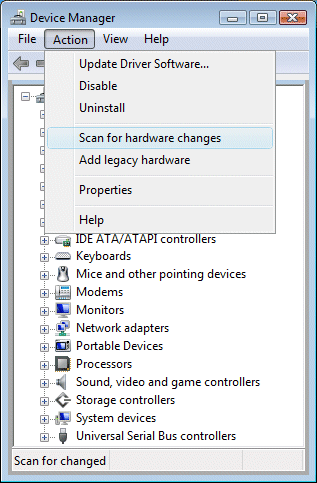
-
Double-click Imaging Devices to expand the list of webcam drivers.
-
If the HP Webcam-101 or Microsoft USB Video Device is listed, right-click the driver and select Update Driver Software and follow the on-screen instructions.
-
Restart your computer, and open your webcam software to see if the problem is resolved.
If the problem persists, use HP PCs - Using Microsoft System Restore (Windows 10, 😎 to go back to a time when the webcam was working properly.
Hope this helps! Keep me posted for further assistance.
If I have helped you resolve the issue, feel free to give me a virtual high-five by clicking the 'Thumbs Up' icon below,
Followed by clicking on "Accept as solution" from the drop-down menu on the upper right corner,
Thank you for posting in the HP Support Forum. Have a great day!
ECHO_LAKE
I am an HP Employee
01-13-2019 09:29 PM
HP Recommended
The last time it worked correctly was on Saturday September 15 2018. One day after that I logged onto my computer I got the YouCamYouCam6_webcam_camera_video.exe has stooped working message. After that I continuously get that message when ever I try to open the software, and Skype gives me the black screen and never uses my HP Webcam. (Skype gives me the webcam as a choice to use yet never turns it on or actually uses it)
The last Software change I've made was a STEAM update ,and the AV-Anti viruse update. As for hardware it's all stock and the only thing I've done to the hardware was a Reset which I had done today. (Sunday Jan 13 2019)
I've already done the whole scan for hardware changes and uninstalling the device and what not. Still hasn't worked yet, and I still don't have an imaging devices in my manager tap. In fact I've done that 25 times now.
01-14-2019 10:39 AM
HP Recommended
@PhantomFox34
Thank you for posting back.
You’ve done an excellent job on diagnosing the issue from your end. I appreciate your efforts to try and resolve the issue.
As you've mentioned that Youcam was working fine earlier, this sounds most likely a software related issue.
Let's perform a system factory recovery reset in order to isolate the issue.
This document explains how to reset the computer to its original factory shipped state. Click here
Hope this helps! Keep me posted for further assistance.
ECHO_LAKE
I am an HP Employee
01-14-2019 09:13 PM
HP Recommended
Even after factory Reseting I still have the same problem .


After the long bootup and what checked the camera function it worked perfectly fine. Then I decided to download Skype and I went through the set up, but I came across the same issue with Skype. Then I checked to see is Cyberlink would work it went through the boot up logo this time at lest then not even a minute later it crashed and went to the video has stopped working screen again. This is the 2nd time I've reset my computer and the issue hasn't been fixed.
01-15-2019 12:33 PM
HP Recommended
Thank you for posting back.
I appreciate your efforts to try and resolve the issue. I understand you are in need of support, As you've performed relevant troubleshooting steps and the issue persists, this sounds like hardware related. And to help you out, I'm sending out a Private message to assist you with the next course of action. Please check your Private message icon on the upper right corner of your HP Forums profile Next, to your profile Name, you should see a little blue envelope, please click on it or simply click on this link: https://h30434.www3.hp.com/t5/notes/privatenotespage
ECHO_LAKE
I am an HP Employee

Be alert for scammers posting fake support phone numbers and/or email addresses on the community.
If you think you have received a fake HP Support message, please report it to us by clicking on "Flag Post".
† The opinions expressed above are the personal opinions of the authors, not of HP. By using this site, you accept the Terms of Use and Rules of Participation.


Didn't find what you were looking for?
Ask the community
† The opinions expressed above are the personal opinions of the authors, not of HP. By using this site, you accept the <a href="https://www8.hp.com/us/en/terms-of-use.html" class="udrlinesmall">Terms of Use</a> and <a href="/t5/custom/page/page-id/hp.rulespage" class="udrlinesmall"> Rules of Participation</a>.