
-
×InformationNeed Windows 11 help?Check documents on compatibility, FAQs, upgrade information and available fixes.
Windows 11 Support Center. -
-
×InformationNeed Windows 11 help?Check documents on compatibility, FAQs, upgrade information and available fixes.
Windows 11 Support Center. -
- HP Community
- Notebooks
- Notebook Hardware and Upgrade Questions
- Keyboard Backlight won't come on as F5 key doesn't activate ...

Create an account on the HP Community to personalize your profile and ask a question
Your account also allows you to connect with HP support faster, access a personal dashboard to manage all of your devices in one place, view warranty information, case status and more.
Common problems for Battery
We would like to share some of the most frequently asked questions about: Battery Reports, Hold a charge, Test and Calibrating Battery . Check out this link: Is your notebook plugged in and not charging?

It has been a while since anyone has replied. Simply ask a new question if you would like to start the discussion again.

07-04-2017 12:22 PM - edited 07-04-2017 12:42 PM
 HP Recommended
Product: Envy Dv6
Operating System: Microsoft Windows 10 (64-bit)
Hello there.
My keyboard light won't come on because the f5 key which is responsible for switching it on and off only refreshes. I've tried holding down the fn key+f5, unistalling keyboard driver, turning off action key in bios, turning on action key in bios, updating hotkeys application, updating bios, changing region input settings, running UEFI diagnostic and testing the keyboard all to no avail. All other action keys work fine.
Please help....thanks in advance.
12 REPLIES 12


07-05-2017 11:28 AM
HP Recommended
A very warm welcome to the HP community. A very good day to you.
I understand that you have an Envy Dv6 series laptop. I read that the keyboard backlight does not work. Pressing the f5 key only refreshes the laptop screen. You've done a remarkable job performing the steps. Not worry, I'll do my best to help you.
Please let me know the exact product model no. This link will help you to find the model no: http://hp.care/2bygf7l
-
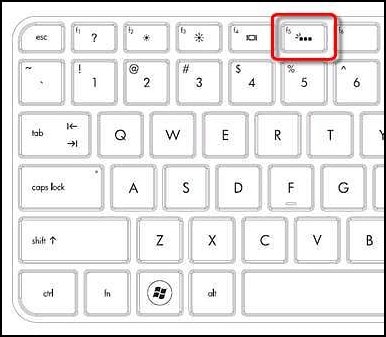
To check whether your particular model has a backlit keyboard, check the F5 key to see if the backlit keyboard key
 is present.
 -
To turn the keyboard back light on or off, press the F5
key.
Figure : F5 key - Backlit keyboard key
You could try one of the following methods depending on your model, to turn the backlit keyboard on or off.
-
If the spacebar has a keyboard icon on the left side, press and hold the Function key (Fn) and then tap the space bar one time.
-
Press the F12 key.
-
Press the F5 key.
-
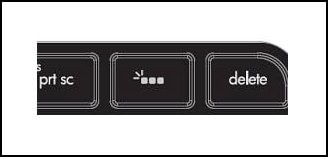
Press the special key dedicated to turning the back light on and off.
Figure : Dedicated key for the keyboard back light
I hope this information helps. Please let me know what happens. Good luck! 🙂
07-06-2017 12:23 AM
HP Recommended
Thanks @MKazi. It was working well before until I serviced the computer. And yes, I have tried all the steps you suggested above, in fact it was one of the first things I tried.
I don't know exactly what you need so I'll just put all the info at the back of the laptop here.
Product: D4M04EA#UUZ
Model: dv6-7367sz
Serial: 2CE3041QTN
And yes, I have checked the backlit connector ribbon and its well intact and firmly connected. The f5 key refreshes when I press f5 and also when I press fn+f5. I don't what else to do as the other action keys ( brightness, volume, mute, play/pause, help, wifi, display) work flawlessly.
Thanks again in advance.
I don't know exactly what you need so I'll just put all the info at the back of the laptop here.
Product: D4M04EA#UUZ
Model: dv6-7367sz
Serial: 2CE3041QTN
And yes, I have checked the backlit connector ribbon and its well intact and firmly connected. The f5 key refreshes when I press f5 and also when I press fn+f5. I don't what else to do as the other action keys ( brightness, volume, mute, play/pause, help, wifi, display) work flawlessly.
Thanks again in advance.
07-06-2017 12:25 AM
HP Recommended
@MKazi
Thanks @MKazi. It was working well before until I serviced the computer. And yes, I have tried all the steps you suggested above, in fact it was one of the first things I tried.
I don't know exactly what you need so I'll just put all the info at the back of the laptop here.
Product: D4M04EA#UUZ
Model: dv6-7367sz
Serial: 2CE3041QTN
And yes, I have checked the backlit connector ribbon and its well intact and firmly connected. The f5 key refreshes when I press f5 and also when I press fn+f5. I don't what else to do as the other action keys ( brightness, volume, mute, play/pause, help, wifi, display) work flawlessly.
Thanks again in advance.
Thanks @MKazi. It was working well before until I serviced the computer. And yes, I have tried all the steps you suggested above, in fact it was one of the first things I tried.
I don't know exactly what you need so I'll just put all the info at the back of the laptop here.
Product: D4M04EA#UUZ
Model: dv6-7367sz
Serial: 2CE3041QTN
And yes, I have checked the backlit connector ribbon and its well intact and firmly connected. The f5 key refreshes when I press f5 and also when I press fn+f5. I don't what else to do as the other action keys ( brightness, volume, mute, play/pause, help, wifi, display) work flawlessly.
Thanks again in advance.
07-06-2017 12:27 AM
HP Recommended
@MKazi
Thanks @MKazi. It was working well before until I serviced the computer. And yes, I have tried all the steps you suggested above, in fact it was one of the first things I tried.
I don't know exactly what you need so I'll just put all the info at the back of the laptop here.
Product: D4M04EA#UUZ
Model: dv6-7367sz
Serial: 2CE3041QTN
And yes, I have checked the backlit connector ribbon and its well intact and firmly connected. The f5 key refreshes when I press f5 and also when I press fn+f5. I don't what else to do as the other action keys ( brightness, volume, mute, play/pause, help, wifi, display) work flawlessly.
Thanks again in advance.
Thanks @MKazi. It was working well before until I serviced the computer. And yes, I have tried all the steps you suggested above, in fact it was one of the first things I tried.
I don't know exactly what you need so I'll just put all the info at the back of the laptop here.
Product: D4M04EA#UUZ
Model: dv6-7367sz
Serial: 2CE3041QTN
And yes, I have checked the backlit connector ribbon and its well intact and firmly connected. The f5 key refreshes when I press f5 and also when I press fn+f5. I don't what else to do as the other action keys ( brightness, volume, mute, play/pause, help, wifi, display) work flawlessly.
Thanks again in advance.

07-07-2017 07:53 AM
HP Recommended
Hi @Sezi01,
Thank you for your reply, I'll be more than glad to help you.
I understand that the issue still persists after following the steps provided in the previous interaction.
It looks like you were interacting with @MKazi, but he is out of the office at this moment so I'll take over from here.
Please follow the link: Notebook Keyboard Troubleshooting (Windows 10, 😎
Let me know if this works.
You have a good day ahead.
Rainbow23 - HP Support.
07-07-2017 10:06 AM
HP Recommended
Hi @Rainbow23
Thanks for the suggestion, but I have already tried that. My PC model doesn't have the hotkeys driver available on the HP site. I got one from a thrifty party site. I don't know if it makes any difference but I never needed all these drivers before and it was working.
I'm really sad cause I do lots of work at night and the backlight was on of the major reasons I got the laptop. Is there like a software to toggle the keyboard light since the f5 key won't alternate between refresh function and backlight function?
Thanks alot again in advance.....
Thanks for the suggestion, but I have already tried that. My PC model doesn't have the hotkeys driver available on the HP site. I got one from a thrifty party site. I don't know if it makes any difference but I never needed all these drivers before and it was working.
I'm really sad cause I do lots of work at night and the backlight was on of the major reasons I got the laptop. Is there like a software to toggle the keyboard light since the f5 key won't alternate between refresh function and backlight function?
Thanks alot again in advance.....
07-07-2017 04:38 PM
HP Recommended
You're welcome. 🙂
I suggest you to use the HP Quick Launch program. If this program is not present on the laptop then you may download and install them from this link.
Once the HP Quick Launch program is installed, to use the HP Quick Launch buttons program, click Start, enter quick into the search field, and then select HP Quick Launch Buttons from the list to open the HP Quick Launch Buttons window. Alternately, if the HP Quick Launch buttons icon  is visible in the system tray beside the clock, double-click the icon to open the HP Quick Launch Buttons window.
To program the Quick Launch buttons, follow the steps below.
-
Click Start, enter quick into the search field, and then select HP Quick Launch Buttons from the list to open the HP Quick Launch Buttons window.
Alternately, double-click the Quick Launch icon
in the system tray to open the HP Quick Launch Buttons window. -
Select an action to perform for each Quick Launch button by clicking the arrow to the right of the name of each action, select an action from the pop-up menu, click Apply, and then OK.
The Quick Launch buttons will now perform the actions that you just programmed.
Hope this helps. Cheers! 🙂

07-10-2017 05:53 PM
HP Recommended
Hi @Sezi01,
Thank you for replying,
I appreciate your time and efforts,
As I understand you have already tried the steps suggested and still having the issue, I would personally suggest you contact our HP phone support for available service related options. If your product is out of warranty, please choose paid options to get the tech support number.
HP Technical Support can be reached by clicking on the following link:http://h22207.www2.hp.com/us-en/?openCLC=true
(1) Once the support page opens please select the country in which you're located. Next, enter your HP model number on the right.
(2) Next, choose the 'Contact Support' tab at the top and scroll down to the bottom of the 'HP Support- Contact' page to fill out the form provided with your contact information.
(3) Once completed click the 'Show Options' icon on the bottom right.
(4) Lastly, scroll down to the bottom of the page and select 'Get the phone number.' A case number and phone number will now populate for you.
If you have any troubles, let me know and I will do my best to help!
Hope this helps, for any further queries reply to the post and feel free to join us again.
Feel free to post your query for any other assistance as well,
It's been a pleasure interacting with you and I hope you have a good day ahead.
If you wish to show appreciation for my efforts, mark my post as Accepted Solution.
And click on the Purple Thumbs up icon at the bottom of my comment.
Regards,
Jeet_Singh
I am an HP Employee

Be alert for scammers posting fake support phone numbers and/or email addresses on the community.
If you think you have received a fake HP Support message, please report it to us by clicking on "Flag Post".
† The opinions expressed above are the personal opinions of the authors, not of HP. By using this site, you accept the Terms of Use and Rules of Participation.


Didn't find what you were looking for?
Ask the community
† The opinions expressed above are the personal opinions of the authors, not of HP. By using this site, you accept the <a href="https://www8.hp.com/us/en/terms-of-use.html" class="udrlinesmall">Terms of Use</a> and <a href="/t5/custom/page/page-id/hp.rulespage" class="udrlinesmall"> Rules of Participation</a>.