• ×
    Information
    Need Windows 11 help?
    Check documents on compatibility, FAQs, upgrade information and available fixes.
    Windows 11 Support Center.
  • post a message
  • ×
    Information
    Need Windows 11 help?
    Check documents on compatibility, FAQs, upgrade information and available fixes.
    Windows 11 Support Center.
  • post a message
Guidelines
Join the HP Community Solve‑a‑thon | Help Others & Share Your Solutions | Live on Zoom | 2:30 PM to 2:30 AM IST | Every Wednesday Click here to know more
Common problems for Battery
We would like to share some of the most frequently asked questions about: Battery Reports, Hold a charge, Test and Calibrating Battery . Check out this link: Is your notebook plugged in and not charging?
HP Recommended
HP Spectre 360x
Microsoft Windows 10 (32-bit)

Hi!  

  Suddenly my keyboard, touchpad, and touchscreen all stopped working.  Also, my screen will not flip if I turn my laptop sideways or upside down. 

 Strangely, I am able to type on a Bluetooth keyboard via a USB Bluetooth adapter and when I press "caps lock," the caps lock key light turns on on the laptops keyboard, despite the fact that it is not working.

I've already ran diagnostic tests (I restarted my computer and pressed 'escape' a bunch of times until I was in diagnostics mode) and everything was fine.  

Help!  What do I do?  

 Gabe  

1 REPLY 1
HP Recommended

@HeschG

Welcome to the HP Support Community


Could you please help me with the exact model name or the product number fo the notebook?


Open the System Tests menu and run an extensive test.

  1. Hold the power button for at least five seconds to turn off the computer.

  2. Turn on the computer and immediately press Esc repeatedly, about once every second. When the menu appears, press the F2 key.

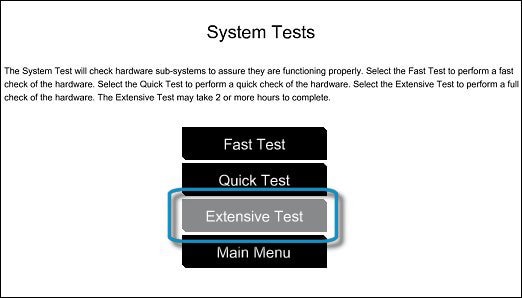
  3. On the main menu, click System Tests.

    The System Tests menu displays.

  4. Then click Extensive Test.

     Selecting the Extensive Test

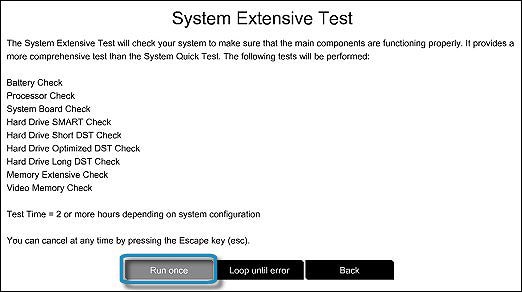
  5. Click Run once, or Loop until error.

    While the test is running, the time remaining and test result for each component displays on the screen. The test can take 2 or more hours to complete.

    Running the Extensive Test

  6. If a component fails a test, write down the failure ID (24-digit code) for when you contact HP Customer Support. The information is also available in Test Logs on the main menu.


If the test passes, Run HP Support Assistant and update the computer.


HP Support Assistant helps keep your HP computer in working order by finding updates and providing troubleshooting tools


Click on this link: https://support.hp.com/in-en/document/c03467905 for Using HP Support Assistant 


Keep me posted, how it goes!

If the information I've provided was helpful, give us some reinforcement by clicking the Accepted Solution and Kudos buttons, that'll help us and others see that we've got the answers!

Have a great day!

Cheers:)

Raj1788
I am an HP Employee 

† The opinions expressed above are the personal opinions of the authors, not of HP. By using this site, you accept the <a href="https://www8.hp.com/us/en/terms-of-use.html" class="udrlinesmall">Terms of Use</a> and <a href="/t5/custom/page/page-id/hp.rulespage" class="udrlinesmall"> Rules of Participation</a>.