• ×
    Information
    Need Windows 11 help?
    Check documents on compatibility, FAQs, upgrade information and available fixes.
    Windows 11 Support Center.
  • post a message
  • ×
    Information
    Need Windows 11 help?
    Check documents on compatibility, FAQs, upgrade information and available fixes.
    Windows 11 Support Center.
  • post a message
Guidelines
Seize the moment! nominate yourself or a tech enthusiast you admire & join the HP Community Experts!
Common problems for Battery
We would like to share some of the most frequently asked questions about: Battery Reports, Hold a charge, Test and Calibrating Battery . Check out this link: Is your notebook plugged in and not charging?
HP Recommended
laptop /notebook
Microsoft Windows 10 (64-bit)

every time the number 1 is typed the number 2 comes up as well 12. the same apply to letters q,a,z, each time they are keyed  I get qw,as,zx. It works the oposite as well. All other keys are fine. I have tried uninstalling the driver and that has not solved the problem.

I have an external USB keyboard which works fine.

I have seen this exact problem posted before but can not find the solution.

1 REPLY 1
HP Recommended

@century1

Thank you for posting on HP Support Community.


Don't worry as I'll be glad to help, I have a few troubleshooting steps we could try to fix the issue:  

While you respond to that, let's try these steps: 

Use HP PC Hardware Diagnostics to complete functional test of the keyboard and identify any problems with the hardware.

NOTE: Bluetooth devices are not currently supported.
  1. Download the latest version of HP PC Hardware Diagnostics.

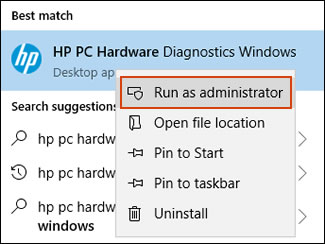
  2. In Windows, search for and right-click HP PC Hardware Diagnostics for Windows, and then select Run as administrator.

    Run HP PC Hardware Diagnostics Windows as an administrator

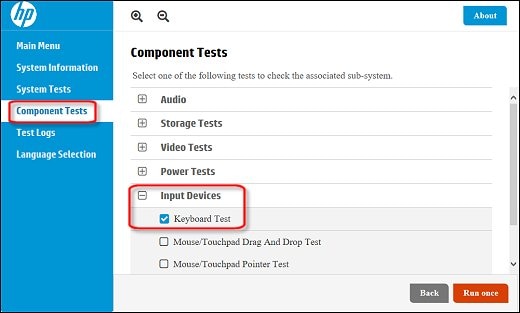
  3. Click Component Tests, click Input Devices, and then select the Keyboard Test.

    Running the Keyboard Test

  4. Click Run once to begin the test.

    The test ends when you complete the tasks or after 3 minutes.

For more information about using the HP PC Hardware Diagnostics for Windows, go to HP PCs - Testing for Hardware Failures.
 

Hope this helps! Keep me posted for further assistance.
Please click “
Accept as Solution” if you feel my post solved your issue, it will help others find the solution.

ECHO_LAKE
I am an HP Employee

† The opinions expressed above are the personal opinions of the authors, not of HP. By using this site, you accept the <a href="https://www8.hp.com/us/en/terms-of-use.html" class="udrlinesmall">Terms of Use</a> and <a href="/t5/custom/page/page-id/hp.rulespage" class="udrlinesmall"> Rules of Participation</a>.