• ×
    Information
    Need Windows 11 help?
    Check documents on compatibility, FAQs, upgrade information and available fixes.
    Windows 11 Support Center.
  • post a message
  • ×
    Information
    Need Windows 11 help?
    Check documents on compatibility, FAQs, upgrade information and available fixes.
    Windows 11 Support Center.
  • post a message
Guidelines
Join the HP Community Solve‑a‑thon | Help Others & Share Your Solutions | Live on Zoom | 2:30 PM to 2:30 AM IST | Every Wednesday Click here to know more
Common problems for Battery
We would like to share some of the most frequently asked questions about: Battery Reports, Hold a charge, Test and Calibrating Battery . Check out this link: Is your notebook plugged in and not charging?
HP Recommended
Envy 17t
Microsoft Windows 10 (64-bit)

My battery is not holding a charge.  Is there a way to get a new one?  I plug it in to charge and the unplug to use it.  I never left it plugged in.  I get on it for maybe 2hrs and it is low

1 REPLY 1
HP Recommended

@MinnaP


Welcome to HP forums, I see that your notebook battery does not hold the charge.


Test the AC adapter using the UEFI Hardware Diagnostic tests

  1. Make sure the power cord and adapter is connected to the system and wall outlet.

  2. Press and hold the power button until the computer turns off completely.

  3. Turn on the computer.

  4. Immediately press the F2 key repeatedly, about once every second, until the UEFI Hardware Diagnostics screen is displayed.

  5. In the UEFI Main menu, select Component Tests.

    Figure : UEFI Main menu with Component Tests selected

    UEFI Main menu with Component Tests selected
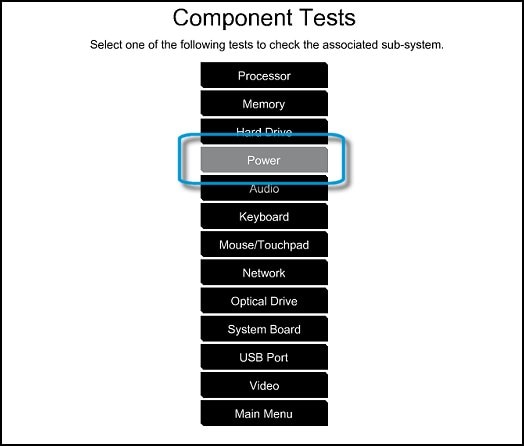
  6. In the Component Tests menu, select Power

    Figure : UEFI Component Tests menu with Power selected

    UEFI Component Tests menu with Power selected
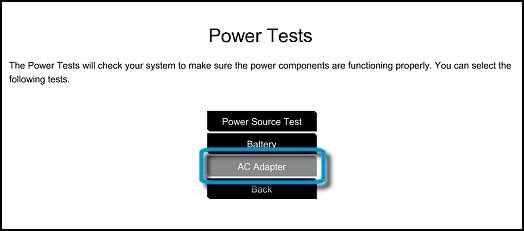
  7. In the Power menu, select the AC Adapter test.

    Figure : Power Tests menu with AC Adapter selected

    Power Tests menu with AC Adapter selected
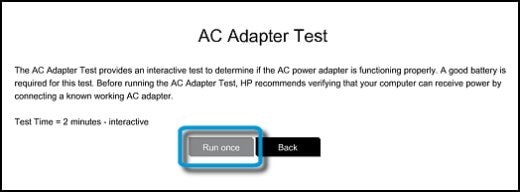
  8. Run the test and follow the onscreen instructions.

    Figure : Running the AC Adapter Test

    Running the AC Adapter Test
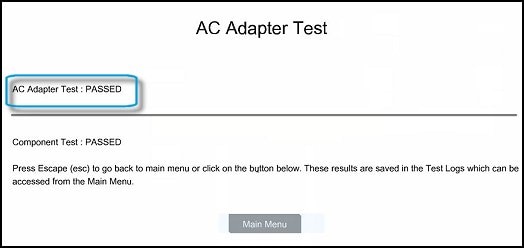
  9. When the test is finished, the results display.

    Figure : Example of AC Adapter Test results

    Example of AC Adapter Test results

    If the test PASSED, there is no issue with the AC adapter. Do not replace it.

If the test pass, then refer this HP document for more troubleshooting steps to fix this issue:- Click here


Let me know how it goes.

To thank me for my efforts to help you, please mark my post as an accepted solution so that it benefits several others.

Cheers.

Sandytechy20
I am an HP Employee

† The opinions expressed above are the personal opinions of the authors, not of HP. By using this site, you accept the <a href="https://www8.hp.com/us/en/terms-of-use.html" class="udrlinesmall">Terms of Use</a> and <a href="/t5/custom/page/page-id/hp.rulespage" class="udrlinesmall"> Rules of Participation</a>.