• ×
    Information
    Need Windows 11 help?
    Check documents on compatibility, FAQs, upgrade information and available fixes.
    Windows 11 Support Center.
  • post a message
  • ×
    Information
    Need Windows 11 help?
    Check documents on compatibility, FAQs, upgrade information and available fixes.
    Windows 11 Support Center.
  • post a message
Guidelines
Join the HP Community Solve‑a‑thon | Help Others & Share Your Solutions | Live on Zoom | 2:30 PM to 2:30 AM IST | Every Wednesday Click here to know more
Common problems for Battery
We would like to share some of the most frequently asked questions about: Battery Reports, Hold a charge, Test and Calibrating Battery . Check out this link: Is your notebook plugged in and not charging?
HP Recommended
HP 15-bs0xx laptop
Microsoft Windows 10 (64-bit)

What is the best method of cloning the HDD to a SSD?  Does the HP Support provide a cloning software?

3 REPLIES 3
HP Recommended

@LaptopQ 

To answer the second question first, no, HP does not supply cloning software.


As to the first question, what I recommend is the following:
1) Download and install Macrium Reflect (MR) from here: https://www.macrium.com/reflectfree
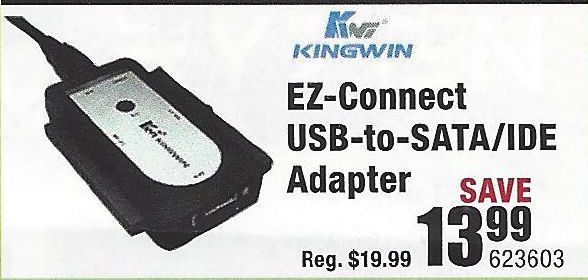
2) Connect the new drive to the PC using a USB-to-SSD drive adapter (like the one illustrated below)
3) Follow the instructions in this link: http://knowledgebase.macrium.com/display/KNOW/Cloning+a+disk
4) Shutdown the PC when done
5) Swap the drives and reboot the PC.

NOTE: To do this easily, the SDD has to be the same capacity as the HDD.  IF you get an SDD that is a lot smaller, then before you do the cloning, you have to shrink the largest partition on the HDD (usually the OS partition), to the size such that it, and the other partitions, fit easily on the SSD.


You should boot from the new drive without any problems.

Typical USB-to-SSD adapter:

USB-Drive-Adapter.jpg
Good Luck


I am a volunteer and I do not work for, nor represent, HP
HP Recommended

I currently have an EZD-2535, but it is not working.  The one you displayed is out of stock, so I am working with Kingwin to fix the EZD 2535 if I can.

I had a question concerning the Shrinking the Volume.  Will that delete the volume and recreate a new one or does change the size of the volume without deleting the contents?

HP Recommended

@LaptopQ 

Good question -- the shrinking is done BEFORE the cloning so all it does is reduce the size of the OS partition so that the sum of ALL the partitions is small enough to fit easily onto the SSD.  It does not remove or damage any of the contents of the OS partition.


I am a volunteer and I do not work for, nor represent, HP
† The opinions expressed above are the personal opinions of the authors, not of HP. By using this site, you accept the <a href="https://www8.hp.com/us/en/terms-of-use.html" class="udrlinesmall">Terms of Use</a> and <a href="/t5/custom/page/page-id/hp.rulespage" class="udrlinesmall"> Rules of Participation</a>.