-
×InformationNeed Windows 11 help?Check documents on compatibility, FAQs, upgrade information and available fixes.
Windows 11 Support Center. -

-
×InformationNeed Windows 11 help?Check documents on compatibility, FAQs, upgrade information and available fixes.
Windows 11 Support Center. -
- HP Community
- Notebooks
- Notebook Hardware and Upgrade Questions
- Re: Laptop upgrade

Create an account on the HP Community to personalize your profile and ask a question
05-28-2023 06:36 AM - edited 05-28-2023 06:43 AM
- My laptop is hp pavilion dv6-6016tx notebook and has Intel core i5-2410m processor.It has 4 gb ram and 500 gb hdd.I have more than 400 gb free space.The laptop is slow.
What are the updates can I do to make it faster?
Suggest a suitable SSD and RAM for my device?
Will I be able to upgrade to a better cpu?
If I can upgrade cpu what processor will be compatible with my mother board ?
Can this cpu upgrade be done in hp service centre?
05-30-2023 12:17 PM
Hi @Vikas_B1,
Welcome to HP Support Community.
Thank you for posting your query, I will be glad to help you.
I suggest that you check page 9 to 15 of this User Manual.
I hope this helps.
Take care and have a good day.
Please click “Accepted Solution” if you feel my post solved your issue, it will help others find the solution. Click the “Kudos/Thumbs Up" on the bottom right to say “Thanks” for helping!
05-30-2023 01:29 PM
Thank you for the reply. I read the user manual but there was no information about SSD and if I can be able to upgrade my processor to new processor in the market.Suggest me what brand ddr3 RAM is best as I can upgrade it to 8GB. Please provide information for SSD also
05-30-2023 01:49 PM
Hi @Vikas_B1,
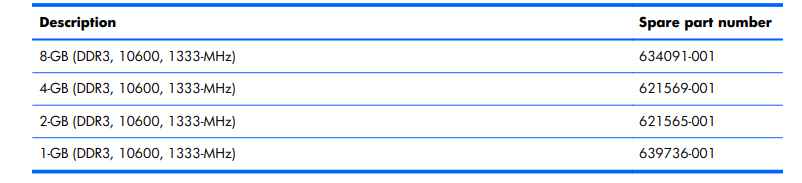
The compatible RAM's are

160-GB solid-state drive is for selective models only. (for use only with computer models equipped with an Intel processor) spare part no: 641825-001
You may also contact HP Service Center in your location from this weblink: https://support.hp.com/us-en/help/service-center
Note: Select your country from the dropdown, enter the city or postal code, select the product, change the radius, and click on search to locate the nearest HP Service center near your location.
I hope this helps.
Take care and have a good day.
Please click “Accepted Solution” if you feel my post solved your issue, it will help others find the solution. Click the “Kudos/Thumbs Up" on the bottom right to say “Thanks” for helping!