-
×InformationNeed Windows 11 help?Check documents on compatibility, FAQs, upgrade information and available fixes.
Windows 11 Support Center. -

-
×InformationNeed Windows 11 help?Check documents on compatibility, FAQs, upgrade information and available fixes.
Windows 11 Support Center. -

Create an account on the HP Community to personalize your profile and ask a question
10-25-2018 01:50 PM
The fan is really loud. I have tried to use a tutorial on this site but I couldn't find the right settings. The fan is always on and makes a lot of noise. I have a friend with a HP Pavilion too which doesn't make nearly as much sound. I don't know what to do. I have tried a lot of different things.
10-26-2018 03:31 PM
Thank you for joining HP Forums.
It's a pleasure assisting you in finding answers to your technical queries.
To provide you with an accurate solution, I'll need a few more details:
Are you facing this issue after the windows update?
Was any hardware change made in the notebook?
How long are you facing this issue?
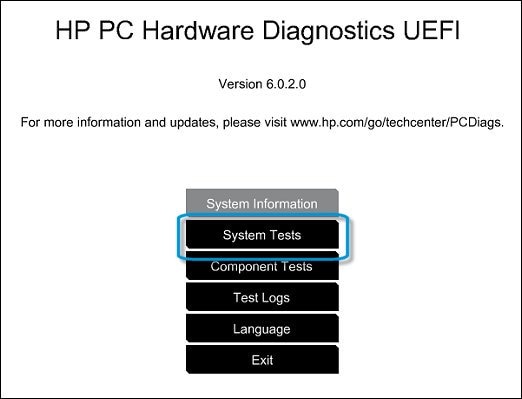
Use the following steps to open the System Tests menu when Windows won't start.
-
Hold the power button for at least five seconds to turn off the computer.
-
Turn on the computer and immediately press Esc repeatedly, about once every second. When the menu appears, press the F2 key.
-
On the main menu, click System Tests.

-
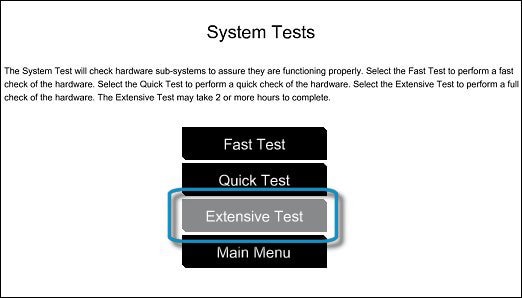
The System Tests menu displays.
-
Then click Extensive Test.

-
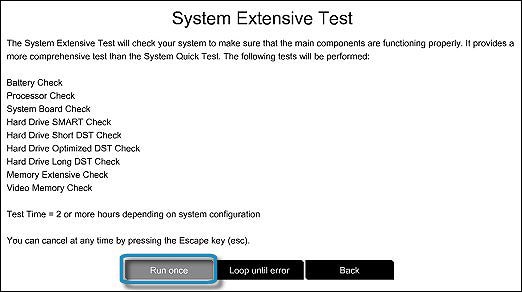
Click Run once, or Loop until error.
While the test is running, the time remaining and test result for each component are shown on the screen. The test can take 2 or more hours to complete.

-
If a component fails a test, write down the failure ID (24-digit code) so you have it available when you contact HP Customer Support. The information is also available in Test Logs on the main menu.
If the test passes click on this link: https://support.hp.com/in-en/document/c01007591 and follows the troubleshooting steps.
Use this link: https://support.hp.com/in-en/drivers/selfservice/hp-pavilion-14-bf100-laptop-pc/16842295/model/19390... to update the BIOS, Chipset and other drivers.
Keep me posted, how it goes!
If the information I've provided was helpful, give us some reinforcement by clicking the Accepted Solution and Kudos buttons, that'll help us and others see that we've got the answers!
Have a great day!
Cheers:)
Raj1788
I am an HP Employee
10-27-2018 06:13 AM
Hi
Thank you for your fast reply!
I don't know if it started happening after the windows update. It might have...
I have never done any hardware changes to the laptop.
I don't know exactly but I would guess about a month.
I will be trying the steps you have provided now and i will send another reply after that.
10-27-2018 07:49 AM
Hi raj1788
The system test passed so I downloaded the BIOS update and one other driver update (Intel Dynamic Platform and Thermal Framework Client Driver (Windows 10 v1703)).
The laptop is still loud and it seems like it didn't make a difference. Are there anything else I can do?
10-27-2018 10:28 AM
Thanks for the reply.
Appreciate all your time and efforts.
I have sent you a private message, to contact HP Phone support depending on the product that cannot be shared in a public post.
Can you please check your inbox on the forums page for the private message.
Have a great day!
Raj1788
I am an HP Employee