• ×
    Information
    Need Windows 11 help?
    Check documents on compatibility, FAQs, upgrade information and available fixes.
    Windows 11 Support Center.
  • post a message
  • ×
    Information
    Need Windows 11 help?
    Check documents on compatibility, FAQs, upgrade information and available fixes.
    Windows 11 Support Center.
  • post a message
Guidelines
Seize the moment! nominate yourself or a tech enthusiast you admire & join the HP Community Experts!
Common problems for Battery
We would like to share some of the most frequently asked questions about: Battery Reports, Hold a charge, Test and Calibrating Battery . Check out this link: Is your notebook plugged in and not charging?
HP Recommended
da1013ne
Microsoft Windows 10 (64-bit)


Product Name: HP 15 Notebook da1013ne

Microsoft Windows 10 (64-Bit)


i5 8th gen, 1tb hdd, 8gb ram, purchased in September/ 2/ 2019


My question is 

Can i add https://www.amazon.in/Samsung-860-EVO-Internal-MZ-N6E250BW/dp/B07864V6CK/ref=cm_cr_arp_d_product_top...

to my notebook?

Can i use both ssd m.2 for boot and as a primary drive and 1TB HDD as for normal use like storing data?

If yes, would it be safe to install myself or should i get it done from hp support office coz i think it mught void the warranty, what is your call?

One more question

I would highly appreciate if you can also tell me this

Where can I do this upgrade.

1 ACCEPTED SOLUTION

Accepted Solutions
HP Recommended

@Stone6 The best way to get the answers to those questions are to contact a local tech for assistance before investing on anything, as I must let you know that HP does not recommend upgrades or hardware changes as the device is equipped with parts that perform at its optimal performance by design, that said, the upgradeable parts listed by HP articles (shared earlier has the answer to your question on Optane) are purely for your ease, as the decision to upgrade will be at your own discretion.


I hope that helps!

If you wish to thank me for my efforts, you could click on "Accept as solution" on my post as the solution should help others too.

Riddle_Decipher
I am an HP Employee


Learning is a journey, not a destination.
Let's keep asking questions and growing together.

View solution in original post

3 REPLIES 3
HP Recommended

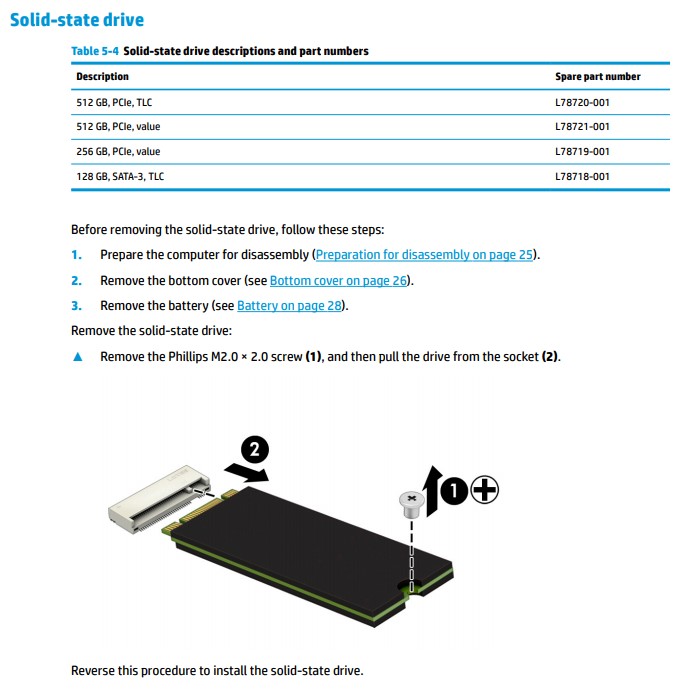
@Stone6 Here's the list of parts tested and approved by HP, to work on your computer:


For more details: click here


P.S: Welcome to HP Community 😉


I hope that answers your query,  

If it did, simply select "Accept as solution", to help the community grow, 

And if you wish to thank us for our efforts, click on the thumbs up for kudos.

Have a great day ahead.

Riddle_Decipher
I am an HP Employee


Learning is a journey, not a destination.
Let's keep asking questions and growing together.
HP Recommended

Can i use both ssd m.2 for boot and as a primary drive and 1TB HDD as for normal use like storing data? And is 128 Gb enough for a bootdrive. And does it support Intel optane.

HP Recommended

@Stone6 The best way to get the answers to those questions are to contact a local tech for assistance before investing on anything, as I must let you know that HP does not recommend upgrades or hardware changes as the device is equipped with parts that perform at its optimal performance by design, that said, the upgradeable parts listed by HP articles (shared earlier has the answer to your question on Optane) are purely for your ease, as the decision to upgrade will be at your own discretion.


I hope that helps!

If you wish to thank me for my efforts, you could click on "Accept as solution" on my post as the solution should help others too.

Riddle_Decipher
I am an HP Employee


Learning is a journey, not a destination.
Let's keep asking questions and growing together.
† The opinions expressed above are the personal opinions of the authors, not of HP. By using this site, you accept the <a href="https://www8.hp.com/us/en/terms-of-use.html" class="udrlinesmall">Terms of Use</a> and <a href="/t5/custom/page/page-id/hp.rulespage" class="udrlinesmall"> Rules of Participation</a>.