
-
×InformationNeed Windows 11 help?Check documents on compatibility, FAQs, upgrade information and available fixes.
Windows 11 Support Center. -
-
×InformationNeed Windows 11 help?Check documents on compatibility, FAQs, upgrade information and available fixes.
Windows 11 Support Center. -
- HP Community
- Notebooks
- Notebook Hardware and Upgrade Questions
- M2 key for Omen?

Create an account on the HP Community to personalize your profile and ask a question
Your account also allows you to connect with HP support faster, access a personal dashboard to manage all of your devices in one place, view warranty information, case status and more.
Common problems for Battery
We would like to share some of the most frequently asked questions about: Battery Reports, Hold a charge, Test and Calibrating Battery . Check out this link: Is your notebook plugged in and not charging?

It has been a while since anyone has replied. Simply ask a new question if you would like to start the discussion again.

10-26-2017 02:20 PM
 HP Recommended
Product: 15-ax200wm
Operating System: Microsoft Windows 10 (64-bit)
I recently purchased a notebook with a disc drive instead of an SSD, and want to move everything over to one for performance and battery life. 1TB is far more than I'll use on this, so I'm gonna go to a 256G or a 512G SSD, but I'm a bit confused on which one to buy:
Looking at the manual's description, it seems the SSD M2 slot is keyed
M vs B. However, the picture in the service manual pictures a B key. I haven't opened it yet, as I want to only do it once. Maybe the pictures are from older ones?
Any help is appreciated.
**Yes, I know, I bought it at Walmart, but it was cheap on closeout!
Solved! Go to Solution.
1 ACCEPTED SOLUTION
Accepted Solutions


10-26-2017 02:33 PM - edited 10-26-2017 02:39 PM
HP Recommended
Here's the Manual:
See page 37 for a good overhead view. The hard drive is in the upper right and the M.2 slot is just to the left of the battery. The laptop can take either a SATA (B + M keyed) or NVME/PCIe disk (M key)
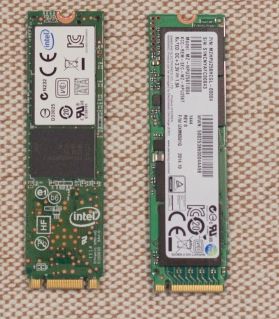
So, given that you definitely want the M keyed NVME disk: they are much faster than a SATA M.2 disk.
HP charges $108 for the 256 gig M.2 NVME disk which is a bargain. Buy it before they change their pricing as they have on some other similar disks.
And I know you say you do not want to do this but I would open it before I bought anything for it. The "wm" Walmart models are notorious for being "defeatured" i.e. having components that are shown in the manual just not there. Walmart orders and sells enough of these that HP can order a special production run for the system boards and they can save a couple bucks by leaving components off, allowing the low prices you see at Wal-mart. So there just isn't any free lunch. Your laptop may or may not have an M.2 slot is what I am saying.
If this is "the Answer" please click "Accept as SOlution" to help others find it.


4 REPLIES 4
10-26-2017 02:33 PM - edited 10-26-2017 02:39 PM
HP Recommended
Here's the Manual:
See page 37 for a good overhead view. The hard drive is in the upper right and the M.2 slot is just to the left of the battery. The laptop can take either a SATA (B + M keyed) or NVME/PCIe disk (M key)
So, given that you definitely want the M keyed NVME disk: they are much faster than a SATA M.2 disk.
HP charges $108 for the 256 gig M.2 NVME disk which is a bargain. Buy it before they change their pricing as they have on some other similar disks.
And I know you say you do not want to do this but I would open it before I bought anything for it. The "wm" Walmart models are notorious for being "defeatured" i.e. having components that are shown in the manual just not there. Walmart orders and sells enough of these that HP can order a special production run for the system boards and they can save a couple bucks by leaving components off, allowing the low prices you see at Wal-mart. So there just isn't any free lunch. Your laptop may or may not have an M.2 slot is what I am saying.
If this is "the Answer" please click "Accept as SOlution" to help others find it.
10-26-2017 02:39 PM
HP Recommended
Thanks for the feedback! I do agree, that price is excellent, as it's the same as the WD one I've found. It's amazing how much faster and cheaper SSD's have gone. I got 2x16GB a few years ago for around $250. Now, my laptop has 16 gigs of memory haha.

10-26-2017 03:15 PM
HP Recommended
I still believe machines with Single HDD Storage Configuration don't have M.2 slot, but I could be wrong. Many members on this forum ONLY KNOW when they open their machines.
Regards.
BH
***
**Click the KUDOS thumb up on the left to say 'Thanks'**
Make it easier for other people to find solutions by marking a Reply 'Accept as Solution' if it solves your problem.


***
**Click the KUDOS thumb up on the left to say 'Thanks'**
Make it easier for other people to find solutions by marking a Reply 'Accept as Solution' if it solves your problem.

Be alert for scammers posting fake support phone numbers and/or email addresses on the community.
If you think you have received a fake HP Support message, please report it to us by clicking on "Flag Post".
† The opinions expressed above are the personal opinions of the authors, not of HP. By using this site, you accept the Terms of Use and Rules of Participation.


Didn't find what you were looking for?
Ask the community
† The opinions expressed above are the personal opinions of the authors, not of HP. By using this site, you accept the <a href="https://www8.hp.com/us/en/terms-of-use.html" class="udrlinesmall">Terms of Use</a> and <a href="/t5/custom/page/page-id/hp.rulespage" class="udrlinesmall"> Rules of Participation</a>.