
-
×InformationNeed Windows 11 help?Check documents on compatibility, FAQs, upgrade information and available fixes.
Windows 11 Support Center. -
-
×InformationNeed Windows 11 help?Check documents on compatibility, FAQs, upgrade information and available fixes.
Windows 11 Support Center. -
- HP Community
- Notebooks
- Notebook Hardware and Upgrade Questions
- New HDD and install OS

Create an account on the HP Community to personalize your profile and ask a question
Your account also allows you to connect with HP support faster, access a personal dashboard to manage all of your devices in one place, view warranty information, case status and more.
Common problems for Battery
We would like to share some of the most frequently asked questions about: Battery Reports, Hold a charge, Test and Calibrating Battery . Check out this link: Is your notebook plugged in and not charging?

It has been a while since anyone has replied. Simply ask a new question if you would like to start the discussion again.

05-01-2019 07:28 PM
 HP Recommended
Product: HP 15-bs066nr notebook
Operating System: Microsoft Windows 10 (64-bit)
After running tests to check my hard drive and finding out that it was damaged, I purchased a new HDD. I would like to make sure that I got the right one Amazon.com: Seagate Momentus 1 TB 2.5-Inch SATA III 5400 RPM 8MB Cache Hard Drive Bare (ST1000LM024): Computers & Accessories. I also purchased this USB device to reinstall or recovery windows 10 OS from EzaLink on Amazon. Before starting this I wanted to make sure I got the right stuff and I would also like any directions you could provide for me, please. Thank you in advance.
6 REPLIES 6
05-02-2019 10:29 AM
HP Recommended
The reason I asked is that I wouldn't recommend putting that exact same hard drive back in it because it's old technology and slow. It is 1 TB in size though which is nice but if you don't' need that much storage space you could go with a really fast SSD 250 GB for $12 more or 500 GB for $30 more:
can you post a direct link here to what windows recovery product you bought from Amazon?
Your old hard drive is completely dead and won't boot up, is that correct?
05-03-2019 09:24 AM
HP Recommended
Hi Cindy yea so I asked the EZALINK people for you and according to them it will work. So get yourself one of the hard drives I recommended and you should be all set and will greatly improve the performance of your laptop as well. 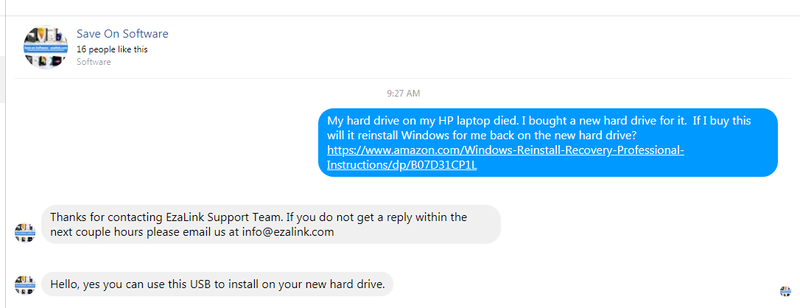

Be alert for scammers posting fake support phone numbers and/or email addresses on the community.
If you think you have received a fake HP Support message, please report it to us by clicking on "Flag Post".
† The opinions expressed above are the personal opinions of the authors, not of HP. By using this site, you accept the Terms of Use and Rules of Participation.


Didn't find what you were looking for?
Ask the community
† The opinions expressed above are the personal opinions of the authors, not of HP. By using this site, you accept the <a href="https://www8.hp.com/us/en/terms-of-use.html" class="udrlinesmall">Terms of Use</a> and <a href="/t5/custom/page/page-id/hp.rulespage" class="udrlinesmall"> Rules of Participation</a>.