
-
×InformationNeed Windows 11 help?Check documents on compatibility, FAQs, upgrade information and available fixes.
Windows 11 Support Center. -
-
×InformationNeed Windows 11 help?Check documents on compatibility, FAQs, upgrade information and available fixes.
Windows 11 Support Center. -
- HP Community
- Notebooks
- Notebook Hardware and Upgrade Questions
- Re: No battery after BIOS update

Create an account on the HP Community to personalize your profile and ask a question
Your account also allows you to connect with HP support faster, access a personal dashboard to manage all of your devices in one place, view warranty information, case status and more.
Common problems for Battery
We would like to share some of the most frequently asked questions about: Battery Reports, Hold a charge, Test and Calibrating Battery . Check out this link: Is your notebook plugged in and not charging?

It has been a while since anyone has replied. Simply ask a new question if you would like to start the discussion again.

02-05-2020 03:30 AM - edited 02-05-2020 03:46 AM
 HP Recommended
Product: HP x2 10 p039nf
Operating System: Microsoft Windows 10 (64-bit)
Hi all
I have a HP x2 10 p039nf laptop.
I have updated BIOS with file from HP website :
File is BIOS F.34 Rev.A . File date is 24 january 2020 (security update) sp101394.exe
Since update my computer shows no battery (Windows icon) at all. Light is always OFF and computer doesn't see AC plug.
I want to flash back old BIOS but as computer doesn't see AC power, flash tool dont want tu start update BIOS.
I tried USB BIOS recovery.
HP internal diagnostic tool says computer has no battery and no AC power plugged.
Is there a way to flash back BIOS without AC power (i think AC power works but computer don't see it anymore).
Laptop has american megatrends bios BIOS.
Strange : older BIOS from site is F34 too but 1 july 2019. sp98130.exe
I think there may be a problem with lastest BIOS from site.
Thanks to help
5 REPLIES 5


02-07-2020 01:12 PM
HP Recommended
Welcome to the HP Support Community!
I reviewed your post and I understand that the operating system is not detecting the battery and the AC adapter after the BIOS update.
Don’t worry, I assure you I will try my best to get this sorted.
I recommend you boot to BIOS and restore the BIOS defaults and check if it helps.
Follow the steps in the below article.
https://support.hp.com/in-en/document/c04831065
If you continue facing the issue, then install all the Windows updates (Including optional) and check.
Here is how it is done.
Open the Settings menu and go to Update & security > Windows Update. Click Check for updates to prompt your PC to scan for the latest updates. The update will be downloaded and installed automatically. Click Restart Now to restart your PC and complete the installation process.
Let me know how it goes and you have a great day!
If you wish to show appreciation for my efforts, mark my post as Accept as Solution. Your feedback counts!
Cheers!
The_Fossette
I am an HP Employee
02-11-2020 03:58 AM
HP Recommended
Hello and thanks to help.
>I recommend you boot to BIOS and restore the BIOS defaults and check if it helps.
I tried that with no success.
>If you continue facing the issue, then install all the Windows updates (Including optional) and check.
Windows is already updated.
I think the bad BIOS update has disabled (or stuck) the chip wich manage AC power and battery level on the
motherboard because :
- In windows's device manager and under batteries, there is a missing device : Microsoft ACPI battery....
- HP BIOS flashing tool sees no AC power even if it's plugged, so i can't flash back old BIOS.

- When pressing power button to power on computer, CAPSLOCK key flashes 2 times (1 short, 1 long). Was just
once before problems.
- Windows shows no battery icon, doesn't see AC power, like a desktop computer.
- Computer's charging LED is always OFF, was orange or white before bad BIOS flashing.
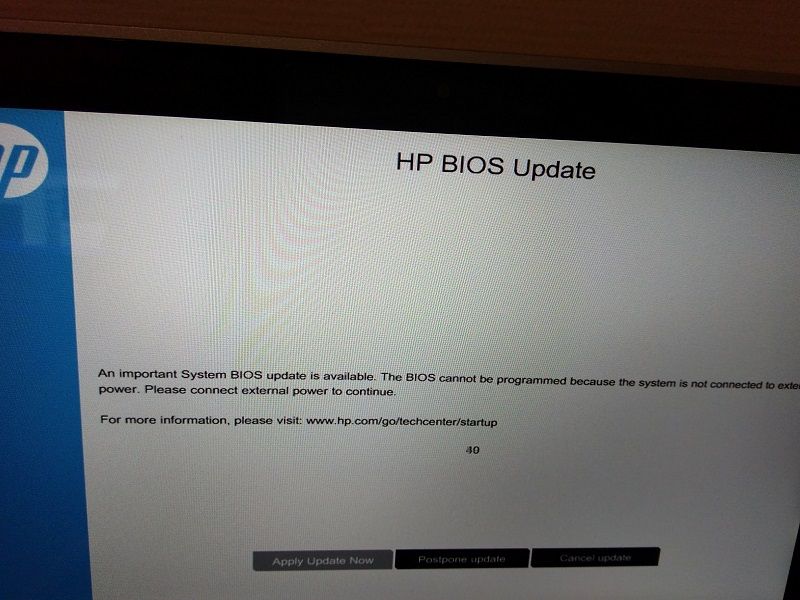
So i'm stuck, and i need a flashing tool that doesn't check for AC power.
Cheers.
02-11-2020 08:34 AM
HP Recommended
Are you able to boot to BIOS? If yes, then follow the steps in the below article and restore the BIOS defaults and check
https://support.hp.com/in-en/document/c04831065
If you are unable to boot to BIOS then follow the steps in the below article and roll back the BIOS to the previous version.
https://support.hp.com/in-en/document/c02693833
If you wish to show appreciation for my efforts, mark my post as Accept as Solution. Your feedback counts!
Cheers!
The_Fossette
I am an HP Employee
02-13-2020 03:41 AM
HP Recommended
>Are you able to boot to BIOS? If yes, then follow the steps in the below article and restore the BIOS defaults and check
Yes i can access BIOS settings. Already reset to defaults. Computer does not work better.
>If you are unable to boot to BIOS then follow the steps in the below article and roll back the BIOS to the previous version.
I tried that too. But BIOS recovery tool can't flash old BIOS because computer don't see AC power plug.
I need a tool that does not check for AC power.
Thanks
02-13-2020 08:01 AM
HP Recommended
There is no tool to bypass the AC adapter from HP. I recommend you contact support to further diagnose the issue.
Here is how you can get in touch with support.
1)Click on this link – www.hp.com/contacthp/
2)Select the product type.
3)Enter the serial number of your device or select let HP detect your product option.
4)Select the country from the drop-down.
5)You should see the HP phone support number or Chat option listed.
Cheers!
The_Fossette
I am an HP Employee

Be alert for scammers posting fake support phone numbers and/or email addresses on the community.
If you think you have received a fake HP Support message, please report it to us by clicking on "Flag Post".
† The opinions expressed above are the personal opinions of the authors, not of HP. By using this site, you accept the Terms of Use and Rules of Participation.


Didn't find what you were looking for?
Ask the community
† The opinions expressed above are the personal opinions of the authors, not of HP. By using this site, you accept the <a href="https://www8.hp.com/us/en/terms-of-use.html" class="udrlinesmall">Terms of Use</a> and <a href="/t5/custom/page/page-id/hp.rulespage" class="udrlinesmall"> Rules of Participation</a>.