• ×
    Information
    Need Windows 11 help?
    Check documents on compatibility, FAQs, upgrade information and available fixes.
    Windows 11 Support Center.
  • post a message
  • ×
    Information
    Need Windows 11 help?
    Check documents on compatibility, FAQs, upgrade information and available fixes.
    Windows 11 Support Center.
  • post a message
Guidelines
Seize the moment! nominate yourself or a tech enthusiast you admire & join the HP Community Experts!
Common problems for Battery
We would like to share some of the most frequently asked questions about: Battery Reports, Hold a charge, Test and Calibrating Battery . Check out this link: Is your notebook plugged in and not charging?
HP Recommended
HP Pavilion x360 - 13-u103nf
Microsoft Windows 10 (64-bit)

Hi,

What is the procedure to replace the battery pack of the HP Pavilion x360 13-u103nf ?

Best regards,

Michel Michel

1 ACCEPTED SOLUTION

Accepted Solutions
HP Recommended

Google is your friend

https://www.youtube.com/watch?v=Gu9ZstRUGVo

there are probably others.


Have you done a battery calibration?  Once every 3 or so months is helpful.

https://support.hp.com/us-en/document/ish_2268927-1713329-16


What does the HP assistant say about the battery?


Have you looked a the battery report?  Possibly the charger is having problems.
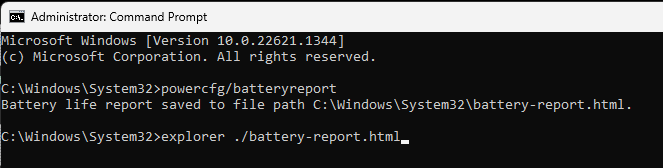
you run the battery report by bringing up the administrator command windows "cmd" and running powercfg/batteryreport as shown below

After entering that explorer line you should see something like the following. You will have to click on it as it is long
https://stateson.net/docs/SP4_battery-report.html


Thank you for using HP products and posting to the community.
I am a community volunteer and do not work for HP. If you find
this post useful click the Yes button. If I helped solve your
problem please mark this as a solution so others can find it

View solution in original post

2 REPLIES 2
HP Recommended

Google is your friend

https://www.youtube.com/watch?v=Gu9ZstRUGVo

there are probably others.


Have you done a battery calibration?  Once every 3 or so months is helpful.

https://support.hp.com/us-en/document/ish_2268927-1713329-16


What does the HP assistant say about the battery?


Have you looked a the battery report?  Possibly the charger is having problems.
you run the battery report by bringing up the administrator command windows "cmd" and running powercfg/batteryreport as shown below

After entering that explorer line you should see something like the following. You will have to click on it as it is long
https://stateson.net/docs/SP4_battery-report.html


Thank you for using HP products and posting to the community.
I am a community volunteer and do not work for HP. If you find
this post useful click the Yes button. If I helped solve your
problem please mark this as a solution so others can find it
HP Recommended

Perfect !

Many Thanks.

† The opinions expressed above are the personal opinions of the authors, not of HP. By using this site, you accept the <a href="https://www8.hp.com/us/en/terms-of-use.html" class="udrlinesmall">Terms of Use</a> and <a href="/t5/custom/page/page-id/hp.rulespage" class="udrlinesmall"> Rules of Participation</a>.