• ×
    Information
    Need Windows 11 help?
    Check documents on compatibility, FAQs, upgrade information and available fixes.
    Windows 11 Support Center.
  • post a message
  • ×
    Information
    Need Windows 11 help?
    Check documents on compatibility, FAQs, upgrade information and available fixes.
    Windows 11 Support Center.
  • post a message
Guidelines
Seize the moment! nominate yourself or a tech enthusiast you admire & join the HP Community Experts!
Common problems for Battery
We would like to share some of the most frequently asked questions about: Battery Reports, Hold a charge, Test and Calibrating Battery . Check out this link: Is your notebook plugged in and not charging?
HP Recommended
HP Pavilion 15-Cw0088nr
Microsoft Windows 10 (64-bit)

IMG_20181202_010727.jpg

I'm planning on upgrading my M.2 2280 SSD (picture above) that came with my laptop since its only 128gb. My question is can I use the Samsung 860 EVO M.2 SSD (picture below) and will it work on my laptop?

IMG_20181202_010746.jpg


I was previously planning on just adding the 2.5" SSD but the bracket and cable are unavailable at the parts store (checked my laptop and it didn't come with any) and would just cost more so that's basically something I wouldn't wanna do.


Attached a photo of the inside of the laptop maybe it would help out? I just want to be sure that whatever Ssd I'll buy would be compatible with my laptop. 

IMG_20181202_011658_778-01.jpeg


Would really appreciate y'all kind response 🙂 

1 REPLY 1
HP Recommended

@Mariputent

Welcome to HP Forums,

This is a great place to get support, find answers and tips,
Thank you for posting your query, I'll be more than glad to help you out 🙂


I see you need help in upgrading the SSD, on HP Pavilion - 15-cs0025cl notebook. Don't worry as I have a few suggestions which should help you.


After reading your post, I did go through the Product specifications

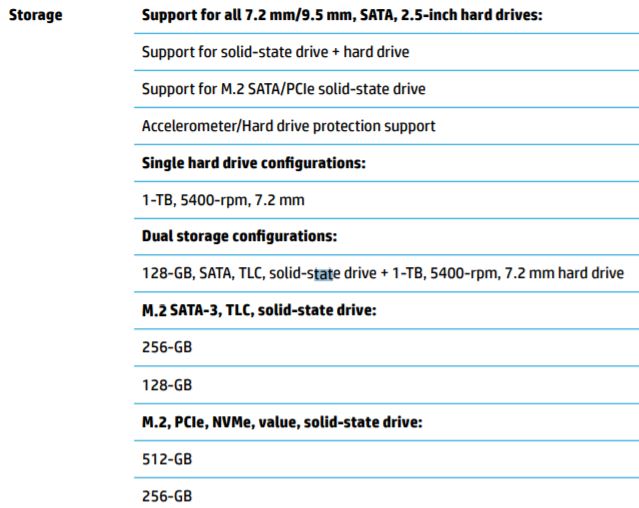
of your product and found that you have 128 GB PCIe® NVMe™ M.2 SSD installed on the PC.

Next thing, I would suggest here is to go through the Maintenance and Service guide 

of your HP notebook, and found that your PC supports One M.2 slot for the solid-state drive.


These are compatible and tested solid state drive available for your PC.

For a detailed study, please go through Page 2 Chapter 1. Product Description.

For the spare part number, please go through Page 18 Chapter 3 Illustrated parts catalogue.


I hope this answers your question. Let me know if you need any further assistance.

If I have helped you resolve the issue, feel free to give me a virtual high-five by clicking the 'Thumbs Up' icon below,
Followed by clicking on "Accept as solution" from the drop-down menu on the upper right corner,
Thank you for posting in the HP Support Forum.  Have a great day!


ECHO_LAKE
I am an HP Employee

† The opinions expressed above are the personal opinions of the authors, not of HP. By using this site, you accept the <a href="https://www8.hp.com/us/en/terms-of-use.html" class="udrlinesmall">Terms of Use</a> and <a href="/t5/custom/page/page-id/hp.rulespage" class="udrlinesmall"> Rules of Participation</a>.