
-
×InformationNeed Windows 11 help?Check documents on compatibility, FAQs, upgrade information and available fixes.
Windows 11 Support Center. -
-
×InformationNeed Windows 11 help?Check documents on compatibility, FAQs, upgrade information and available fixes.
Windows 11 Support Center. -
- HP Community
- Notebooks
- Notebook Hardware and Upgrade Questions
- Re: NVME SSD support for hp 15-da0014ne

Create an account on the HP Community to personalize your profile and ask a question
Your account also allows you to connect with HP support faster, access a personal dashboard to manage all of your devices in one place, view warranty information, case status and more.
Common problems for Battery
We would like to share some of the most frequently asked questions about: Battery Reports, Hold a charge, Test and Calibrating Battery . Check out this link: Is your notebook plugged in and not charging?

It has been a while since anyone has replied. Simply ask a new question if you would like to start the discussion again.

09-11-2019 06:01 AM
 HP Recommended
& have a slot for ssd inside the laptop or he most exchange the 2T HDD with the New SSD?
Solved! Go to Solution.
1 ACCEPTED SOLUTION
Accepted Solutions


09-14-2019 11:38 AM
HP Recommended
The HP Notebook - 15 series support the following Hard drives and SSD
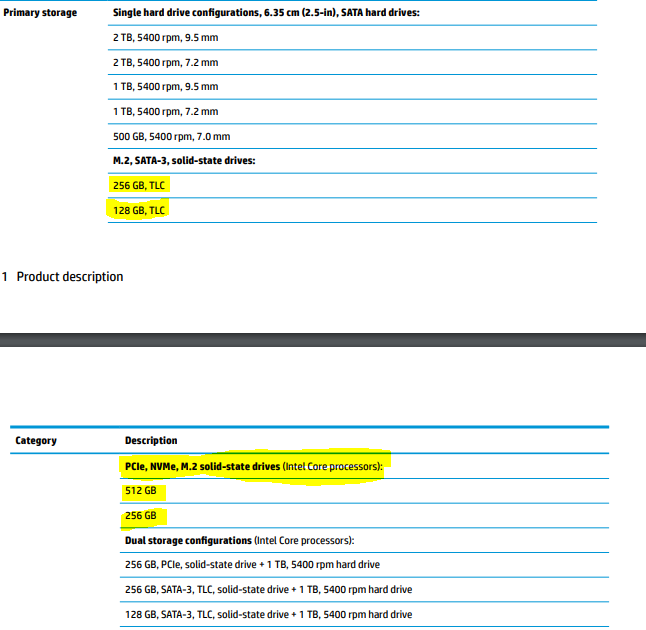
Since the Notebook comes with Intel Processors, you can also go for dual storage configuration
Service Guide: http://h10032.www1.hp.com/ctg/Manual/c06147959
Thank you 😊
If the information I've provided was helpful, give us some reinforcement by clicking the "Solution Accepted" on this Post and it will also help other community members with similar issue.
KrazyToad
I Am An HP Employee
7 REPLIES 7
09-14-2019 11:38 AM
HP Recommended
The HP Notebook - 15 series support the following Hard drives and SSD
Since the Notebook comes with Intel Processors, you can also go for dual storage configuration
Service Guide: http://h10032.www1.hp.com/ctg/Manual/c06147959
Thank you 😊
If the information I've provided was helpful, give us some reinforcement by clicking the "Solution Accepted" on this Post and it will also help other community members with similar issue.
KrazyToad
I Am An HP Employee
10-01-2019 03:01 PM
HP Recommended
The Notebook can support up to 512 GB SSDs. For cloning the HDD to the SSD, I suggest you go through this Microsoft Forums: https://answers.microsoft.com/en-us/windows/forum/windows_10-windows_install/move-windows-10-from-in...
KrazyToad
I Am An HP Employee
10-04-2019 08:47 PM
HP Recommended
What?!! Only supports to 512 GB SSD... that’s disappointing i was hopping maybe will support at least to 1TB SSD what a shame... 😔
& the Ram i can put more like for example 32 gb or only 16 gb i stick with like what I have it now?
& In my previous question you did not understand me the Windows in my laptop is on the SSD and not on the HDD because you sent me the way to transfer from the HDD to SSD.
& my last question is i have NVIDIA GeForce MX130 builds in with the laptop & say on laptop description it’s 4GB graphic card but when i use the website can you run it to see my laptop if he can handle some games it’s till me that i have 2 GB only for Graphic Card??!!!
i hope you answers all my questions & thanks. 🙂
10-08-2019 11:37 AM
HP Recommended
You notebook can support up to 16 GB Memory only as per the Service Guide
The specifications show that the Notebook comes with 4 GB Graphics card. Link: https://support.hp.com/in-en/document/c06053889
Download the HP Support Assistant from this Link: https://www8.hp.com/us/en/campaigns/hpsupportassistant/hpsupport.html and go to the Specifications TAB and check the Graphics Card details and keep me posted
Backup or data transferred works the same way both ways. From HDD to SSD or vice versa.
KrazyToad
I Am An HP Employee

Be alert for scammers posting fake support phone numbers and/or email addresses on the community.
If you think you have received a fake HP Support message, please report it to us by clicking on "Flag Post".
† The opinions expressed above are the personal opinions of the authors, not of HP. By using this site, you accept the Terms of Use and Rules of Participation.


Didn't find what you were looking for?
Ask the community
† The opinions expressed above are the personal opinions of the authors, not of HP. By using this site, you accept the <a href="https://www8.hp.com/us/en/terms-of-use.html" class="udrlinesmall">Terms of Use</a> and <a href="/t5/custom/page/page-id/hp.rulespage" class="udrlinesmall"> Rules of Participation</a>.