• ×
    Information
    Need Windows 11 help?
    Check documents on compatibility, FAQs, upgrade information and available fixes.
    Windows 11 Support Center.
  • post a message
  • ×
    Information
    Need Windows 11 help?
    Check documents on compatibility, FAQs, upgrade information and available fixes.
    Windows 11 Support Center.
  • post a message
Guidelines
Seize the moment! nominate yourself or a tech enthusiast you admire & join the HP Community Experts!
Common problems for Battery
We would like to share some of the most frequently asked questions about: Battery Reports, Hold a charge, Test and Calibrating Battery . Check out this link: Is your notebook plugged in and not charging?
HP Recommended
HP Spectre x360 - 15-bl112dx
Microsoft Windows 10 (32-bit)

I didn't know what category to select but I have an old printer and laptop that still shows on my dashboard.  How can I remove those items from my dashboard?

1 REPLY 1
HP Recommended

@dafcpa 


Welcome to the HP Community --


-------------------- --------------------

HP Account - Management / Device Lists / Warranty and Product Information


HP Account - Login / Dashboard

HP Device list, Cases, Warranty information, How-to / Troubleshooting, Product and Service information, Add or Delete a device


HP_Account_Dashboard_6HP_Account_Dashboard_6


-------------------- --------------------


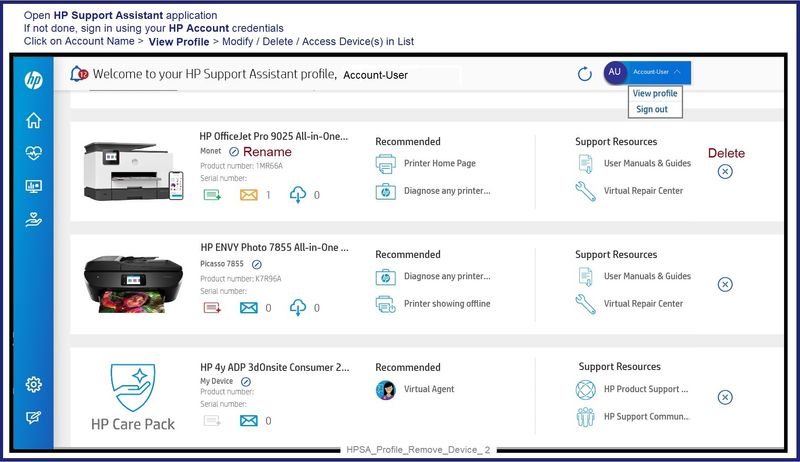
HP Support Assistant – Device List – Remove Device

Note:  Printers that are / were subscribed to Instant Ink might resist being removed and will remain in the list.


Open and read >>> HP Support Personal Dashboard Resource Guide 

NOTE:  Device renaming in the Dashboard does not rename the printer in Devices and Printers (Windows)


Example - HPSA - Remove Device

HPSA_Profile_Remove_Device_2HPSA_Profile_Remove_Device_2


If you do manage to find the unwanted device in the HP Support Assistant application and remove it,

(and)

If, after the unwanted device is "gone" from both the Device Dashboard and the HP Support Assistant,

If HPSA won't let go of the device,

(then)

Uninstall the HPSA application

Restart the computer and log in

"Get" and install a new copy of the app from Download HP Support Assistant

 Reference: HP PCs - Using HP Support Assistant (Windows) 


=+=+=+=+=+=+=+=+=+=+=+=+=+=

References / Resources


=+=+=+=+=+=+=+=+=+=+=+=+=+=+=+=+=+=+=+=+=+=

HP Printer Home Page - References and Resources

Learn about your Printer  - Solve Problems

“Things that are your printer”

When the website support page opens, Select (as available) a Category > Topic Subtopic

NOTE:  Content depends on device type and Operating System

Categories Alerts, Access to the Print and Scan Doctor (Windows), Warranty Check, HP Drivers / Software / Firmware Updates, How-to Videos, Bulletins/Notices, Lots of How-to Documents, Troubleshooting, Manuals > User Guides, Product Information (Specifications), Supplies, and more

Open

 Printer Product Home

 Enter the device type and model name of your HP product


Thank you for participating in the HP Community --

People who own, use, and support HP devices.

Click Yes to say Thank You

Question / Concern Answered, Click my Post "Accept as Solution"


Dragon-Fur

† The opinions expressed above are the personal opinions of the authors, not of HP. By using this site, you accept the <a href="https://www8.hp.com/us/en/terms-of-use.html" class="udrlinesmall">Terms of Use</a> and <a href="/t5/custom/page/page-id/hp.rulespage" class="udrlinesmall"> Rules of Participation</a>.