• ×
    Information
    Need Windows 11 help?
    Check documents on compatibility, FAQs, upgrade information and available fixes.
    Windows 11 Support Center.
  • post a message
  • ×
    Information
    Need Windows 11 help?
    Check documents on compatibility, FAQs, upgrade information and available fixes.
    Windows 11 Support Center.
  • post a message
Guidelines
Seize the moment! nominate yourself or a tech enthusiast you admire & join the HP Community Experts!
Common problems for Battery
We would like to share some of the most frequently asked questions about: Battery Reports, Hold a charge, Test and Calibrating Battery . Check out this link: Is your notebook plugged in and not charging?
HP Recommended
Folio 9470m
Microsoft Windows 10 (64-bit)

I have issue with Samsung 860 QVO 1TB, when I restarting my laptop it's not "see" SSD while starting. But when power off/on, system starts normaly. I have last firmware on SSD and on BIOS. Anybody have same problem?

My laptop: HP Folio 9470m.

3 REPLIES 3
HP Recommended

Hi! I have the same SSD 860 QVO 1TB disk. My notebook is HP Elitebook 8570p. It's interesting, that it worked 7 years on SSD disk Samsung 840 500GB without problems. I read in internet, that it can be powering problem, because SSD disks need less power, than standard HDD, but in this case my old SSD disk shoudn't work too.

I tested almost everythig: BIOS update, BIOS reset, changing booting system, installing all Windows and HP updates (drivers, software) etc... 

Any ideas?

HP Recommended

Hi, unfortunately no. I asked Samsung support, they don't unerstand problem. With old SSD notebook restarts as norma, with new QVO 1TB no. I hope maybe some BIOS update will come.  Fortunately this problem not principal.

HP Recommended

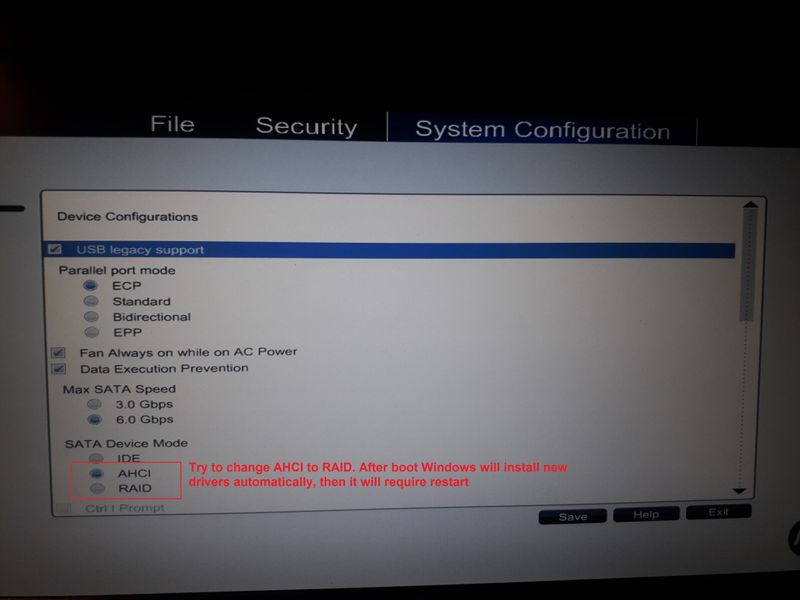
Try this: change in BIOS SATA device Mode from AHCI to RAID and let me know.


BIOS_AHCI_to_RAID.jpg

† The opinions expressed above are the personal opinions of the authors, not of HP. By using this site, you accept the <a href="https://www8.hp.com/us/en/terms-of-use.html" class="udrlinesmall">Terms of Use</a> and <a href="/t5/custom/page/page-id/hp.rulespage" class="udrlinesmall"> Rules of Participation</a>.