• ×
    Information
    Need Windows 11 help?
    Check documents on compatibility, FAQs, upgrade information and available fixes.
    Windows 11 Support Center.
  • post a message
  • ×
    Information
    Need Windows 11 help?
    Check documents on compatibility, FAQs, upgrade information and available fixes.
    Windows 11 Support Center.
  • post a message
Guidelines
Seize the moment! nominate yourself or a tech enthusiast you admire & join the HP Community Experts!
Common problems for Battery
We would like to share some of the most frequently asked questions about: Battery Reports, Hold a charge, Test and Calibrating Battery . Check out this link: Is your notebook plugged in and not charging?
HP Recommended
Pavilion 15CS1052tx
Microsoft Windows 10 (64-bit)

Can i replace the 2TB HDD of my Pavilion 15CS1052tx(Indian variant) with SSD ? If yes then what type of SSD can i add and of how much capacity?

1 REPLY 1
HP Recommended

@Ashish6399 

You can replace your laptop HDD with any standard SATA SSD.  Those are designed to take the same space and connectors as laptop HDDs.


As to the capacity, 1TB SSDs can be had for around $100 -- but sales can be found if you search for them.  2TB SSDs are a LOT more expensive, ranging from $250 to $500.


As to replacing your current system, please read the information below ...


What I recommend is the following:
1) Download and install Macrium Reflect (MR) from here: https://www.macrium.com/reflectfree
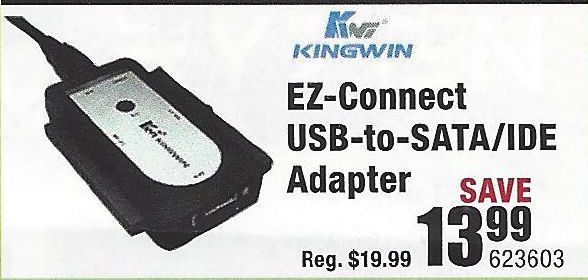
2) Connect the new drive to the PC using a USB-to-SSD drive adapter (like the one illustrated below)
3) Follow the instructions in this link: http://knowledgebase.macrium.com/display/KNOW/Cloning+a+disk
4) Shutdown the PC when done
5) Swap the drives and reboot the PC.

NOTE: To do this easily, the SDD has to be the same capacity as the HDD.  IF you get an SDD that is a lot smaller, then before you do the cloning, you have to shrink the largest partition on the HDD (usually the OS partition), to the size such that it, and the other partitions, fit easily on the SSD.


You should boot from the new drive without any problems.

Typical USB-to-SSD adapter:

USB-Drive-Adapter.jpg
Good Luck


I am a volunteer and I do not work for, nor represent, HP
† The opinions expressed above are the personal opinions of the authors, not of HP. By using this site, you accept the <a href="https://www8.hp.com/us/en/terms-of-use.html" class="udrlinesmall">Terms of Use</a> and <a href="/t5/custom/page/page-id/hp.rulespage" class="udrlinesmall"> Rules of Participation</a>.