• ×
    Information
    Need Windows 11 help?
    Check documents on compatibility, FAQs, upgrade information and available fixes.
    Windows 11 Support Center.
  • post a message
  • ×
    Information
    Need Windows 11 help?
    Check documents on compatibility, FAQs, upgrade information and available fixes.
    Windows 11 Support Center.
  • post a message
Guidelines
Seize the moment! nominate yourself or a tech enthusiast you admire & join the HP Community Experts!
Common problems for Battery
We would like to share some of the most frequently asked questions about: Battery Reports, Hold a charge, Test and Calibrating Battery . Check out this link: Is your notebook plugged in and not charging?
HP Recommended
HP 15g-br106TX
Microsoft Windows 10 (64-bit)

I want to add a SSD to my laptop apart from the already present HDD. I want to know which type of SSD is supported for my laptop is it SATA or NVMe interface. Also where can I find instructions for adding the SSD. Can someone please help with this?


Thanks and Regards

1 ACCEPTED SOLUTION

Accepted Solutions
HP Recommended

@romil2005 


You can add M.2 SATA SSD to your machine using Crucial MX500 or Samsung 860 series. You may need the following parts


  • Solid-state drive board part # 924992-001
  • Solid-state drive bracket part # 924981-001

Regards.

BH
***
**Click the KUDOS thumb up on the left to say 'Thanks'**
Make it easier for other people to find solutions by marking a Reply 'Accept as Solution' if it solves your problem.


View solution in original post

2 REPLIES 2
HP Recommended

@romil2005 


You can add M.2 SATA SSD to your machine using Crucial MX500 or Samsung 860 series. You may need the following parts


  • Solid-state drive board part # 924992-001
  • Solid-state drive bracket part # 924981-001

Regards.

BH
***
**Click the KUDOS thumb up on the left to say 'Thanks'**
Make it easier for other people to find solutions by marking a Reply 'Accept as Solution' if it solves your problem.


HP Recommended

Hi,

You do not need any parts to install an M2 SATA3 SSD (no PCIe NVMe SSD)

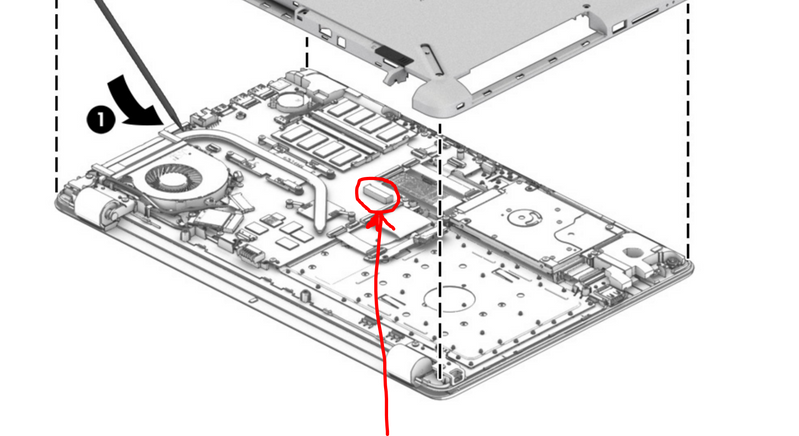
However, before buying the drive you should check and see if the M2 slot is present on motherboard as sometimes in PCs that did not come with M2 SSD, the physical slot is missing.

On page 45 of service manual you can see how to remove the bottom cover to take a look.

http://h10032.www1.hp.com/ctg/Manual/c05493257

M2 slotM2 slot

So, if the slot is there you can install an M2 SATA3 SSD of your desired brand and capacity.


Hope it helps,

David

† The opinions expressed above are the personal opinions of the authors, not of HP. By using this site, you accept the <a href="https://www8.hp.com/us/en/terms-of-use.html" class="udrlinesmall">Terms of Use</a> and <a href="/t5/custom/page/page-id/hp.rulespage" class="udrlinesmall"> Rules of Participation</a>.