• ×
    Information
    Need Windows 11 help?
    Check documents on compatibility, FAQs, upgrade information and available fixes.
    Windows 11 Support Center.
  • post a message
  • ×
    Information
    Need Windows 11 help?
    Check documents on compatibility, FAQs, upgrade information and available fixes.
    Windows 11 Support Center.
  • post a message
Guidelines
Join the HP Community Solve‑a‑thon | Help Others & Share Your Solutions | Live on Zoom | 2:30 PM to 2:30 AM IST | Every Wednesday Click here to know more
Common problems for Battery
We would like to share some of the most frequently asked questions about: Battery Reports, Hold a charge, Test and Calibrating Battery . Check out this link: Is your notebook plugged in and not charging?
HP Recommended
Hp bs576tx
Microsoft Windows 10 (64-bit)

Can i install a solid state drive in my hp bs576tx laptop? 

1 REPLY 1
HP Recommended

@Jerin_-004 Welcome to HP Community!

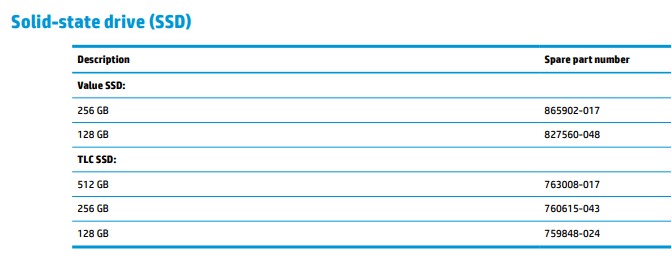
As per your product's service and maintenance guide on Page. 58 Chapter 6 Removal and replacement procedures for Authorized Service Provider parts, you can connect an Solid State Drive (SSD) and listed below are the storage capacity tested and approved by HP:


(As an upgrade/custom enthusiast I personally love the idea of upgrading the device as well, However, HP recommends that you go easy on it as the device is equipped with parts that perform at its optimal performance and also, the upgradeable parts listed above are purely for your ease, though the decision to upgrade will be at your own discretion)


Keep me posted, as I (Or a trusted colleague) shall follow-up on this case to ensure the concern has been addressed, 

And your device is up and running again, only in case you don't get back to us, first! 

That said, If the information I've provided was helpful, give us some reinforcement by clicking the solution and kudos buttons, 

That'll help us, and others see that we've got the answers!

Good Luck.

Riddle_Decipher
I am an HP Employee


Learning is a journey, not a destination.
Let's keep asking questions and growing together.
† The opinions expressed above are the personal opinions of the authors, not of HP. By using this site, you accept the <a href="https://www8.hp.com/us/en/terms-of-use.html" class="udrlinesmall">Terms of Use</a> and <a href="/t5/custom/page/page-id/hp.rulespage" class="udrlinesmall"> Rules of Participation</a>.