• ×
    Information
    Need Windows 11 help?
    Check documents on compatibility, FAQs, upgrade information and available fixes.
    Windows 11 Support Center.
  • post a message
  • ×
    Information
    Need Windows 11 help?
    Check documents on compatibility, FAQs, upgrade information and available fixes.
    Windows 11 Support Center.
  • post a message
Guidelines
Join the HP Community Solve‑a‑thon | Help Others & Share Your Solutions | Live on Zoom | 2:30 PM to 2:30 AM IST | Every Wednesday Click here to know more
Common problems for Battery
We would like to share some of the most frequently asked questions about: Battery Reports, Hold a charge, Test and Calibrating Battery . Check out this link: Is your notebook plugged in and not charging?
HP Recommended
HP 15 Bs 180tx
Microsoft Windows 10 (64-bit)

I am upgrading my laptop I am adding 8gb ram, 256gb m.2 ssd data 3,a fingerprint scanner,and also buying airbar touch enabler and some other accessories. I want to know if my laptop after upgrade will be good for programming as well as gaming and also want to know what else I can upgrade to make it perfect

5 REPLIES 5
HP Recommended


See Page 2, 3 in this manual: http://h10032.www1.hp.com/ctg/Manual/c05493257


You can add extra 8gb stick in the second slot of exact same configuration as given in manual and each other.


You can also add a M.2 2280 SATA-3 SSD, make it boot drive keeping hard drive for storage alone for improved performance.


Airbar touch enabler should work in any 15.6 inch notebook display.


As far as programming and gaming is concerned, this notebook does not actually come in gaming series and I cannot give you any assurance for the same with the given specs.


HP Recommended

Hi,

Max RAM for your system is 32GB of DDR4 2400Mhz (2x16GB)

You can add another 8GB in the empty slot for a total of 16GB. You can buy from your preferred brand such as Crucial, Samsung...

On page 50 of service manual you can see the steps to install RAM:

http://h10032.www1.hp.com/ctg/Manual/c05493257


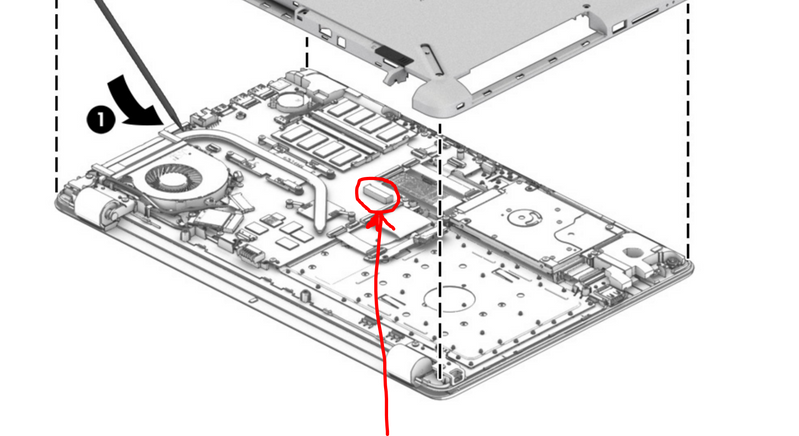
The service manual mentions support for M2 SATA3 SSD. You should take a quick look and see if the M2 slot is on the motherboard, as sometimes notebooks that did not come with M2 SSD are missing physical slot. On page 45 of the service manual, you can see the steps to remove the bottom cover.

M2 slotM2 slot

If the slot is present you can install an M2 SATA3 SSD such as the Samsung 860 Evo or similar. This will give a great boost to the everyday performance of the PC.

The PC will be good for programming, work and general use, however, it will not be great for gaming. The reason being the graphics "card" in the notebook (which is not upgradable) is an entry-level graphics card for notebooks.

You can take a look at some of the testing sites and see the results.

Example:

https://www.notebookcheck.net/AMD-Radeon-520-GPU-Benchmarks-and-Specs.214532.0.html


Hope it helps,

David


Please click on thumbs up for thanks

Please click on accept as solution if answered your question

HP Recommended

What other upgrades I can make in this laptop

HP Recommended

The SSD and the RAM are basically the only possible upgrades for performance. The SSD upgrade will be real noticeable, the RAM upgrade probably less unless you are using applications which need loads of RAM.


Regards,

David

HP Recommended

Will my laptop become good for programming and medium gaming or I will still need some upgrades laptop is HP 15 Bs 180tx

† The opinions expressed above are the personal opinions of the authors, not of HP. By using this site, you accept the <a href="https://www8.hp.com/us/en/terms-of-use.html" class="udrlinesmall">Terms of Use</a> and <a href="/t5/custom/page/page-id/hp.rulespage" class="udrlinesmall"> Rules of Participation</a>.