• ×
    Information
    Need Windows 11 help?
    Check documents on compatibility, FAQs, upgrade information and available fixes.
    Windows 11 Support Center.
  • post a message
  • ×
    Information
    Need Windows 11 help?
    Check documents on compatibility, FAQs, upgrade information and available fixes.
    Windows 11 Support Center.
  • post a message
Guidelines
Join the HP Community Solve‑a‑thon | Help Others & Share Your Solutions | Live on Zoom | 2:30 PM to 2:30 AM IST | Every Wednesday Click here to know more
Common problems for Battery
We would like to share some of the most frequently asked questions about: Battery Reports, Hold a charge, Test and Calibrating Battery . Check out this link: Is your notebook plugged in and not charging?
HP Recommended
14 Inch X360 (model CD0011NR)
Microsoft Windows 10 (64-bit)

How do I remove the rear cover after removing the 3 screws on back?    Is this upgradable - hard drive replaceable to SSD and memory from 8 to 16?


Thanks

1 ACCEPTED SOLUTION

Accepted Solutions
HP Recommended

Yes and yes. Here is the Service Manual:


Manual


Start on p. 33. You are not getting the screws under the rubber feet. Be careful not to stretch them out or they will not fit back in the channels. 


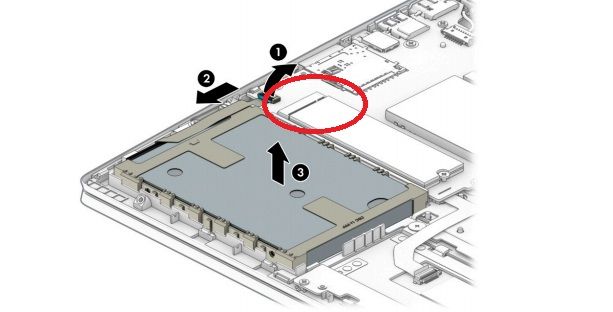
M.2 SSD slot circled in redM.2 SSD slot circled in red

You can actually add an M.2 "gumstick" type SSD to the existing hard drive and configure the system to run Windows from the much faster M.2 disk. You can use the superfast PCIe/NVME kind and you should do that since they only cost a little more and are 5 times as fast as a SATA SSD. 


https://www.amazon.com/Samsung-970-EVO-Plus-MZ-V7S500B/dp/B07M7Q21N7/ref=sr_1_3?keywords=970+Evo+M.2...


Memory modules are under a metal shield shown on p. 44 of the Manual. Uses DDR4-2400. The Manual says the max is 12 gigs (8 + 4) but this is not right and in fact it would run 2 x 16 = 32 gigs but certainly you can add an 8 gig module to have 16 gigs total. 


https://www.amazon.com/Crucial-Single-PC4-19200-SODIMM-260-Pin/dp/B01BIWKP58/ref=sr_1_3?keywords=DDR...


Post back if you have any more questions and please accept as solution if its the info you needed. 

View solution in original post

1 REPLY 1
HP Recommended

Yes and yes. Here is the Service Manual:


Manual


Start on p. 33. You are not getting the screws under the rubber feet. Be careful not to stretch them out or they will not fit back in the channels. 


M.2 SSD slot circled in redM.2 SSD slot circled in red

You can actually add an M.2 "gumstick" type SSD to the existing hard drive and configure the system to run Windows from the much faster M.2 disk. You can use the superfast PCIe/NVME kind and you should do that since they only cost a little more and are 5 times as fast as a SATA SSD. 


https://www.amazon.com/Samsung-970-EVO-Plus-MZ-V7S500B/dp/B07M7Q21N7/ref=sr_1_3?keywords=970+Evo+M.2...


Memory modules are under a metal shield shown on p. 44 of the Manual. Uses DDR4-2400. The Manual says the max is 12 gigs (8 + 4) but this is not right and in fact it would run 2 x 16 = 32 gigs but certainly you can add an 8 gig module to have 16 gigs total. 


https://www.amazon.com/Crucial-Single-PC4-19200-SODIMM-260-Pin/dp/B01BIWKP58/ref=sr_1_3?keywords=DDR...


Post back if you have any more questions and please accept as solution if its the info you needed. 

† The opinions expressed above are the personal opinions of the authors, not of HP. By using this site, you accept the <a href="https://www8.hp.com/us/en/terms-of-use.html" class="udrlinesmall">Terms of Use</a> and <a href="/t5/custom/page/page-id/hp.rulespage" class="udrlinesmall"> Rules of Participation</a>.
-->