• ×
    Information
    Need Windows 11 help?
    Check documents on compatibility, FAQs, upgrade information and available fixes.
    Windows 11 Support Center.
  • post a message
  • ×
    Information
    Need Windows 11 help?
    Check documents on compatibility, FAQs, upgrade information and available fixes.
    Windows 11 Support Center.
  • post a message
Guidelines
Join the HP Community Solve‑a‑thon | Help Others & Share Your Solutions | Live on Zoom | 2:30 PM to 2:30 AM IST | Every Wednesday Click here to know more
Common problems for Battery
We would like to share some of the most frequently asked questions about: Battery Reports, Hold a charge, Test and Calibrating Battery . Check out this link: Is your notebook plugged in and not charging?
HP Recommended
omen 15t ax200
Microsoft Windows 10 (64-bit)

I have a hp omen 15t ax200 the usb 3.0 will only recognize usb 3.0 devices where it use to recognize older usb devices like my usb 2.0 mouse also the memory card reader stoped working the same day the usb did. Ive tested a number of memory cards and micro sd cards on it and even tho the computer sees the reader in the device manager it doesnt see any card have also tried a number of different devices in the usb and only ones that are being seen are the 3.0 usb ones. There were no changes made to the system nor were there any windows 10 updates prior to them stopping i had just used a memory card to burn an octoprint img to a raspberry pi and the mouse quit working so i changed ports put in a different memory card to burn a second image and the computer didnt see it so i tried another then another and so on.

1 REPLY 1
HP Recommended

@Tidus38 Welcome to HP Forums Community!

Some USB 2.0 devices will not work when connected to a USB 3.0 port. To fix this, uninstall the USB 3.0 driver in Device Manager using the following steps.

  1. In Windows, search for and open Device Manager.

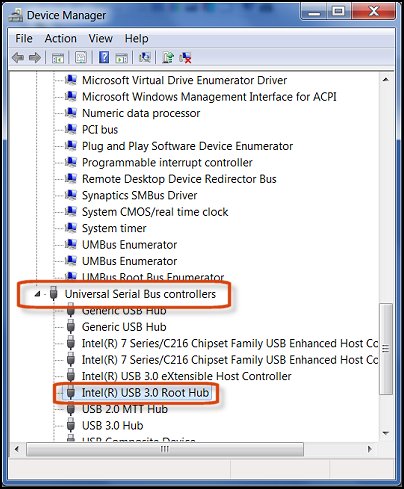
  2. Locate the USB 3.0 Root Hubs under Universal Serial Bus Controllers.
     

    Figure: Locating the USB Root Hub

    Locating the USB Root Hub
     
  3. Right-click the USB 3.0 Root Hub, and click Uninstall.

And I suggest you check the memory cards on another device and check if that works fine before you try them on this device, if the issue persists, please update the BIOS and Chipset drivers using the HP Support Assistant, if it doesn't work, update via the HP website.


Keep us posted,

If you would like to thank us for our efforts to help you, 

Give us a virtual high-five by clicking the 'Thumbs Up' icon below, followed by clicking on the "Accept as solution" on this post, 

Have a great day!

Riddle_Decipher
I am an HP Employee


Learning is a journey, not a destination.
Let's keep asking questions and growing together.
† The opinions expressed above are the personal opinions of the authors, not of HP. By using this site, you accept the <a href="https://www8.hp.com/us/en/terms-of-use.html" class="udrlinesmall">Terms of Use</a> and <a href="/t5/custom/page/page-id/hp.rulespage" class="udrlinesmall"> Rules of Participation</a>.