
-
×InformationNeed Windows 11 help?Check documents on compatibility, FAQs, upgrade information and available fixes.
Windows 11 Support Center. -
-
×InformationNeed Windows 11 help?Check documents on compatibility, FAQs, upgrade information and available fixes.
Windows 11 Support Center. -
- HP Community
- Notebooks
- Notebook Hardware and Upgrade Questions
- Re: Windows 7 on Pavilion Notebook i7 ( 15-ab513na )

Create an account on the HP Community to personalize your profile and ask a question
Your account also allows you to connect with HP support faster, access a personal dashboard to manage all of your devices in one place, view warranty information, case status and more.
Common problems for Battery
We would like to share some of the most frequently asked questions about: Battery Reports, Hold a charge, Test and Calibrating Battery . Check out this link: Is your notebook plugged in and not charging?

It has been a while since anyone has replied. Simply ask a new question if you would like to start the discussion again.

12-28-2018 04:40 AM
 HP Recommended
Product: Pavilion 15-ab513na
Operating System: Microsoft Windows 7 (64-bit)
Im looking to fresh install windows 7 on my HP Pavilion Notebook 15-ab513na .
I cant stand windows 10 its so slow and clunky.
I know there are no official drivers and firmware, but anyone know if its possible?
Are there any other HP models that I can use the drivers from?
Im happy to be a test dummy if I can be pointed in the right direction.
System Name LAPTOP-8D3U99UV
System Manufacturer HP
System Model HP Pavilion Notebook
System Type x64-based PC
Processor Intel(R) Core(TM) i7-6500U CPU @ 2.50GHz, 2592 Mhz, 2 Core(s), 4 Logical Processor(s)
BIOS Version/Date Insyde F.78, 07/03/2016
SMBIOS Version 2.8
Embedded Controller Version 91.29
BIOS Mode UEFI
You can see full system info here - http://s000.tinyupload.com/index.php?file_id=01645981801712526110
7 REPLIES 7


12-28-2018 05:18 AM
HP Recommended
It can be done but its no walk in the park. You first have to prepare a Windows 7 image that has special drivers added or the usb function will turn off during installation and you will lose keyboard and mouse and access to to the installation media.
Study that and post back. Drivers can be found. You can run Windows 7 on a 6th generation system. There are several reasons I would advise against it, but its your computer.


12-28-2018 07:23 AM
HP Recommended
Hi, @goldie365
You can use all of the W7 x64 drivers and software from the 15-ab100 model on yours, except the BIOS and firmware files.
https://support.hp.com/us-en/drivers/selfservice/hp-pavilion-15-ab100-notebook-pc-series/8499302
If you use a W7 installation DVD you will not have any issues with the KB and mouse freezing up on a notebook PC.
That only happens on a desktop PC that does not have a PS/2 mouse and KB.
If your only option is to use a W7 installation flash drive, the tool at the link I posted below is pure magic, and will automatically put the USB3 drivers into your W7 USB installation media.
http://download.gigabyte.eu/FileList/Utility/mb_utility_windowsimagetool.zip
Here is a video on how to use the utility...I did not make new installation media.
I just used the tool on the flash drive I already had. But that is up to you.
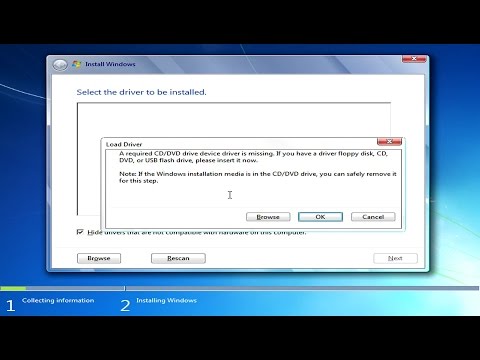
Many folks trying to install Windows 7 via USB on their new computer builds using motherboards with 100 series or 200 series chipsets are finding out that Windows 7 will not install. The reason for this is Windows 7 does not have up-to-date USB drivers on the installation media. Microsoft last ...
12-29-2018 03:16 PM
HP Recommended
Thanks for the info guys.
I've backed up windows10 using acronis.
I'm trying to install windows 7 but struggling a bit with uefi / gpt issues. I'm installing from a dvd so I don't have usb issues as you mention.
I've had to disable secure boot and enable legacy support in the bios. Otherwise I'm unable to even see and boot the win7 install dvd.
The problem is then when I try an install, win7 won't install to a partition stating 'the selected disk is got partition style.
Any help on how to proceed?
There are 5 partitions discovered when installing, and I've only deleted the main C:/ partition so far. Should I delete any of the other partitions? I'm worried that if I delete more partitions I won't be able to revert and restore win10 if this win7 install doesn't work.
Here are screenshots of bios & install screen
Ahttps://photos.app.goo.gl/UkV5qicoaXoqGdNA6
https://photos.app.goo.gl/JiHbMqdg8tbReeFm8
12-29-2018 03:31 PM
HP Recommended
Yes you will need to wipe out existing partitions. Once Windows 7 is on it you will disable the ability to use the HP restore partition anyway so I suggest you make the recovery usb disk from the HP Backup and Recovery app and store it somewhere. Or Windows 10 is now a free download that requires no Key Code to reinstall so going back to Windows 10 will be easy if you ever need to do that. Windows 7 install will go much smoother onto a clean drive and let Windows 7 make all the partitions.
12-29-2018 04:17 PM
HP Recommended
Hi:
You just need to change the disk format from GPT to MBR during the installation process.
Watch this video to see how to get around that error...
12-30-2018 05:53 PM - edited 12-30-2018 06:37 PM
HP Recommended
So I've wiped the partitions and installed Windows 7.
It is installed using a legacy bios boot mode and MBR.
Is that going to cause problems? Should I try and convert it to uefi & gpt?
The drivers from the 15-ab100 model have worked, except for the ethernet LAN and USB drivers (and one unknown device).
Are there any other models I can try for win7 drivers?
The 3 devices i need drivers for are labelled:
Ethernet Controller
Universal Serial Bus (USB) controller
Unknown ( ACPI\HPQ6007 )
12-30-2018 06:38 PM
HP Recommended

Be alert for scammers posting fake support phone numbers and/or email addresses on the community.
If you think you have received a fake HP Support message, please report it to us by clicking on "Flag Post".
† The opinions expressed above are the personal opinions of the authors, not of HP. By using this site, you accept the Terms of Use and Rules of Participation.


Didn't find what you were looking for?
Ask the community
† The opinions expressed above are the personal opinions of the authors, not of HP. By using this site, you accept the <a href="https://www8.hp.com/us/en/terms-of-use.html" class="udrlinesmall">Terms of Use</a> and <a href="/t5/custom/page/page-id/hp.rulespage" class="udrlinesmall"> Rules of Participation</a>.