
-
×InformationNeed Windows 11 help?Check documents on compatibility, FAQs, upgrade information and available fixes.
Windows 11 Support Center. -
-
×InformationNeed Windows 11 help?Check documents on compatibility, FAQs, upgrade information and available fixes.
Windows 11 Support Center. -
- HP Community
- Notebooks
- Notebook Hardware and Upgrade Questions
- additional SSD possible?

Create an account on the HP Community to personalize your profile and ask a question
Your account also allows you to connect with HP support faster, access a personal dashboard to manage all of your devices in one place, view warranty information, case status and more.
Common problems for Battery
We would like to share some of the most frequently asked questions about: Battery Reports, Hold a charge, Test and Calibrating Battery . Check out this link: Is your notebook plugged in and not charging?

It has been a while since anyone has replied. Simply ask a new question if you would like to start the discussion again.

02-07-2020 12:18 AM
 HP Recommended
Product: Envy 17T
Operating System: Microsoft Windows 10 (64-bit)
Hello.
I've just ordered - not yet delivered - a notebook Envy 17T - i7 10th gen, 512GB SSD + 32GB Optane memory.
I need to enlarge storage, so I am considering installing another SSD(1T) besides 512GB SSD.
Does this item allow to accommodate another 1T SSD? Some gave me a reply of NO, others, YES. Which is right?
Is the following composition possible, that is to say, 512GB SSD + 32GB Optane + 1T SSD?
Thank you for your help.
7 REPLIES 7


02-10-2020 05:55 PM
HP Recommended
Welcome to HP support community.
Note: Please ensure the complete product name/number for a quicker response from the community, as we need to know what we are dealing with to provide an accurate solution:
Click here for steps on finding the information we need!
http://support.hp.com/us-en/document/c03754824
Remember: Do not share any of your personal information such as serial, phone number, email ID, etc.
Cheers.
Sandytechy20
I am an HP Employee
02-13-2020 08:57 AM
HP Recommended
Thank you for your kind reply.
My notebook model is Envy 17t-ce100.
Its current device composition is 512 SSD + 32GB Optane + ODD.
I would like to know if I can add another 1T SSD. And if not, is it possible to replace ODD with 1T SSD?
That is to say :
1) 512G SSD + 32G Optane + ODD + 1T SSD. Is that possible?
or
2) How about " 512G SSD + 32G Optane + 1T SSD (ODD detached)
Thank you.


02-13-2020 05:32 PM
HP Recommended
@JangHeon Here's a list of configuration options tested and approved to work on your device by HP:
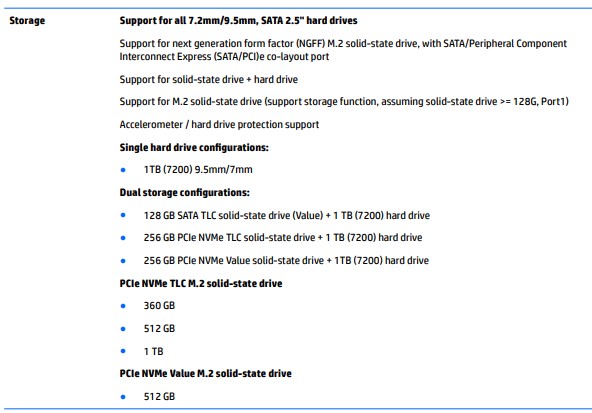
For details on how the SSD can be replaced: click here & visit page. 33-34 Chapter 5 Removal and replacement procedures for authorized service p... and yes, if you have a caddy, you can replace the ODD with an HDD or an SSD at your own discretion.
I hope that answers your query,
If it did, simply select "Accept as solution", to help the community grow,
And if you wish to thank us for our efforts, click on the thumbs up for kudos.
Have a great day ahead.
Riddle_Decipher
I am an HP Employee
Learning is a journey, not a destination.
Let's keep asking questions and growing together.
02-14-2020 11:18 PM - edited 02-14-2020 11:22 PM
HP Recommended
Hello.
I am sorry to say, "Not Really."
Option 1 : To insert an SSD(SATA) in the space for HDD, as the serviceman said, I need an HDD cable, part number L52656-001. They say that HP Korea has none of them for now. The SSD model I want to set in the laptop is SAMSUNG 860 EVO 1TB.
Option 2 : If I will replace the ODD with an SSD, he has to cut some protruding portion off the ODD case(?). Once you cut it away, he says, there might occur a couple of critical problems although there's might be no problem using the added SSD.
I am quite at a loss for what to do.
02-17-2020 11:18 AM
HP Recommended
If the part isn't available on the HP parts store you can get it at any local online store, the part number is universal for option 1.
Option 2 doesn't seem to be something we recommend doing at HP, instead you can get yourself an external storage device and save yourself from all the trouble.
Cheers.
Sandytechy20
I am an HP Employee

Be alert for scammers posting fake support phone numbers and/or email addresses on the community.
If you think you have received a fake HP Support message, please report it to us by clicking on "Flag Post".
† The opinions expressed above are the personal opinions of the authors, not of HP. By using this site, you accept the Terms of Use and Rules of Participation.


Didn't find what you were looking for?
Ask the community
† The opinions expressed above are the personal opinions of the authors, not of HP. By using this site, you accept the <a href="https://www8.hp.com/us/en/terms-of-use.html" class="udrlinesmall">Terms of Use</a> and <a href="/t5/custom/page/page-id/hp.rulespage" class="udrlinesmall"> Rules of Participation</a>.