• ×
    Information
    Need Windows 11 help?
    Check documents on compatibility, FAQs, upgrade information and available fixes.
    Windows 11 Support Center.
  • post a message
  • ×
    Information
    Need Windows 11 help?
    Check documents on compatibility, FAQs, upgrade information and available fixes.
    Windows 11 Support Center.
  • post a message
Guidelines
Seize the moment! nominate yourself or a tech enthusiast you admire & join the HP Community Experts!
Common problems for Battery
We would like to share some of the most frequently asked questions about: Battery Reports, Hold a charge, Test and Calibrating Battery . Check out this link: Is your notebook plugged in and not charging?
HP Recommended
Pavilion x360 13-s104nl
Microsoft Windows 10 (64-bit)

hi, sometimes at the boot of the system, before the hp's logo, it screens this message 'hp battery alert. The system has detected the storage of the battery stated below the be very low. Primary battery (601)', then after few seconds it shut down. I have already done the system checkup of the battery and it results to be more or less in good condition. this message is not shown at every start. can you help me please?

1 REPLY 1
HP Recommended

@Hey9791

Welcome to HP Forums, 

This is a great place to get support, find answers and tips to your technical queries.


To provide you with an accurate solution, I'll need a few more details:

Any hardware changes made in the notebook?

How long are you facing this issue?

Are you facing this issue after an update?

Have you tried any troubleshooting steps on your own?


Let's update the BIOS for your notebook using this link: https://support.hp.com/in-en/drivers/selfservice/swdetails/hp-pavilion-13-s100-x360-convertible-pc/8... 


If the issue persists, follow the below steps.


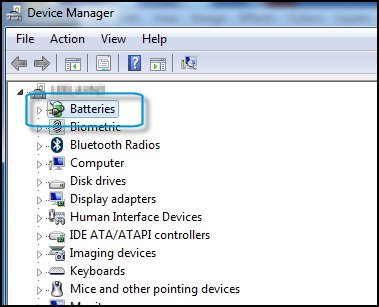
  1. Search for and open Device Manager.

  2. Click the arrow next to Batteries to expand the battery options.

    Device Manager with Batteries highlighted

  3. In the Batteries options menu, right-click each ACPI option, then click Uninstall.

    The battery should now charge properly. If not, it might need to be replaced.

    Device manager with ACPI options highlighted

  4. Restart the computer.


Use this link: https://support.hp.com/in-en/document/c04700771 for your reference.


Keep me posted, how it goes!

If the information I've provided was helpful, give us some reinforcement by clicking the Accepted Solution and Kudos buttons, that'll help us and others see that we've got the answers!

Have a great day!

Cheers:)

Raj1788
I am an HP Employee 

† The opinions expressed above are the personal opinions of the authors, not of HP. By using this site, you accept the <a href="https://www8.hp.com/us/en/terms-of-use.html" class="udrlinesmall">Terms of Use</a> and <a href="/t5/custom/page/page-id/hp.rulespage" class="udrlinesmall"> Rules of Participation</a>.