
-
×InformationNeed Windows 11 help?Check documents on compatibility, FAQs, upgrade information and available fixes.
Windows 11 Support Center. -
-
×InformationNeed Windows 11 help?Check documents on compatibility, FAQs, upgrade information and available fixes.
Windows 11 Support Center. -
- HP Community
- Notebooks
- Notebook Hardware and Upgrade Questions
- Re: can not deactivate the touchpad

Create an account on the HP Community to personalize your profile and ask a question
Your account also allows you to connect with HP support faster, access a personal dashboard to manage all of your devices in one place, view warranty information, case status and more.
Common problems for Battery
We would like to share some of the most frequently asked questions about: Battery Reports, Hold a charge, Test and Calibrating Battery . Check out this link: Is your notebook plugged in and not charging?

It has been a while since anyone has replied. Simply ask a new question if you would like to start the discussion again.

05-09-2021 12:54 AM - edited 05-09-2021 01:15 AM
 HP Recommended
Product: elitebook 850 G5
Operating System: Microsoft Windows 10 (64-bit)
I can't deactivate the touchpad on my elitebook 850 G5. I used to work without the touchpad .But since a few days the option in windows for deactivating the touchpad is missing. I had a mainboard change and following to this I did some windows updates.
The touchpad itself is working. In windows and bios mode as well. So it doesn't seem to be a hardware issue.
In the meantime I updated all relevant drivers, firmware, ... shown in the HP support assistant and the software and drivers site are listed for my model. Nothing worked
Maybe infos from device manager can help someone to guide me in the right direction.


Mouse settings doesn't show up a touchpad

Thanks in advance for any hints and help
10 REPLIES 10

05-09-2021 02:23 AM
HP Recommended
You obviously have a device incorrectly installed, that's all your images show
Reinstalled the ClickPad driver
https://support.hp.com/us-en/drivers/selfservice/hp-elitebook-850-g5-notebook-pc/18491276
check in passing if you are not missing something else here
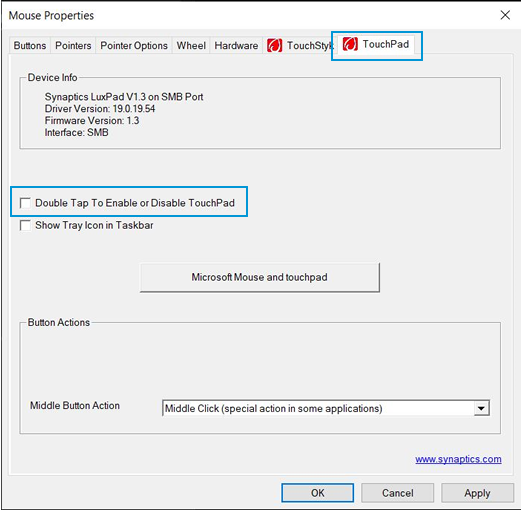
- How to Disable the "Double Tap to Enable or Disable TouchPad" Feature
- Using the TouchPad or ClickPad (Windows 10)
--------------------------------------------- Signature ---------------------------------------------
was this reply helpful , or just say thank you ? Click on the yes button
Please remember to mark the answers this can help other users

Desktop-Knowledge-Base
Windows 11 22h2 inside , user
------------------------------------------------------------------------------------------------------------
was this reply helpful , or just say thank you ? Click on the yes button
Please remember to mark the answers this can help other users
please click on the accept as solution button if message provided an answer to the problem

Desktop-Knowledge-Base
Windows 11 22h2 inside , user
------------------------------------------------------------------------------------------------------------
05-09-2021 04:08 AM
HP Recommended
sorry, but we need to say more
I can not guess
you found and installed the driver, it is installed no error?
Have you fixed the driver problem I indicated! ?
Do you have the option as described in the link or not at all?
etc
--------------------------------------------- Signature ---------------------------------------------
was this reply helpful , or just say thank you ? Click on the yes button
Please remember to mark the answers this can help other users
Desktop-Knowledge-Base
Windows 11 22h2 inside , user
------------------------------------------------------------------------------------------------------------
was this reply helpful , or just say thank you ? Click on the yes button
Please remember to mark the answers this can help other users
please click on the accept as solution button if message provided an answer to the problem
Desktop-Knowledge-Base
Windows 11 22h2 inside , user
------------------------------------------------------------------------------------------------------------

05-10-2021 10:29 AM
HP Recommended
No it's not your fault, if I make a capture, it's in French for me, we don't have much choice
It is indicated which version for your driver, sometimes there is no control panel, but quite real it seems to me
For the given driver it is indicated, this
DESCRIPTION:
This package contains the HP Pointing Device Drivers. This package provides drivers for the HID Mouse and the ClickPad on supported notebook models that are running a supported operating system. This driver provides advanced functionality, including support for multi-touch gestures and TouchGuard palm rejection.
but I also have a doubt you show me the panel for the pad, there I see the mouse, not used a laptop for a while, it is not the same if?
--------------------------------------------- Signature ---------------------------------------------
was this reply helpful , or just say thank you ? Click on the yes button
Please remember to mark the answers this can help other users
Desktop-Knowledge-Base
Windows 11 22h2 inside , user
------------------------------------------------------------------------------------------------------------
was this reply helpful , or just say thank you ? Click on the yes button
Please remember to mark the answers this can help other users
please click on the accept as solution button if message provided an answer to the problem
Desktop-Knowledge-Base
Windows 11 22h2 inside , user
------------------------------------------------------------------------------------------------------------

05-11-2021 11:17 AM
HP Recommended
good !
shame to stop there, but yes it is a solution
Otherwise, can't you just disable the driver from the device manager if you don't use it?
--------------------------------------------- Signature ---------------------------------------------
was this reply helpful , or just say thank you ? Click on the yes button
Please remember to mark the answers this can help other users
Desktop-Knowledge-Base
Windows 11 22h2 inside , user
------------------------------------------------------------------------------------------------------------
was this reply helpful , or just say thank you ? Click on the yes button
Please remember to mark the answers this can help other users
please click on the accept as solution button if message provided an answer to the problem
Desktop-Knowledge-Base
Windows 11 22h2 inside , user
------------------------------------------------------------------------------------------------------------
05-11-2021 11:37 AM
HP Recommended
ho, then I do not understand any more, you indicated to me that it works, it is therefore that it must be installed
Then, I don't quite know which window you are showing me, but in your manager
Synaptics, pointing device, isn't that right?
Well after, it's a bit complicated, because there is everything in German
If you remove the mouse, what exactly do you have?
--------------------------------------------- Signature ---------------------------------------------
was this reply helpful , or just say thank you ? Click on the yes button
Please remember to mark the answers this can help other users
Desktop-Knowledge-Base
Windows 11 22h2 inside , user
------------------------------------------------------------------------------------------------------------
was this reply helpful , or just say thank you ? Click on the yes button
Please remember to mark the answers this can help other users
please click on the accept as solution button if message provided an answer to the problem
Desktop-Knowledge-Base
Windows 11 22h2 inside , user
------------------------------------------------------------------------------------------------------------

Be alert for scammers posting fake support phone numbers and/or email addresses on the community.
If you think you have received a fake HP Support message, please report it to us by clicking on "Flag Post".
† The opinions expressed above are the personal opinions of the authors, not of HP. By using this site, you accept the Terms of Use and Rules of Participation.


Didn't find what you were looking for?
Ask the community
† The opinions expressed above are the personal opinions of the authors, not of HP. By using this site, you accept the <a href="https://www8.hp.com/us/en/terms-of-use.html" class="udrlinesmall">Terms of Use</a> and <a href="/t5/custom/page/page-id/hp.rulespage" class="udrlinesmall"> Rules of Participation</a>.