• ×
    Information
    Need Windows 11 help?
    Check documents on compatibility, FAQs, upgrade information and available fixes.
    Windows 11 Support Center.
  • post a message
  • ×
    Information
    Need Windows 11 help?
    Check documents on compatibility, FAQs, upgrade information and available fixes.
    Windows 11 Support Center.
  • post a message
Guidelines
Webcam Not Working? Advanced Fixes for HP Notebooks! Click here to view the instructions!
Common problems for Battery
We would like to share some of the most frequently asked questions about: Battery Reports, Hold a charge, Test and Calibrating Battery . Check out this link: Is your notebook plugged in and not charging?
HP Recommended
HP notebook 15 db1080au
Microsoft Windows 10 (64-bit)

hello Community I want the help from Hp community about That Does My Hp 15 DB1080AU Support M.2 SSD Slots Because my notebook are so Slowdown Please Anyone Tell Me Does MY laptop Have m.2 SSD Slots No One Help me nows a Days but I Expect from  Hp Community to Please ANswer Me Quickly So That I Can Assured and ALso Sad For Me That I dont Have CD Writter  OPtion TO Use Caddy SSD Sata And Also Tell ME What i have Option for Me In this perticular Model

1 ACCEPTED SOLUTION

Accepted Solutions
HP Recommended

@Ankit455


Welcome to HP Community


I have gone through your Post and would like to help


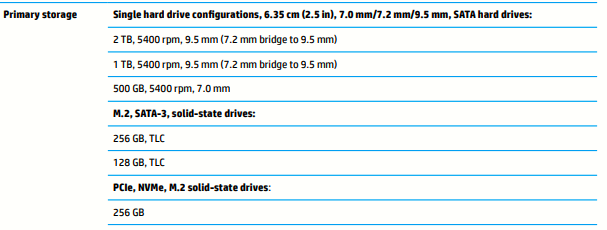
Yes it has an M.2 SSD Slot as per the Service Guide: http://h10032.www1.hp.com/ctg/Manual/c06245081


Since this is a Notebook and if you need to use an CD Writer, it is preferable to use an external DVD Writer which you can connect through the USB ports


Thank you


If the information I've provided was helpful, give us some reinforcement by clicking the "Solution Accepted" on this Post and it will also help other community members with similar issue.
 

KrazyToad
I Am An HP Employee

View solution in original post

2 REPLIES 2
HP Recommended

@Ankit455


Welcome to HP Community


I have gone through your Post and would like to help


Yes it has an M.2 SSD Slot as per the Service Guide: http://h10032.www1.hp.com/ctg/Manual/c06245081


Since this is a Notebook and if you need to use an CD Writer, it is preferable to use an external DVD Writer which you can connect through the USB ports


Thank you


If the information I've provided was helpful, give us some reinforcement by clicking the "Solution Accepted" on this Post and it will also help other community members with similar issue.
 

KrazyToad
I Am An HP Employee

HP Recommended

Hello krazy taud as you Told that this model support m, 2 ssd But today I physically check my internal Components and see whats  Reality now what I do 

† The opinions expressed above are the personal opinions of the authors, not of HP. By using this site, you accept the <a href="https://www8.hp.com/us/en/terms-of-use.html" class="udrlinesmall">Terms of Use</a> and <a href="/t5/custom/page/page-id/hp.rulespage" class="udrlinesmall"> Rules of Participation</a>.