-
×InformationNeed Windows 11 help?Check documents on compatibility, FAQs, upgrade information and available fixes.
Windows 11 Support Center. -

-
×InformationNeed Windows 11 help?Check documents on compatibility, FAQs, upgrade information and available fixes.
Windows 11 Support Center. -
- HP Community
- Notebooks
- Notebook Hardware and Upgrade Questions
- (non-hp) wireless mouse device driver

Create an account on the HP Community to personalize your profile and ask a question
03-27-2020 08:35 PM
my machine shipped with a wireless mouse (iMicro wa-200) that I cant activate. I also cant find online a device driver to install. what glaringly obvious fact about wireless peripherals am I missing. and (approximately) how much better is the pen anyway? thanks
03-30-2020 03:08 PM
@brotheryoni We've got you covered, here's a list of steps that should help resolve the issue once and for all, as for the pen, what pen are you referring to?
NOTE:If you are experiencing issues with Bluetooth input devices, go to Troubleshooting a Bluetooth Connection.
-
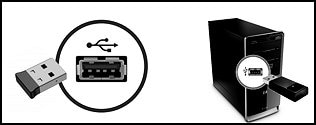
Locate the USB receiver for the device, and then make sure it is connected directly into a USB port
on the computer.NOTE:
A USB hub might not provide enough power for your device to connect properly.

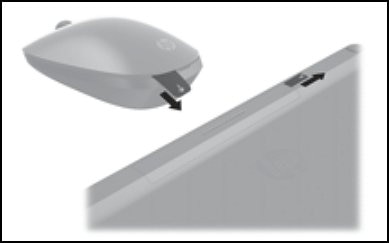
If you cannot locate the receiver, check the original packaging. Some HP Touch and All-in-Ones come with the USB receiver preinstalled in the computer. Or, look for a USB storage container on the device.

-
Look for and remove any battery tabs from the device. This tab prevents the device from receiving power.

-
Make sure the device has adequate power.
-
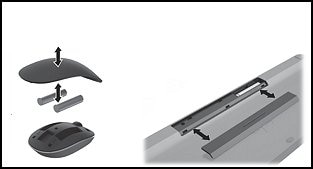
If the device uses batteries, install new batteries according to the guide in the battery compartment.

-
If the device is rechargeable, connect the charging cable to the device, and then to a power source, such as a USB-charging port on the computer or an external USB power adapter.
-
LED battery indicator
-
MicroUSB cable to charging device
-
-
-
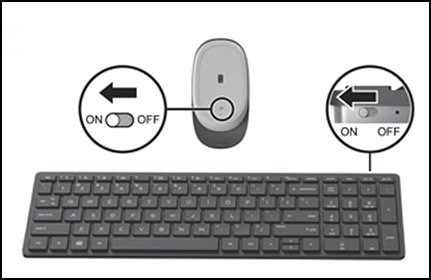
If the device has a power switch, confirm the switch is set to ON.

-
On your computer, test the device.
If the device still does not work as expected, go to Wireless Keyboard and Mouse Troubleshooting.
P.S: Welcome to HP Community 😉
Let me know how that pans out,
If you feel I was helpful, simply click on Accept as Solution to help the community grow,
That said, I will have someone follow-up on this to ensure you've been helped,
Just in case you don't get back to us,
have a good day, ahead.
Riddle_Decipher
I am an HP Employee
Learning is a journey, not a destination.
Let's keep asking questions and growing together.