• ×
    Information
    Need Windows 11 help?
    Check documents on compatibility, FAQs, upgrade information and available fixes.
    Windows 11 Support Center.
  • post a message
  • ×
    Information
    Need Windows 11 help?
    Check documents on compatibility, FAQs, upgrade information and available fixes.
    Windows 11 Support Center.
  • post a message
Guidelines
Seize the moment! nominate yourself or a tech enthusiast you admire & join the HP Community Experts!
Common problems for Battery
We would like to share some of the most frequently asked questions about: Battery Reports, Hold a charge, Test and Calibrating Battery . Check out this link: Is your notebook plugged in and not charging?
HP Recommended
Omen 17
Microsoft Windows 10 (64-bit)

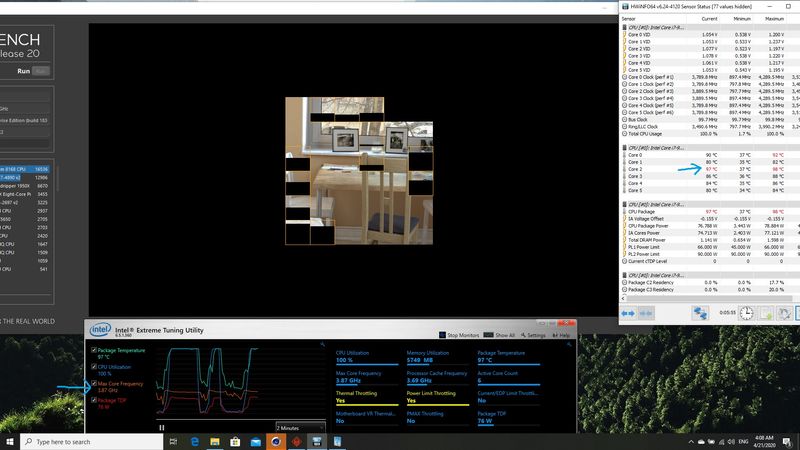
i just purchased HP omen 17 with i7 9th and rtx 2080 . and i tested it with cinebench r20 with UV 0.155 and i got over 3050 score . my i7 9th cpu reach 4GH untill the last 10 sec hit the thermal throttle at 97C and drop down to 3.8GH . i thought that was normal some how ,but after couple of days i tested it again with the same everything and the cpu hit the 97C immediately and start to drop done until 3.6GH and the score didn't get over 2900 . i didn't do anything and i didn't see any BIOS update any where ( mine is f24 ) , so what happens ? is that normal or i miss something ?

4 REPLIES 4
HP Recommended

@Meesho,


I reviewed your post and I understand that your computer hits thermal throttling in Cinebench R20.


Don’t worry, I assure you I will try my best to get this sorted.


Are you able any issues with the computer?

Is the computer thermal throttling when you play games?

What is the exact model for your computer?


I see that you are using a third-party benchmarking app and getting a lesser score than the first time. HP doesn’t know how these third party apps work and have no control over it.


Usually, when you run the benchmark tests every time the results will differ, and you will not get the exact same score every time.


I hope that asnwers your question and you have a great day!


P.S: Welcome to the HP Support Community 😊


If you wish to show appreciation for my efforts, mark my post as Accept as Solution. Your feedback counts!


Cheers!


The_Fossette
I am an HP Employee

HP Recommended

thermal.jpg

HP Recommended

as you see my cpu start to thermal throttle the moment the test started and it is only happen  in core 2 .. before i didn't have this problem and my cpu didn't hit the thermal throttle until the end of the test ... the problem is as you see in the picture, when the core 2 hits 97C the CPU start to reduce the clock speed to 3.8GH and it will remain until it reach 3.6GH witch it not acceptable caz it will affect the render time ...before i was able to get 4GH until the end of the test .

HP Recommended

@Meesho,


I recommend you contact support to further diagnose the issue.


Here is how you can get in touch with support.


1)Click on this link – www.hp.com/contacthp/

2)Select the product type.

3)Enter the serial number of your device or select let HP detect your product option.

4)Select the country from the drop-down.

5)You should see the HP phone support number or Chat option listed.


Cheers!

The_Fossette
I am an HP Employee

† The opinions expressed above are the personal opinions of the authors, not of HP. By using this site, you accept the <a href="https://www8.hp.com/us/en/terms-of-use.html" class="udrlinesmall">Terms of Use</a> and <a href="/t5/custom/page/page-id/hp.rulespage" class="udrlinesmall"> Rules of Participation</a>.