-
×InformationNeed Windows 11 help?Check documents on compatibility, FAQs, upgrade information and available fixes.
Windows 11 Support Center. -

-
×InformationNeed Windows 11 help?Check documents on compatibility, FAQs, upgrade information and available fixes.
Windows 11 Support Center. -
- HP Community
- Notebooks
- Notebook Hardware and Upgrade Questions
- Re: touch pad goes crazy

Create an account on the HP Community to personalize your profile and ask a question
07-11-2020 10:30 AM
The touchpad of my hp pavillion g4 2050la goes crazy a moment after it starts, It zooms in and out, the left click wont work, it moves everywhere when I touch it. I have used a mouse and everything works ok, but i don't always have a mouse at hand. The computer is running windows 10. I'd say this problem started with the last update of w10, but I am not 100 per cent sure.
07-14-2020 07:25 AM
Welcome to HP Community
I have gone through your Post and would like to help
I suggest you download and run the HP Support Assistant from this Link: https://www8.hp.com/us/en/campaigns/hpsupportassistant/hpsupport.html?jumpid=va_r602_us/en/any/psg/p...
HPSA will automatically search for all the latest drivers for your Notebook
-
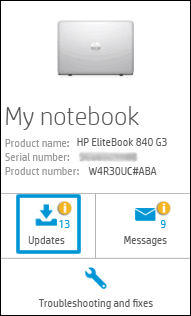
Click My devices in the top menu, and then click Updates in the My PC or My notebook pane.

-
Click Check for updates and messages to scan for new updates.

-
Review the list of updates. Updates with a yellow information icon are recommended. Updates with a blue information icon are optional.
-
Click the update name for a description, version number, and file size.
-
Select the box next to any updates you want to install, and then click Download and install.
Also ensure Windows is up to date.
Select the Start button, and then go to Settings > Update & security > Windows Update , and select Check for updates. If Windows Update says your device is up to date, you have all the updates that are currently available
Keep me posted how it goes
Thank you and have a wonderful day 😊
If the information I've provided was helpful, give us some reinforcement by clicking the "Solution Accepted" on this Post and it will also help other community members with similar issue.
KrazyToad
I Am An HP Employee
07-15-2020 01:47 PM
HI. Thanks for you support. I had been thinking about when this problem started and I pinpointed a recent update of windows 10. So, What i did - and I know it is quite laborious but I needed to fix my computed- is that I downgraded to windows 7 and the problem magically solved. I also made sure I had all the drivers up-to-date before taking this huge step. I guess there is a glitch between my computer and the last update of w10.
Bests,
Your friendly neighbor
07-15-2020 01:48 PM
HI. Thanks for you support. I had been thinking about when this problem started and I pinpointed a recent update of windows 10. So, What i did - and I know it is quite laborious but I needed to fix my computed- is that I downgraded to windows 7 and the problem magically solved. I also made sure I had all the drivers up-to-date before taking this huge step. I guess there is a glitch between my computer and the last update of w10.
Bests,
Your friendly neighbor
07-16-2020 06:45 AM
Thank you for keeping me posted
This seems to be a driver compatibility issue. Usually such issues get resolved with the next Windows update
Drop us a message anytime you need hep
Thank you
KrazyToad
I Am An HP Employee