• ×
    Information
    Need Windows 11 help?
    Check documents on compatibility, FAQs, upgrade information and available fixes.
    Windows 11 Support Center.
  • post a message
  • ×
    Information
    Need Windows 11 help?
    Check documents on compatibility, FAQs, upgrade information and available fixes.
    Windows 11 Support Center.
  • post a message
Guidelines
Join the HP Community Solve‑a‑thon | Help Others & Share Your Solutions | Live on Zoom | 2:30 PM to 2:30 AM IST | Every Wednesday Click here to know more
Check out our WINDOWS 11 Support Center info about: OPTIMIZATION, KNOWN ISSUES, FAQs, VIDEOS AND MORE.
HP Recommended

There is my only hope, that the mother board (which is located on the side of the defected hinge) is not properly connected to th hdd (by the way, I have a ssd, does this change something?) 

I will try to get someone to show me the mother board and see if the connection is proper. 

The computer is awesome I cannot believe from one day to another it went away. 

Thanks! 

HP Recommended

@ClaudiaV wrote:

There is my only hope, that the mother board (which is located on the side of the defected hinge) is not properly connected to th hdd (by the way, I have a ssd, does this change something?) 

I will try to get someone to show me the mother board and see if the connection is proper. 

The computer is awesome I cannot believe from one day to another it went away. 

Thanks! 


If an SSD is about to fail, SSD drives go away very fast. One of my previous SSDs which failed managed to fail in 2-3 hours and was completely unusable after that.


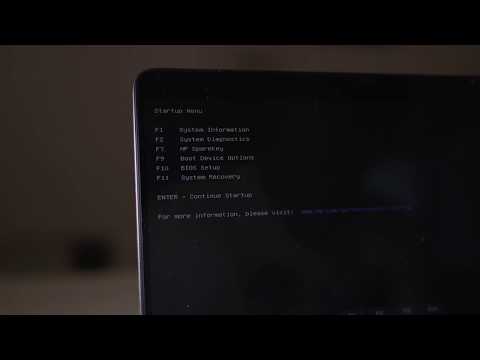
Can you post your full HP product model and product number (p/n) - F1 option -> http://support.hp.com/us-en/document/c00033108

I can show you how to check the connection


By the way, how old is the PC - is it under active warranty ?


Your FEEDBACK is important. Use the interactive buttons below and let me know if the post helps ;
*** HP employee *** I express personal opinion only *** Joined the Community in 2013
HP Laptops On Amazon BEST PRICE - https://amzn.to/3CEJDF4 HP Spectre x360 - https://amzn.to/40Z1NM4 PLEASE SUBSCRIBE IF THIS HELPS YOU - IT HELPS ME :-) Here is a very quick video on how to enter the HP Boot Menu from a HP Laptop. Step 1 - Press the power on button. Step 2 - Quickly start pressing
HP Recommended

So my product number is J0C49EA#AB9, the computer is 3 years old and has been amazing so far. Thanks! 

HP Recommended

Any news? 

HP Recommended

Apologies for the delay.


You may check your PC's manual (service guide) here >> http://h10032.www1.hp.com/ctg/Manual/c04691689

  • If your SSD storage drive is of type SATA - Refer to page 55 (63) on how to check the connection
  • If you use M.2 storage SSD drive - refer to page 42 (50) on how to check the connection
Your FEEDBACK is important. Use the interactive buttons below and let me know if the post helps ;
*** HP employee *** I express personal opinion only *** Joined the Community in 2013
† The opinions expressed above are the personal opinions of the authors, not of HP. By using this site, you accept the <a href="https://www8.hp.com/us/en/terms-of-use.html" class="udrlinesmall">Terms of Use</a> and <a href="/t5/custom/page/page-id/hp.rulespage" class="udrlinesmall"> Rules of Participation</a>.