• ×
    Information
    Need Windows 11 help?
    Check documents on compatibility, FAQs, upgrade information and available fixes.
    Windows 11 Support Center.
  • post a message
  • ×
    Information
    Need Windows 11 help?
    Check documents on compatibility, FAQs, upgrade information and available fixes.
    Windows 11 Support Center.
  • post a message
Guidelines
Join the HP Community Solve‑a‑thon | Help Others & Share Your Solutions | Live on Zoom | 2:30 PM to 2:30 AM IST | Every Wednesday Click here to know more
Check out our WINDOWS 11 Support Center info about: OPTIMIZATION, KNOWN ISSUES, FAQs, VIDEOS AND MORE.
HP Recommended
HP Envy 15-Q370CA
Microsoft Windows 10 (64-bit)

Cannot

[1] update BIOS on HP Envy 15-q370CA as laptop will not boot

[2] create flash bios drive

[3] find F.20 bios .BIN file to manually update


System boots to BI initialization Library failed  0xc0000229


3 REPLIES 3
HP Recommended

@DonRusak22 I suggest you attempt a BIOS recovery to resolve this issue as its occurred after the last bios update, its possible the BIOS update was interrupted causing it to corrupt the system files:

  1. Turn off the computer, and then connect the power cord.

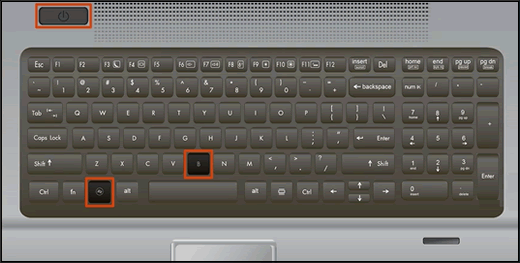
  2. Press and hold the Windows key and the B key at the same time, and then press and hold the Power button for 2 to 3 seconds.

    Keyboard highlighting the key presses for BIOS recovery

FOR DETAILS & FURTHER INSTRUCTIONS, USE THIS LINK: CLICK HERE & SKIP TO STEP 3 ONWARD

(By the end of this article all the issues should be resolved)


P.S: Welcome to HP Community 😉


Keep us posted,

If you would like to thank us for our efforts to help you, 

Give us a virtual high-five by clicking the 'Thumbs Up' icon below, followed by clicking on the "Accept as solution" on this post, 

Have a great day!

Riddle_Decipher
I am an HP Employee


Learning is a journey, not a destination.
Let's keep asking questions and growing together.
HP Recommended

Thank you for the response...


Both BIOS recovery ( 'previous' and 'current' versions ) FAILS and the on the HP site does NOT contain the .BIN and .SIG required to manually update the BIOS.  Also that same "SP###" suggests that it will create a USB updater, but this either FAILS on the creation of the USB key ( WIN7 ) or doesn't even ask to create the key ( WIN10 ).  So I am going in circles here, not making any progress to my issue.    

HP Recommended

@DonRusak22 If this isn't working for you, it's most likely due to a hardware malfunction and I suggest you talk to HP support and discuss your options, follow the below steps to get started:


1) Click on this link - http://www.hp.com/contacthp/

2) Click on Sign-in or select the product using the below step:

3) Enter the serial of your device.

4) Select the country from the drop-down.

5) Click on "Show Options".

Fill the web-form, to populate a case number and phone number for yourself!


Also, if you are having trouble navigating through the above options, it's most likely because the device is out of warranty, if yes? please send me a private message with the region you are contacting us from, 

here's how private messages work: Click here for details.


If you wish to thank me for my efforts, you could click on "Accept as solution" on my post as the solution should help others too.

Riddle_Decipher
I am an HP Employee


Learning is a journey, not a destination.
Let's keep asking questions and growing together.
† The opinions expressed above are the personal opinions of the authors, not of HP. By using this site, you accept the <a href="https://www8.hp.com/us/en/terms-of-use.html" class="udrlinesmall">Terms of Use</a> and <a href="/t5/custom/page/page-id/hp.rulespage" class="udrlinesmall"> Rules of Participation</a>.