• ×
    Information
    Need Windows 11 help?
    Check documents on compatibility, FAQs, upgrade information and available fixes.
    Windows 11 Support Center.
  • post a message
  • ×
    Information
    Need Windows 11 help?
    Check documents on compatibility, FAQs, upgrade information and available fixes.
    Windows 11 Support Center.
  • post a message
Guidelines
Seize the moment! nominate yourself or a tech enthusiast you admire & join the HP Community Experts!
Check out our WINDOWS 11 Support Center info about: OPTIMIZATION, KNOWN ISSUES, FAQs, VIDEOS AND MORE.
HP Recommended
HP Probook 4530s
Microsoft Windows 10 (64-bit)

Hellow!

so for a while i have problems with my drivers. tru here i already fixed 2 of the 4 broken drivers but 2 are still not working. 

This is the following info i get:

Unknown driver

location Port_#0001.Hub_#0004

Details:

USB\VID_138A&PID_003C\00308263C689

is there anyone that can help me out?

im also yousing the HP probook 4530s

5 REPLIES 5
HP Recommended

Hi:


You need this driver for the first device:


HP 3D DriveGuard Software


https://ftp.hp.com/pub/softpaq/sp64001-64500/sp64144.exe 


For the second device, you need this driver:


Validity Fingerprint Sensor Driver


https://ftp.hp.com/pub/softpaq/sp59501-60000/sp59624.exe 


You may need to manually install the fingerprint sensor driver if the auto install method doesn't work.


You can do that by going to the device manager.


Click on the unknown USB\VID_138A&PID_003C device needing the driver.


Click on the driver tab.  Click on Update driver.


Select the 'Browse my computer for drivers' option and browse to the driver folder that was created when you ran the file.


That folder will be located in C:\SWSetup\sp59624.


Make sure that the Include subfolders box is checked and the driver will install.

HP Recommended

Hi,

The first link did work as far as i know, the second link in the other hand said i need windows 7 for this instead of windows 10, should i convert it back or is there another solution?

hope to hear from you soon!

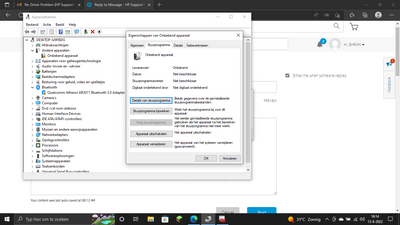
Bhram_0-1660400131896.png


HP Recommended

Hi:


If you are getting an unsupported operating system error when you run the fingerprint sensor driver...


Ignore the error, close out of it and manually install the driver as I had written above.


There is no fix for the Atheros Bluetooth adapter.  it is not supported in W10.


You can try this driver, but it hasn't worked for anyone lately...


Solved: Windows has stopped this device because it has reported prob... - HP Support Community - 823...

HP Recommended

so i have been trying to instal it manually. C:\SWSetup\sp59624 cant be accest because it wornt let me download it due windows 10.

if this is the driver for the fingerprint i might not have to reinstal it bc that works for some reason.

but the other issues are fixed and so far my pc isnt having any problems anymore except just that visual atm!

HP Recommended

I don't understand what the problem is because I have given that method to many other forum members and it works fine.


The only other suggestion I can offer would be to manually install this driver instead...browse to C:\SWSetup\sp58900.


https://ftp.hp.com/pub/softpaq/sp58501-59000/sp58900.exe


You do not need to browse any further than the main driver folder.

† The opinions expressed above are the personal opinions of the authors, not of HP. By using this site, you accept the <a href="https://www8.hp.com/us/en/terms-of-use.html" class="udrlinesmall">Terms of Use</a> and <a href="/t5/custom/page/page-id/hp.rulespage" class="udrlinesmall"> Rules of Participation</a>.