-
×InformationNeed Windows 11 help?Check documents on compatibility, FAQs, upgrade information and available fixes.
Windows 11 Support Center. -

-
×InformationNeed Windows 11 help?Check documents on compatibility, FAQs, upgrade information and available fixes.
Windows 11 Support Center. -
- HP Community
- Notebooks
- Notebook Operating System and Recovery
- Re: Dual GPUs issue with Windows 10 possibility of Windows 7...

Create an account on the HP Community to personalize your profile and ask a question
08-06-2019 12:29 AM
i7-2630qm
Intel HD 3000m
AMD Radeon 6770m
Samsung 850 EVO 500GB
16GB DDR3L ram
Windows 10 1903 x64
My Intel HD 3000M graphics card gets reported as Directx 11.1 capability and my AMD Radeon HD 6770m gets reported as being DirectX 9.0. I know the Intel HD 3000M only supports DirectX 10.1 and the AMD Radeon HD 6770m supports DirectX 11. Intel HD 3000M is not compatible with Windows 10 and the AMD Radeon HD 6770m has a driver for Windows 10.
I have tried all drivers from HP, Intel and AMD even as Windows 7 mode. I can't get them to work properly under Windows 10 and have no way of reinstalling Windows 7 as far as I know. I bought the computer with Windows 10 unfortunately.
Thank you in advance for any help.
08-08-2019 11:28 AM
Welcome to the HP Support Community!
I recommend you download and install HP support assistant from the below link and it will automatically download and install all the drivers available for your computer.
Here is how it is done.
Download Link: https://www8.hp.com/in/en/campaigns/hpsupportassistant/hpsupport.html?jumpid=va_r602_in/en/any/psg/p...
-
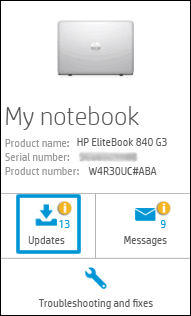
Click My devices in the top menu, and then click Updates in the My PC or My notebook pane.

-
Click Check for updates and messages to scan for new updates.

-
Review the list of updates. Updates with a yellow information icon are recommended. Updates with a blue information icon are optional.
-
Click the update name for a description, version number, and file size.
-
Select the box next to any updates you want to install, and then click Download and install.
-
Perform any other update management actions as needed.
-
Postpone an update: Click Remind me, and then select a time preference.
-
Delete an available update: Click the Delete icon
to remove the update from the list and record it in the action log. -

Review updates status: Click Action log below the list to view installed, postponed, or deleted updates.
-
Let me know how it goes and you have a great day!
If you wish to show appreciation for my efforts, mark my post as Accept as Solution. Your feedback counts!
Cheers!
The_Fossette
I am an HP Employee
12-18-2019 12:36 AM
Unfortunately I found Windows 10 to be incompatable with the Intel HD 3000M graphics card. Due to the incompatability that I dealing with, I was not able to get Windows 10 to recognize the correct DirectX version supported by the Intel HD 3000M. So I eventually just wiped the drive that Windows 10 was installed on and switched to Linux. Sorry for not replying sooner, Thank you to everyone trying to help me and have a good day/night.