• ×
    Information
    Need Windows 11 help?
    Check documents on compatibility, FAQs, upgrade information and available fixes.
    Windows 11 Support Center.
  • post a message
  • ×
    Information
    Need Windows 11 help?
    Check documents on compatibility, FAQs, upgrade information and available fixes.
    Windows 11 Support Center.
  • post a message
Guidelines
Seize the moment! nominate yourself or a tech enthusiast you admire & join the HP Community Experts!
Check out our WINDOWS 11 Support Center info about: OPTIMIZATION, KNOWN ISSUES, FAQs, VIDEOS AND MORE.
HP Recommended
Spectre X360 13
Microsoft Windows 10 (64-bit)

Same exact issue as https://h30434.www3.hp.com/t5/Notebook-Operating-System-and-Recovery/HP-keyboard-driver-update-not-g...


The update actually appears to show as installed but still listed under missing drivers. 

3 REPLIES 3
HP Recommended

@samw5 How are you attempting to install the drivers? if its via the HP Support Assistant? Here's what you need to do:

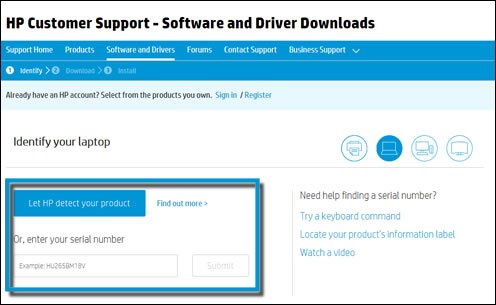
  1. Go to the HP Customer Support - Software and Driver Downloads page.

  2. If a Let's identify your product to get started page displays, click Laptop or Desktop.

  3. Type the model name for your computer in the Or, enter your serial number field, and then click Submit. For example, type Pavilion HPE h8-1360t Desktop, and then click Submit.

    Type the model name for your HP or Compaq computer in the search field

  4. If a Matching products webpage opens, select your model number from the list.

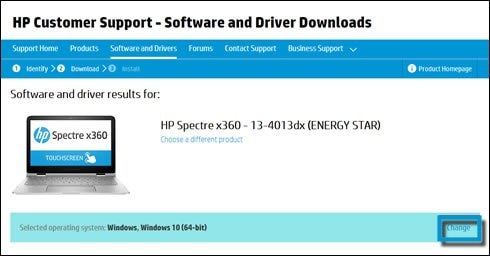
  5. The software results page for your computer displays with the default operating system selected. If you need to change the operating system, click Change, select your version, and then click Change.

    NOTE: 

    If the operating system you want is not on the list, HP does not have drivers for that operating system. See the other sections within this page for other ways you can find software and drivers.

    Change your computer operating system

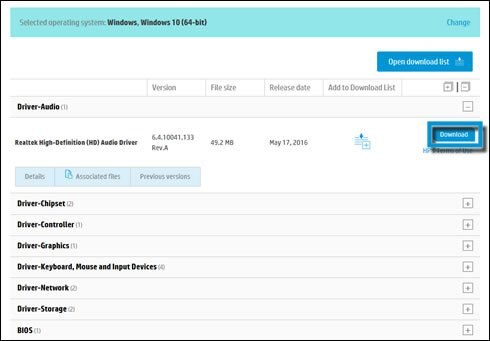
  6. From the list of available software and driver categories, click the category name, and then click Download.

       CAUTION: 

    Sometimes there is more than one download available for a component, such as several DVD firmware updates. If this happens, identify the component installed in your computer, and then download the appropriate file. To find the name of a component, search for and open Device Manager. Find the component, and then expand the category (for example, DVD/CD ROM drives). The category lists the component’s original manufacturer name.

    Select a download

  7. Follow the on-screen instructions to install the software or driver.

P.S: Welcome to HP Community 😉


Let me know how that pans out,

If you feel I was helpful, simply click on Accept as Solution to help the community grow,

That said, I will have someone follow-up on this to ensure you've been helped,

Just in case you don't get back to us, 

have a good day, ahead.

Riddle_Decipher
I am an HP Employee


Learning is a journey, not a destination.
Let's keep asking questions and growing together.
HP Recommended

Keyboard driver isn't listed on the HP site so that doesn't help me much at all. 

Again Windows Update keeps showing the optional update and will try to install it over and over if selected. When looking at the update logs it shows the driver installed correctly however still showing as being needed. Not a big deal, just a bit of a nuissance than anything else but figured I would bring it up.

HP Recommended

@samw5 That could be a generic update from Windows, it's best you click on ignore, if the device is working fine without any issue whatsoever, there's no need of updating the driver in such cases anyway, please ignore the update, and if you need to install updates, please make use of the HP Support Assistant instead.

Riddle_Decipher
I am an HP Employee


Learning is a journey, not a destination.
Let's keep asking questions and growing together.
† The opinions expressed above are the personal opinions of the authors, not of HP. By using this site, you accept the <a href="https://www8.hp.com/us/en/terms-of-use.html" class="udrlinesmall">Terms of Use</a> and <a href="/t5/custom/page/page-id/hp.rulespage" class="udrlinesmall"> Rules of Participation</a>.