• ×
    Information
    Need Windows 11 help?
    Check documents on compatibility, FAQs, upgrade information and available fixes.
    Windows 11 Support Center.
  • post a message
  • ×
    Information
    Need Windows 11 help?
    Check documents on compatibility, FAQs, upgrade information and available fixes.
    Windows 11 Support Center.
  • post a message
Guidelines
Join the HP Community Solve‑a‑thon | Help Others & Share Your Solutions | Live on Zoom | 2:30 PM to 2:30 AM IST | Every Wednesday Click here to know more
Check out our WINDOWS 11 Support Center info about: OPTIMIZATION, KNOWN ISSUES, FAQs, VIDEOS AND MORE.
HP Recommended
Elitebook 8470p
Microsoft Windows 10 (64-bit)

My laptop was slowing down . So I cut the power then turned it back on . It worked every time . This time though I got an error and it wouldn't work :


Failure ID : PW3R73-9R8AN2-XD6WXF-60F103

Product ID : B2F92EC#ABB


When I click on startup I end up in a back page with a message :

Boot device not found
Hard drive 3F0


I just want to recover the data I have there, I don't have it stored anywhere else.


Please let me know if you can help or need more info.

Thank you


1 REPLY 1
HP Recommended

@Anistasia 

All you will be able to recover at best from the drive is personal data. You will not be able to recover settings, website information (including user accounts and passwords) or applications.

Your best bet for recovering data now is to do the following:
1) Remove the disk drive from the old PC. If this is a SATA hard drive or a SATA SSD, this is a simple thing to do. If this is an m.2 SSD, that could be either screwed to the motherboard or soldered to the motherboard. If the second, you would need to have a techician remove it for you, or you risk seriously damaging the PC doing it yourself.
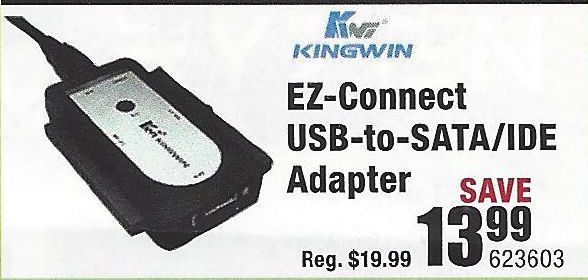
2) If you have a desktop PC with a spare hard drive connector, then connect the old drive to that. If the old drive is a SATA drive, connect both the power cable and the data cable. (This adapter is illustrated below) If the old drive is an m.2 SSD, you will need a USB-to-mSATA cable.
USB-Drive-Adapter.jpg
3) Try to retrieve the files and folders you want to save from the old drive and copy them to the new PC.

If this does not work, then you need to do the following:
1) Download and install this utility on a working PC http://www.majorgeeks.com/news/story/recover_data_in_3_steps_with_minitool_power_data_recovery_free_...
2) Run the data recovery utility to see what can be retrieved from the old drive.

If that tool does not find what you need, an alternative is Recuva http://www.piriform.com/recuva

And, if that does not work well, the best tool out there is this one, but only the demo version is free https://www.runtime.org/data-recovery-software.htm


I am a volunteer and I do not work for, nor represent, HP
† The opinions expressed above are the personal opinions of the authors, not of HP. By using this site, you accept the <a href="https://www8.hp.com/us/en/terms-of-use.html" class="udrlinesmall">Terms of Use</a> and <a href="/t5/custom/page/page-id/hp.rulespage" class="udrlinesmall"> Rules of Participation</a>.