
-
×InformationNeed Windows 11 help?Check documents on compatibility, FAQs, upgrade information and available fixes.
Windows 11 Support Center. -
-
×InformationNeed Windows 11 help?Check documents on compatibility, FAQs, upgrade information and available fixes.
Windows 11 Support Center. -
- HP Community
- Notebooks
- Notebook Operating System and Recovery
- Not able to update Windows 10

Create an account on the HP Community to personalize your profile and ask a question
Your account also allows you to connect with HP support faster, access a personal dashboard to manage all of your devices in one place, view warranty information, case status and more.
Check out our WINDOWS 11 Support Center info about: OPTIMIZATION, KNOWN ISSUES, FAQs, VIDEOS AND MORE.

It has been a while since anyone has replied. Simply ask a new question if you would like to start the discussion again.

04-26-2020 08:58 AM
 HP Recommended
Product: HP Envy 15
Operating System: Microsoft Windows 10 (64-bit)
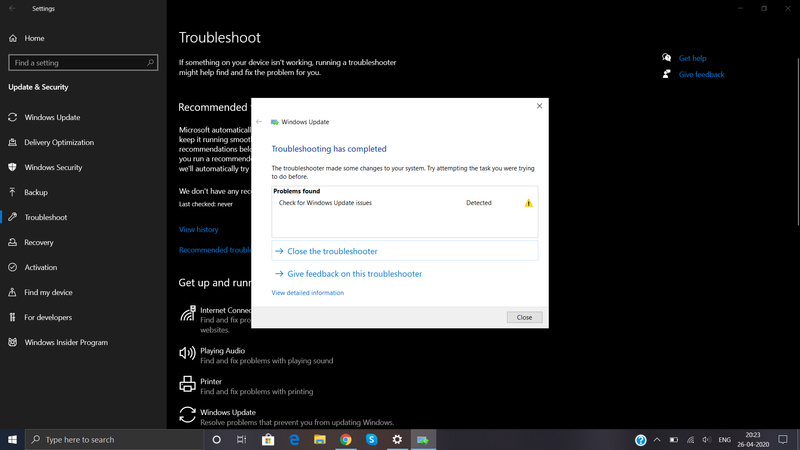
I tried to update my pc from Settings, but ended up with following error. I also ran Windows Update Troubleshooter, it says problem is fixed, but it is not. Please help. Thank you.


6 REPLIES 6


04-26-2020 10:54 AM
HP Recommended
Hello @Arthanshu
Welcome !
- Try to restart your Windows as a first troubleshooting step and then try again. Here are the steps to do it >> https://www.digitalcitizen.life/7-ways-shut-down-or-restart-windows-10-pc-or-device
Is this the first time you are trying to install updates ? Have you performed any changes recently ?
- Please, click on the Windows Start button, type winver and open the app that will appear from the search results. Can you post back which is your build of Windows ?
- Try the steps mentioned in the Community TKB article here >> https://h30434.www3.hp.com/t5/Desktop-Knowledge-Base/Windows-Update-update-fails-to-install-fixes-an...
Let me know how it goes
Your FEEDBACK is important. Use the interactive buttons below and let me know if the post helps ;
*** HP employee *** I express personal opinion only *** Joined the Community in 2013
*** HP employee *** I express personal opinion only *** Joined the Community in 2013
04-26-2020 11:20 AM
HP Recommended
Thank you for answering.
Restarting did not help.
I am not installing the updates for the first time. I did not perfom any changes related to OS or Windows update.
Here is the windows verison.

I followed the steps from Community TKB article. But I am not able to rename the folder "catroot2" to "catroot2.old", as it says "the folder or file is open in another program" .
04-26-2020 11:47 AM
HP Recommended
Hi @Arthanshu
Thank you for following the steps.
There is either some issue in the existing Windows Update mechanism, or the update that your PC is trying to install is faulty/incompatible with your PC. This happens sometimes.
You are already running the latest build 1909 and the updates which means you are (almost) up-to-date.
Newer build (May update - 2004) is waiting on the horizon and will be released in the following week(s), some time in early May 2020 >> https://www.zdnet.com/article/what-to-expect-from-windows-10-version-2004/
If you are willing, I may provide you some steps to troubleshoot further but there is no guarantee they will work (especially if the particular update is not OK).
- I would recommend you just wait and directly try to install Windows 10 build 2004 once it is released in May. You will hear about it in the news, or just try to Google for it.
- Once it is release, try to update to it using the Windows Update Assistant tool which will download the latest build then >> https://support.microsoft.com/en-nz/help/3159635/windows-10-update-assistant
- Once you have build 2004 you will not need the update that is trying to install now and you will have somewhat cleaner start with 2004.
If you insist and prefer to troubleshoot now, please let me know.
Your FEEDBACK is important. Use the interactive buttons below and let me know if the post helps ;
*** HP employee *** I express personal opinion only *** Joined the Community in 2013
*** HP employee *** I express personal opinion only *** Joined the Community in 2013
04-26-2020 09:37 PM
HP Recommended
Thank you again. Basically, my concern is the error it shows on clicking Update button, rather it should show something like "You are using latest version of windows" or "No updates available" without any ERRORS.
04-27-2020 02:14 PM
HP Recommended
@Arthanshu wrote:Thank you again. Basically, my concern is the error it shows on clicking Update button, rather it should show something like "You are using latest version of windows" or "No updates available" without any ERRORS.
You need not to be concerned about this. It will be a problem if it continues long term.
Any different today ?
Can you provide with information about your PC software and configuration?
Download and run the free Speccy > http://www.piriform.com/speccy
Install and run the app
When it is ready, click on File > Save a snapshot
A file with .speccy extension will be generated. Please, upload it somewhere (e.g. in your Google Drive, Dropbox, ICloud or OneDrive storage) and give me URL to download/see, or attach it here in your next reply.
Your FEEDBACK is important. Use the interactive buttons below and let me know if the post helps ;
*** HP employee *** I express personal opinion only *** Joined the Community in 2013
*** HP employee *** I express personal opinion only *** Joined the Community in 2013
04-27-2020 02:17 PM
HP Recommended
Please, provide an update and your log file.
After that, your next steps for troubleshooting would to run:
- DISM
- SFC.EXE
- Advanced troubleshooting using System Update Readiness tool
Here are details (check them below the Resolution title/word)
Your FEEDBACK is important. Use the interactive buttons below and let me know if the post helps ;
*** HP employee *** I express personal opinion only *** Joined the Community in 2013
*** HP employee *** I express personal opinion only *** Joined the Community in 2013

Be alert for scammers posting fake support phone numbers and/or email addresses on the community.
If you think you have received a fake HP Support message, please report it to us by clicking on "Flag Post".
† The opinions expressed above are the personal opinions of the authors, not of HP. By using this site, you accept the Terms of Use and Rules of Participation.


Didn't find what you were looking for?
Ask the community
† The opinions expressed above are the personal opinions of the authors, not of HP. By using this site, you accept the <a href="https://www8.hp.com/us/en/terms-of-use.html" class="udrlinesmall">Terms of Use</a> and <a href="/t5/custom/page/page-id/hp.rulespage" class="udrlinesmall"> Rules of Participation</a>.