• ×
    Information
    Need Windows 11 help?
    Check documents on compatibility, FAQs, upgrade information and available fixes.
    Windows 11 Support Center.
  • post a message
  • ×
    Information
    Need Windows 11 help?
    Check documents on compatibility, FAQs, upgrade information and available fixes.
    Windows 11 Support Center.
  • post a message
Guidelines
Seize the moment! nominate yourself or a tech enthusiast you admire & join the HP Community Experts!
Check out our WINDOWS 11 Support Center info about: OPTIMIZATION, KNOWN ISSUES, FAQs, VIDEOS AND MORE.
HP Recommended
Notebook Pavilion
Microsoft Windows 7 (64-bit)

I am trying to reinstall my labtop which was running Windows 7 home premium. I would like to know how do I get the CD or USB for the recover. Have try the system recovery nothing works.

1 ACCEPTED SOLUTION

Accepted Solutions
HP Recommended

Hello @Sajess 


Welcome to the HP Support Community.


You need to have a valid and readable COA sticker for Windows to use its licence key. It is usually attached on the bottom of the PC or behind/below the battery. Here is how it looks like:


You may be able to purchase some HP Original recovery media but I doubt one will be present since the model is somewhat old. However, there is one additional way (unofficial way). You can use this free utility

>> https://www.heidoc.net/php/Windows%20ISO%20Downloader.exe

>> https://www.heidoc.net/joomla/technology-science/microsoft/67-microsoft-windows-and-office-iso-downl...


The tool will download ISO images from Microsoft and has lots of options for many Windows versions including OEM. If you use it, be careful to select the correct Windows ISO for the OEM, x86 or x64 edition, Home/Pro/Ultimate, etc...


original.png


When download completes, you will need to write or "burn" the ISO image and boot from a bootable media. You need to use either 1 empty/blank USB pendrive (4 GB capacity or more)  OR  an empty/blank DVD disc (4.7 GB capacity)


** How to create bootable ISO on USB device >> http://www.ubuntu.com/download/desktop/create-a-usb-stick-on-windows

or

** How to write ISO to DVD >> http://www.ubuntu.com/download/desktop/burn-a-dvd-on-windows

 instructions are for Ubuntu, but you need to use the ISO image of Windows 7


When ready with the USB drive or with the DVD:


Please, shutdown the computer using the power button.

Insert the Windows USB thumdrive prepared previously

Power on the PC.

As soon as you press the power-on button, start hitting the Esc button repeatedly (like tap-tap-tap).

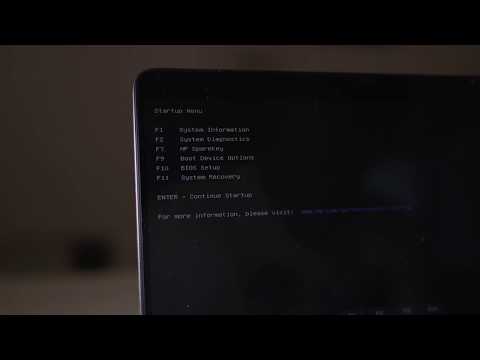
This should open a HP Startup Menu >> https://www.youtube.com/watch?v=GSN0qzXayUY


Choose F9 to open Boot options. Select the USB thumb drive or the DVD as a boot option.


- Follow the on-screen instructions to install Windows 7. Perform clean installation/custom installation (not repair).

Delete all existing partitions and install Windows on Disc 0 Unallocated space


- After successful Windows installation, install drivers taken from HP web site


- Make sure Windows is Activated by going to Start > Control Panel > System


Let me know if this helps. Provide your feedback/update and let me know if you face difficulties

Your FEEDBACK is important. Use the interactive buttons below and let me know if the post helps ;
*** HP employee *** I express personal opinion only *** Joined the Community in 2013

View solution in original post

HP Laptops On Amazon BEST PRICE - https://amzn.to/3CEJDF4 HP Spectre x360 - https://amzn.to/40Z1NM4 PLEASE SUBSCRIBE IF THIS HELPS YOU - IT HELPS ME :-) Here is a very quick video on how to enter the HP Boot Menu from a HP Laptop. Step 1 - Press the power on button. Step 2 - Quickly start pressing
1 REPLY 1
HP Recommended

Hello @Sajess 


Welcome to the HP Support Community.


You need to have a valid and readable COA sticker for Windows to use its licence key. It is usually attached on the bottom of the PC or behind/below the battery. Here is how it looks like:


You may be able to purchase some HP Original recovery media but I doubt one will be present since the model is somewhat old. However, there is one additional way (unofficial way). You can use this free utility

>> https://www.heidoc.net/php/Windows%20ISO%20Downloader.exe

>> https://www.heidoc.net/joomla/technology-science/microsoft/67-microsoft-windows-and-office-iso-downl...


The tool will download ISO images from Microsoft and has lots of options for many Windows versions including OEM. If you use it, be careful to select the correct Windows ISO for the OEM, x86 or x64 edition, Home/Pro/Ultimate, etc...


original.png


When download completes, you will need to write or "burn" the ISO image and boot from a bootable media. You need to use either 1 empty/blank USB pendrive (4 GB capacity or more)  OR  an empty/blank DVD disc (4.7 GB capacity)


** How to create bootable ISO on USB device >> http://www.ubuntu.com/download/desktop/create-a-usb-stick-on-windows

or

** How to write ISO to DVD >> http://www.ubuntu.com/download/desktop/burn-a-dvd-on-windows

 instructions are for Ubuntu, but you need to use the ISO image of Windows 7


When ready with the USB drive or with the DVD:


Please, shutdown the computer using the power button.

Insert the Windows USB thumdrive prepared previously

Power on the PC.

As soon as you press the power-on button, start hitting the Esc button repeatedly (like tap-tap-tap).

This should open a HP Startup Menu >> https://www.youtube.com/watch?v=GSN0qzXayUY


Choose F9 to open Boot options. Select the USB thumb drive or the DVD as a boot option.


- Follow the on-screen instructions to install Windows 7. Perform clean installation/custom installation (not repair).

Delete all existing partitions and install Windows on Disc 0 Unallocated space


- After successful Windows installation, install drivers taken from HP web site


- Make sure Windows is Activated by going to Start > Control Panel > System


Let me know if this helps. Provide your feedback/update and let me know if you face difficulties

Your FEEDBACK is important. Use the interactive buttons below and let me know if the post helps ;
*** HP employee *** I express personal opinion only *** Joined the Community in 2013
HP Laptops On Amazon BEST PRICE - https://amzn.to/3CEJDF4 HP Spectre x360 - https://amzn.to/40Z1NM4 PLEASE SUBSCRIBE IF THIS HELPS YOU - IT HELPS ME :-) Here is a very quick video on how to enter the HP Boot Menu from a HP Laptop. Step 1 - Press the power on button. Step 2 - Quickly start pressing
† The opinions expressed above are the personal opinions of the authors, not of HP. By using this site, you accept the <a href="https://www8.hp.com/us/en/terms-of-use.html" class="udrlinesmall">Terms of Use</a> and <a href="/t5/custom/page/page-id/hp.rulespage" class="udrlinesmall"> Rules of Participation</a>.