-
×InformationNeed Windows 11 help?Check documents on compatibility, FAQs, upgrade information and available fixes.
Windows 11 Support Center. -

-
×InformationNeed Windows 11 help?Check documents on compatibility, FAQs, upgrade information and available fixes.
Windows 11 Support Center. -
- HP Community
- Notebooks
- Notebook Operating System and Recovery
- Re: Spectre x360 left unresponsive besides a black screen

Create an account on the HP Community to personalize your profile and ask a question
01-27-2020 06:46 AM
My laptop Spectre x360 with windows 10 64bit, always updated, configured to never sleep or hibernate, has suddenly overnight, totally unresponsive with a total black screen. I had to shut it down with the power button and restarted once again. I was looking into the "View event logs" looking for a reason but it seems that no big error happened, only a suspicious update.
This is not the first time but I thought years ago, that I was able to get rid of this annoying issue.
Does anybody know what is the reason and possible suggestions to solve it?
Thanks
01-29-2020 04:36 PM
@pstrusi Greetings from the HP Community!
It could be the hybrid sleep or an issue with the sleep mode,
And here's what I suggest we do, to resolve the issue:
- Change - "Put the computer to sleep" to preferred time,
- And Change - "Turn off the monitor" to never.
If the issue persists, try the below steps:
Disabling the hybrid sleep, followed by updating all available Windows updates and the BIOS update from the HP website,
please follow the below steps to disable the hybrid sleep after performing a hard reset on the device should help resolve the issue.
-
In Windows, search for and open Control panel.
-
Make sure the View by setting is set to Category, and then click Hardware and Sound.
-
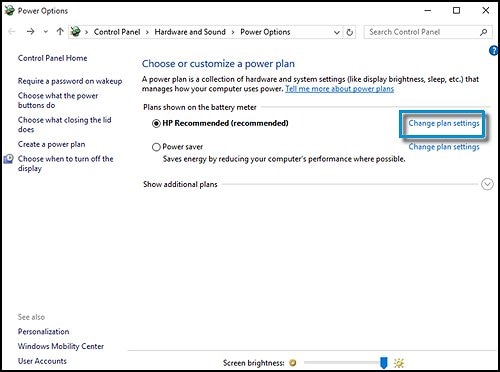
Click Power Options.
-
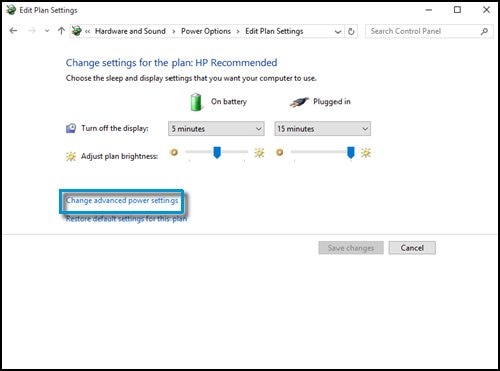
Click Change plan settings for the power plan that is selected.

-
Click Change advanced power settings.

-
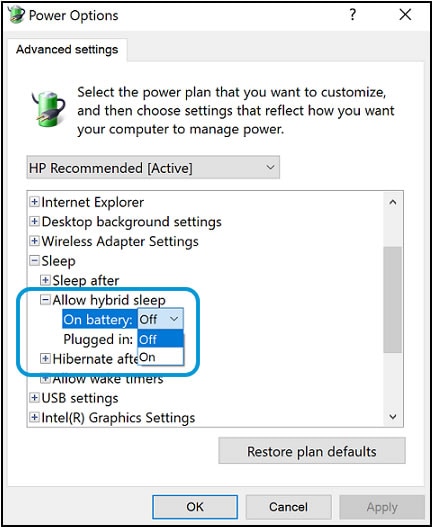
Expand Sleep, and then expand Allow hybrid sleep.
-
Select Off from the On battery drop-down menu, and then select Off from the Plugged in drop-down menu.

-
Click OK.
Keep us posted,
If you would like to thank us for our efforts to help you,
Give us a virtual high-five by clicking the 'Thumbs Up' icon below, followed by clicking on the "Accept as solution" on this post,
Have a great day!
Riddle_Decipher
I am an HP Employee
Learning is a journey, not a destination.
Let's keep asking questions and growing together.
01-30-2020 01:07 AM
Hi RiddleD, I appreciate your suggestions, however, let me give you more info:
I've had the same "power plan configuration" for years working flawlessly, where I "turn off the monitor after idle time " and "All sleep options" to never, with or without battery. Since this setting has worked perfectly for years, I wonder how it's possible that happens now.
Although I always have my laptop totally update, I'll check once again BIOS update. If the issue disappears undoubtedly will hit the button " Accepted as solution"
Once again, thank you for your attention.
01-30-2020 01:55 PM
@pstrusi It's possible that a recent update changed the settings or if the update was interrupted there are chances of corruption of file system that could cause such issues, either way, the suggested steps should help, please take your time and get back to us with the results, good luck!
Riddle_Decipher
I am an HP Employee
Learning is a journey, not a destination.
Let's keep asking questions and growing together.