
-
×InformationNeed Windows 11 help?Check documents on compatibility, FAQs, upgrade information and available fixes.
Windows 11 Support Center. -
-
×InformationNeed Windows 11 help?Check documents on compatibility, FAQs, upgrade information and available fixes.
Windows 11 Support Center. -
- HP Community
- Notebooks
- Notebook Operating System and Recovery
- Re: USB boot option not available

Create an account on the HP Community to personalize your profile and ask a question
Your account also allows you to connect with HP support faster, access a personal dashboard to manage all of your devices in one place, view warranty information, case status and more.
Check out our WINDOWS 11 Support Center info about: OPTIMIZATION, KNOWN ISSUES, FAQs, VIDEOS AND MORE.

It has been a while since anyone has replied. Simply ask a new question if you would like to start the discussion again.

03-28-2020 10:00 AM - edited 03-28-2020 10:01 AM
 HP Recommended
Product: HP-14-ac100na
Operating System: Microsoft Windows 10 (64-bit)
Hi,
I am trying to boot my brand new laptop "HP 14-ck2853no 14" PC" which I bought yesterday. So I put the USB option on from the BIOS then I press f9 to get to the boot menu but all I find is the Windows option and the Boot EFI File. I have seen the below post and I have tried 4 different USB boot media and all drivers are already installed and updated to the latest version. I also disabled secured boot but I cannot find any option to enable legacy in the BIOS.
6 REPLIES 6


04-02-2020 01:30 PM
HP Recommended
I reviewed your post and I understand that you are unable to boot from USB flash drive.
- Why are you trying to boot from the USB flash drive? Are you facing any issues booting to Windows?
- Does the USB flash drive you are using is bootable?
- What is the exact issue you are facing?
While you answer that, I recommend you follow the below steps and check if it helps.
-
Turn on the computer, and insert the USB flash drive into a USB port.
-
Press and hold the power button turn off the computer.
-
Disconnect all connected devices and cables such as Personal Media Drives, printers, and faxes. Remove media from internal drives, and remove any recently added internal hardware. Do not disconnect the monitor, keyboard, mouse, USB recovery flash drive, or power cord.
-
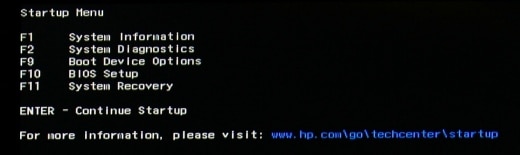
Immediately press the Escape key repeatedly, about once every second, until the Startup Menu opens.
-
Press F9 to open the Boot Device Options menu.
-
Use the up or down arrow key to select the USB flash drive, and then press Enter.
Let me know how it goes and you have a great day!
P.S: Welcome to the HP Support Community 😊
If you wish to show appreciation for my efforts, mark my post as Accept as Solution. Your feedback counts!
Cheers!
The_Fossette
I am an HP Employee
04-02-2020 01:48 PM
HP Recommended
I am trying to boot the laptop from a bootable media to make a backup of the laptop C drive. Yes the USB memory stick is bootable and I tried several of them as mentioned in the main post. Also the exact problem as mentioned in the main post is that none of the USB appear when I choose boot device option in the screen you posted. I tried your suggestion but again the USB does not appear.
04-02-2020 02:07 PM
HP Recommended
I also want to say that this is brand new laptop I bought it a few days ago I have not installed anything on it yet and I am just trying to take a backup before I use it. It seems this one is going back I just noticed the keyboard has no back light! And since I bought it, it only has problems and nothing impressive really
04-03-2020 08:13 AM
HP Recommended
Are you trying to make an image on the C drive? If yes, then follow the steps in the below article and check if it helps.
https://support.hp.com/in-en/document/c06162205
Let me know how it goes and you have a great day!
If you wish to show appreciation for my efforts, mark my post as Accept as Solution. Your feedback counts!
Cheers!
The_Fossette
I am an HP Employee
04-03-2020 01:27 PM
HP Recommended
Hi this might help with taking a backup but does not solve the issue with booting from a USB. What if I want to reboot to install Ubuntu for example or any other reason. I would really like a solution that allows me to see the bootable USB among the option like in any other laptop. In any case if this issue was not solved before the 14 days then I still get my money back so no big deal.
Also if you know how to stop the stupid nerve breaking beep that sounds when I use the BIOS and move the arrows up and down when there are no more options up or down so it makes loud annoying BEEEEEEP Can this be stopped?
04-14-2020 08:29 AM
HP Recommended
I recommend you contact support to further diagnose the issue.
Here is how you can get in touch with support.
1)Click on this link – www.hp.com/contacthp/
2)Select the product type.
3)Enter the serial number of your device or select let HP detect your product option.
4)Select the country from the drop-down.
5)You should see the HP phone support number or Chat option listed.
Cheers!
The_Fossette
I am an HP Employee

Be alert for scammers posting fake support phone numbers and/or email addresses on the community.
If you think you have received a fake HP Support message, please report it to us by clicking on "Flag Post".
† The opinions expressed above are the personal opinions of the authors, not of HP. By using this site, you accept the Terms of Use and Rules of Participation.


Didn't find what you were looking for?
Ask the community
† The opinions expressed above are the personal opinions of the authors, not of HP. By using this site, you accept the <a href="https://www8.hp.com/us/en/terms-of-use.html" class="udrlinesmall">Terms of Use</a> and <a href="/t5/custom/page/page-id/hp.rulespage" class="udrlinesmall"> Rules of Participation</a>.