-
×InformationNeed Windows 11 help?Check documents on compatibility, FAQs, upgrade information and available fixes.
Windows 11 Support Center. -

-
×InformationNeed Windows 11 help?Check documents on compatibility, FAQs, upgrade information and available fixes.
Windows 11 Support Center. -
- HP Community
- Notebooks
- Notebook Operating System and Recovery
- Re: want change OS from win 10 to win 7

Create an account on the HP Community to personalize your profile and ask a question
11-25-2016 12:56 AM
hi,
I want to change OS from win-10 to win-7 bcz it is not supporting our applications i want to use.
Solved! Go to Solution.
11-25-2016 07:44 AM - edited 11-25-2016 07:49 AM
First, create your HP Recovery Media (click link to left, then click " Creating recovery media" and following the directions.... then update the BIOS to F.15 Rev.A
Your computer uses a 6th generation Intel chipset called "Skylake". Intel removed USB 2.0 support from the Skylake chipset, therefore normal DVD and USB Windows 7 installs will not work on 6th generation Intel chipsets. You have to add the USB 3.0 drivers into the Windows 7 ISO using this Intel utility (must be run under Win 8.1 or Win 10);
https://downloadcenter.intel.com/download/25476/Windows-7-USB-3-0-Creator-Utility
After running this utility and directing it to your Windows 7 ISO, the resulting ISO/USB/DVD should be able to install Windows 7 on your computer.
You may also need to provide the below driver for Windows 7 to see the hard drive... Extract the files onto another usb flash drive without any folders;
You may need to install the below driver to make the USB ports usable in Windows 7;
You may need to DISABLE "Secure Boot" and ENABLE "Legacy Support" in the BIOS prior to installing Windows 7. There may be other BIOS settings that need to be changed and you may need to supply USB and/or AHCI driver before the installation will proceed.
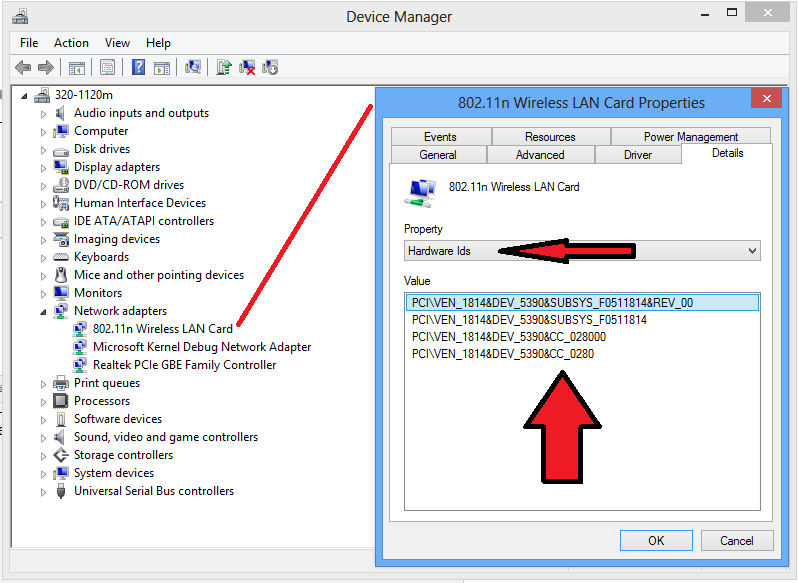
HP doesn't list any Windows 7 drivers for you computer. Please post the Windows Device Manager's "Hardware Ids" (just the string of text will do) for those devices that are listed as missing or unknown devices as shown in the example below;
If you have any further questions, please don't hesitate to ask.
Please click the White KUDOS "Thumbs Up" to show your appreciation
***** Please click the "White Kudos" Thumbs Up to say THANKS for helping *****
***** Please click the "Accept As Solution" on my post, if my help solved your issue *****
***** This is a user supported forum. I am a volunteer and I don't work for HP *****
HP a1632x - Windows 7, 4GB RAM, AMD Radeon HD 6450
HP p6130y - Windows 7, 8GB RAM, AMD Radeon HD 6450
HP p6320y - Windows 7, 8GB RAM, NVIDIA GT 240
HP p7-1026 - Windows 7, 6GB RAM, AMD Radeon HD 6450
HP p6787c - Windows 7, 8GB RAM, NVIDIA GT 240
HP ENVY x360 m6-w103dx - Windows 10, 8GB RAM, Intel HD 520